What Is a Pull Request? How PRs Work and Why They Stall
October 23, 2026
Amir Tavafi
12 min read

A pull request is a proposal to merge one branch of code into another, with a built-in space for teammates to review the changes before they land. That is the whole definition. What it does to a team's speed is a longer story, and it is the part most explainers skip.
Key Takeaways
Q: What is a pull request?
A: A pull request is a request to merge a branch into another branch, usually main. It shows the diff, collects review comments, runs automated checks, and records the approval. The code only merges once the team is satisfied with it.
Q: Is a pull request the same as a merge request?
A: Yes. GitLab uses the term merge request. GitHub, Bitbucket, and Azure DevOps use pull request. The workflow is the same on every platform, which is why Abloomify reads PR flow signals from both GitHub and GitLab the same way.
Q: What makes pull requests slow?
A: Waiting. Diffs that are too big to review, no clear reviewer, and re-review loops leave PRs idle. Time to first review and PR size are the two signals worth checking first.
Q: How do leaders see PR problems without reading code?
A: Through flow signals such as time to first review, cycle time, and self-merge rate. Abloomify pulls these from GitHub and GitLab with PII-free signals, so no code content, screenshots, or message content gets collected.
What Is a Pull Request in Git and GitHub?
A pull request is a formal request to take the changes on one branch and merge them into another branch, along with a shared page where people can review, discuss, and approve those changes first. Git itself has no pull request. Git tracks commits and branches. The pull request is a feature that hosting platforms like GitHub, GitLab, and Bitbucket add on top, so a team can look at a diff together before it reaches the main branch. A typical pull request contains a title, a description of why the change exists, the list of commits, the line-by-line diff, a thread of review comments, and the results of automated checks such as tests and linters. It also records who approved the change and when it merged, which turns it into a small audit trail for every piece of shipped code. The name comes from the idea that the author is asking the owner of the main branch to pull their changes in.
If you want the official reference, the GitHub pull requests documentation covers the mechanics and settings in detail.
How Does a Pull Request Work, Step by Step?
A pull request moves through five stages: the author creates a branch, opens the pull request, reviewers comment, the author addresses feedback until the change is approved, and the branch is merged. Each stage has a different owner, and that is why PRs get stuck so often. The author owns the first and second stages, reviewers own the third, and the fourth bounces between them. Nobody owns the gap between "opened" and "someone looked at it". On most teams that gap is the longest part of the whole process, longer than writing the code or running the tests. Automated checks run in parallel with the human review, so a failing test can block a merge even after every reviewer has approved. Once the branch merges, the work is in main and the clock on that change stops.
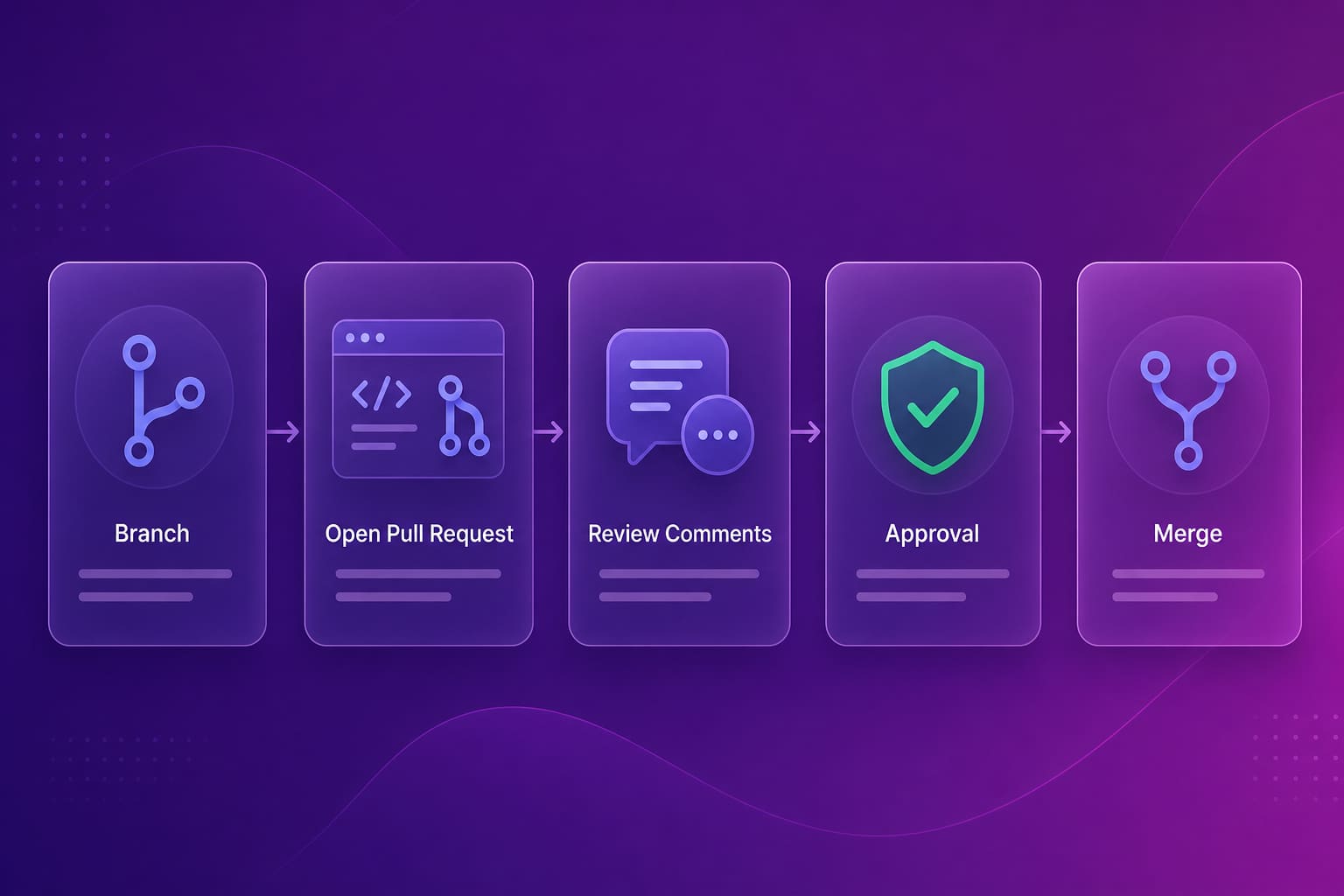
Here is the same flow as a checklist you can hand to a new engineer:
- Create a branch off main and commit your change in small, readable steps.
- Push the branch and open a pull request with a description that says why, not just what.
- Request review from the people who know that area of the code.
- Respond to comments, push fixes, and wait for the automated checks to go green.
- Merge once approved, then delete the branch.
If your team keeps losing time at step 2, a pull request template is the cheapest fix. If it keeps losing time at step 3, you have a review capacity problem, and a template will not help.
Pull Request vs Merge Request: What Is the Difference?
There is no functional difference between a pull request and a merge request. They are two names for the same workflow: propose a branch, review the diff, pass checks, merge. GitHub, Bitbucket, and Azure DevOps say pull request. GitLab says merge request. Some engineers argue GitLab's name is more accurate because the end result is a merge, and others argue the pull request name is more accurate because the author is asking the maintainer to pull changes in. Neither argument changes how you work. The practical differences sit in the details, such as how each platform handles approval rules, draft status, and required checks, and those details matter less than whether your team reviews quickly. What matters if you run a mixed environment is that your reporting treats both the same way.
| Platform | Term | Where reviewers comment |
|---|---|---|
| GitHub | Pull request | Files changed tab |
| GitLab | Merge request | Changes tab |
| Bitbucket | Pull request | Diff view |
| Azure DevOps | Pull request | Files tab |
Abloomify connects to GitHub and GitLab, so a company with some teams on each still gets one consistent view of PR flow.
What Makes a Good Pull Request?
A good pull request is small, explains why the change exists, and is easy to test. Those three properties matter more than anything else because they decide whether a reviewer can actually review or only skim. Small means the reviewer can hold the whole change in their head, which usually means one concern per pull request and a diff that fits in a single sitting. A clear reason means the description states the problem being solved, so the reviewer judges the code against intent instead of guessing at it. Easy to test means the author says how to verify the change, or the automated checks do it for them. Everything else, from commit message style to emoji in titles, is secondary. A pull request that is small, explained, and testable gets reviewed within hours. One that fails on all three tends to sit until someone feels guilty enough to open it.
Concretely, the habits that show up in fast-moving teams are these:
- Keep each pull request to one change, and split refactors from behavior changes.
- Write the description for someone who has never seen the ticket.
- Mark work in progress as a draft so reviewers do not waste time on it.
- Let linters and CI enforce style so humans only discuss logic.
- Reply to review comments the same day, even if only to say "will fix tomorrow".
The code review checklist goes through what reviewers should look for once the pull request is in front of them.
Why Do Pull Requests Stall?
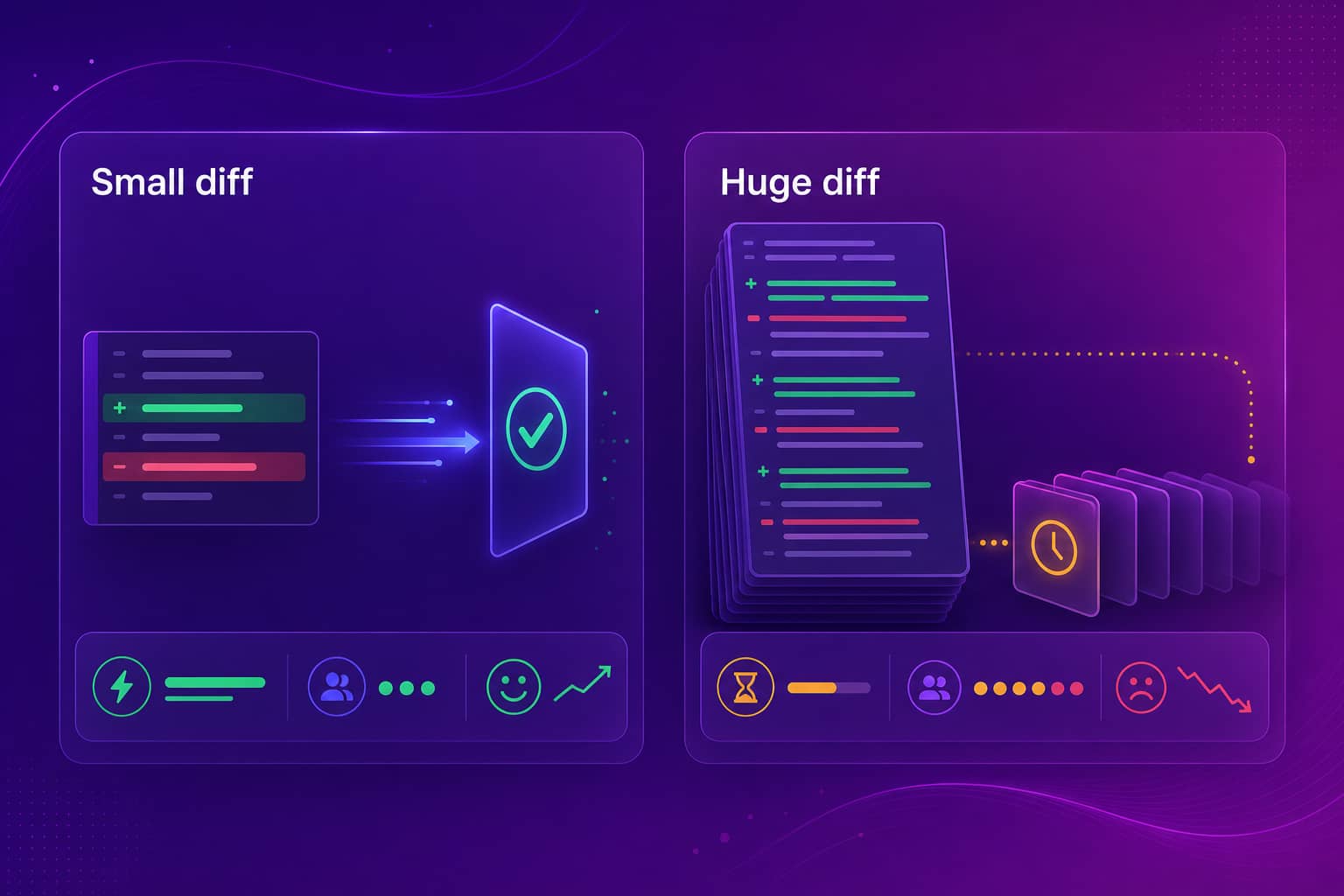
Pull requests stall because of waiting, and the waiting almost always traces back to size, ownership, or reviewer overload rather than anything wrong with the code. A big diff is the most common cause. Reviewers glance at it, see a pile of changed files, and decide to come back later, which means never. The second cause is unclear ownership: the author assumed someone would pick it up, and the reviewers assumed someone else would. The third is concentration, where one senior engineer is the default reviewer for everything and their queue becomes the team's bottleneck. The fourth is the re-review loop, where each round of feedback takes a day to answer, so a ten-minute fix stretches over a week. None of these show up in a sprint board, because the ticket just says "in review". They only show up when you measure the flow.
I have seen this on our own team. When we moved to Cursor, the amount of code arriving for review grew faster than our habits for reviewing it, and the queue became the slow part. Writing code got cheaper. Reading it did not.
If this sounds familiar, how to reduce code review cycle time covers the levers that usually matter, and cycle time vs lead time explains which clock you are actually looking at.
What Should Engineering Leaders Measure About Pull Requests?
Engineering leaders should measure time to first review, PR size, re-review loops, cycle time from open to merge, and self-merge rate. Together these show where work waits and whether review load is spread across the team. They describe how work flows through the team and say nothing about any one person's worth. Time to first review tells you whether reviewers are available. PR size tells you whether authors are shipping reviewable changes. Re-review loops tell you whether feedback is clear. Cycle time is the sum of all of it, and it is the signal most closely tied to how fast a customer sees a change. Self-merge rate tells you whether review is actually happening. You can read these from the GitHub or GitLab data you already have, without anyone installing an agent or sharing screens, and without reading a single line of anyone's code.
Abloomify computes these straight from GitHub and GitLab, alongside the DORA metrics, using PII-free signals. That is the privacy-first part of how it works: the signal is how work flows, not what any one person typed. No screenshots, no keyloggers, no code content. The engineering productivity analytics page shows how the pieces fit together, and the team velocity guide covers how to read them without turning them into a leaderboard.
How Do AI-Generated Pull Requests Change Things?
AI coding tools leave the definition of a pull request alone and change how many arrive and how much attention each one gets. Cursor, GitHub Copilot, and Claude Code produce diffs that compile, read cleanly, and look confident, which makes them easy to approve quickly and hard to review well. The code is not always wrong. The real danger is that review habits built for human-paced output get overwhelmed by machine-paced output, and approvals turn into rubber stamps. Teams adapting well do two things. They ask authors to say what was generated and what they read line by line, so reviewers know where to spend attention. And they watch whether AI adoption is showing up as shipped work or just as bigger diffs and longer queues. That second question is a measurement question, and it is one most teams cannot answer today.
Abloomify separates human and AI agent contribution across tasks, code, PRs, and reviews, and correlates Cursor, Claude Code, and GitHub Copilot usage with engineering output. For a team spending real money on AI coding tools, that is the difference between hoping the investment pays off and knowing.
FAQ
What is a pull request in simple terms?
A pull request is a proposal to merge one branch of code into another, with a place for teammates to review and discuss the changes first. The author opens it, reviewers comment on the diff, and once it is approved and checks pass, the code is merged into the main branch.
Is a pull request the same as a merge request?
Yes, in practice. GitLab calls the same thing a merge request, while GitHub, Bitbucket, and Azure DevOps call it a pull request. The workflow is the same: propose a branch, review the diff, pass checks, merge. Only the name and some interface details differ between platforms.
Who should approve a pull request?
Someone who understands the code being changed and who did not write it. Many teams use a CODEOWNERS file so the right reviewers are requested automatically. Self-approval defeats the purpose, so Abloomify tracks self-merge rate from GitHub and GitLab as one of the PR flow signals engineering leaders watch.
How big should a pull request be?
Small enough that a reviewer can understand it in one sitting. There is no magic line count, but once a diff spans many files and several concerns, reviews get skimmed or deferred. If a change needs a long explanation, split it into smaller pull requests that each stand on their own.
How do you measure whether pull requests are slowing a team down?
Look at time to first review, PR size, re-review loops, and cycle time from open to merge. Abloomify computes these from GitHub and GitLab using PII-free signals, so leaders see where work waits without reading anyone code or messages.
Do AI coding tools change how pull requests work?
The mechanics are identical, but volume and review load change. Cursor, Copilot, and Claude Code can produce diffs faster than a team can review them. Abloomify separates human and AI agent contribution across code and reviews, so you can see whether AI output is shipping or just piling up in the queue.

Amir Tavafi
Co-Founder & CEO
Product leader and innovator with over 15 years of experience in the tech sector, grounded in AI and robotics. Previously led product development in fraud detection and AI solutions at Nasdaq Verafin.