Cumulative Flow Diagram: How to Read One and Fix What It Shows
October 16, 2026
Amir Tavafi
11 min read

A cumulative flow diagram shows how many work items sit in each stage of your workflow, every day, stacked on one chart. It is the best single picture of where work is waiting, and it works because nobody has to estimate anything to draw it. Abloomify's engineering productivity analytics read PR and review activity from GitHub and Jira, so the board columns on the chart can be checked against what the repos say.
Key Takeaways
Q: What is a cumulative flow diagram?
A: A cumulative flow diagram is a stacked area chart of work items per workflow state over time. Each band is a state, like backlog, in progress, review, or done. The top edge is total scope. The bottom edge is what has shipped.
Q: How do you read a cumulative flow diagram?
A: Check band thickness first. A thick band is a pile of waiting work. Then check slope: a steep Done edge means high throughput, and a flat Done edge means nothing is finishing. Parallel bands mean steady flow.
Q: What does a bottleneck look like on a cumulative flow diagram?
A: One band keeps widening while the band after it stays thin. Work is arriving in a state faster than it leaves. A growing review band is the most common version, and it usually lines up with long PR wait times.
Q: What should I check next to a cumulative flow diagram?
A: PR cycle time, time to first review, PR size, and open PRs waiting on review. Abloomify reads these from GitHub and Jira, so you can see whether a fat band on the chart is a review queue or just a board habit.
What is a cumulative flow diagram?
A cumulative flow diagram, often shortened to CFD, is a stacked area chart that counts work items in each workflow state across time. The horizontal axis is dates. The vertical axis is a cumulative count of items. Each colored band is one state on your board, for example backlog, in progress, in review, and done. Because the bands stack and each one is a running total, the top edge of the chart is every item that has ever entered the system, and the bottom band is everything that has finished. The word "cumulative" is the point. Nothing ever drops off the chart, so the lines only go up or stay flat, and the interesting information is in the gaps between them. Kanban teams use it heavily, and Jira Software ships a version of it as a board report, so most teams can open one today.
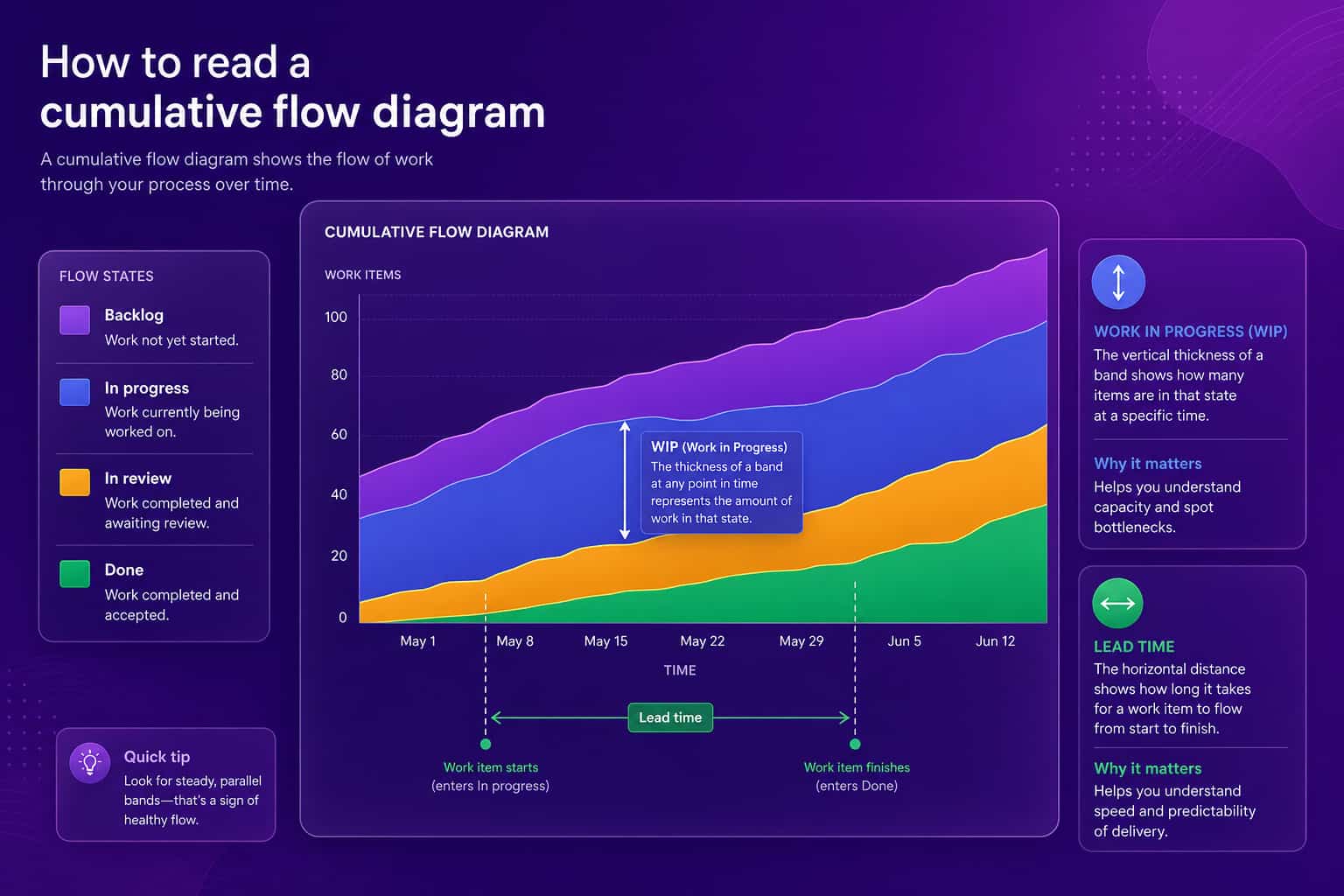
I like it more than most agile charts for a simple reason. A burndown chart tells you if you are late. A cumulative flow diagram tells you where the lateness is living.
How do you read a cumulative flow diagram?
Read three things: band thickness, band slope, and the gaps. Band thickness is the number of items in that state on that date, so a thick in-progress band means a lot of work has been started and not finished. Slope is the rate of change. The slope of the Done edge is your throughput, so a steep Done edge means many items finishing per day. The gaps give you the rest. A vertical slice at any date is the work in progress at that moment. A horizontal slice, from the day an item entered the workflow to the day it hit done, approximates lead time for a team that works roughly first in, first out. These three readings are linked by a simple relationship called Little's Law: average work in progress equals throughput times average cycle time. If the in-progress band grows and throughput stays flat, cycle time has to grow. There is no way around that arithmetic, which is why the chart is hard to argue with.
| What you see | What it usually means | What to ask |
|---|---|---|
| Bands roughly parallel | Items arrive and finish at a steady pace | Nothing, protect it |
| One band keeps widening | Work enters that state faster than it leaves | What is the next state waiting on? |
| Done edge goes flat | Nothing is finishing | Is something blocked, or is work waiting on review? |
| Stair steps in the edges | Work arrives or ships in batches | Why are we releasing in lumps? |
| Backlog band balloons | Intake is outrunning capacity | Who is deciding what enters the system? |
What do the common cumulative flow diagram patterns mean?
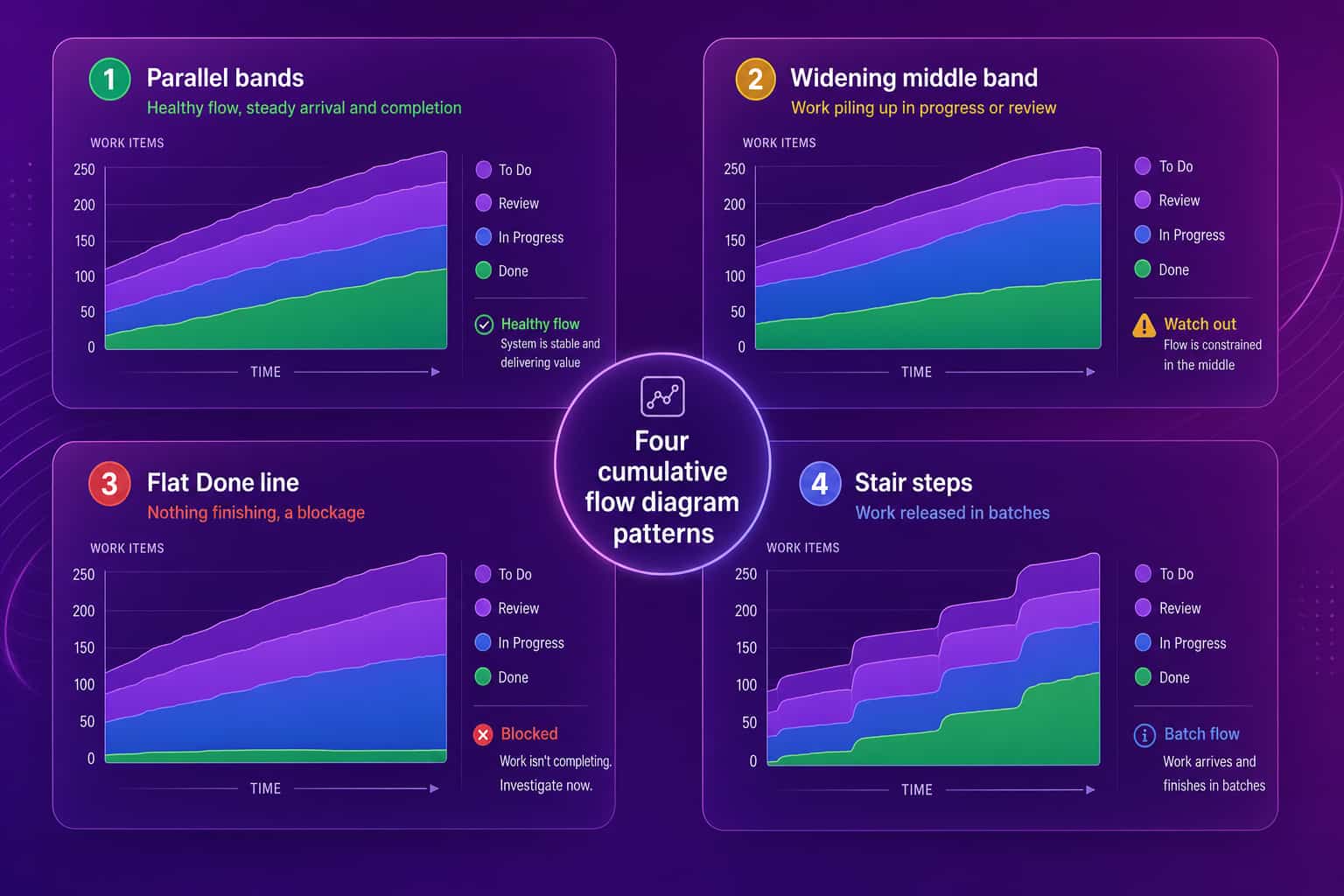
The four shapes to learn are parallel bands, a widening middle band, a flat Done line, and stair steps. Parallel bands are the goal: work is arriving and finishing at a similar rate, and work in progress stays stable. A widening middle band, usually in progress or review, means you are starting faster than you are finishing, and cycle time will rise to match. A flat Done line means no work is crossing the finish line, which points to a blocker, a release freeze, or a review queue with nobody in it. Stair steps show batching: a pile of items moves together, often because of a weekly release, a QA gate, or a reviewer who clears the queue once a week. None of these shapes tells you who to blame, and that is a feature. They point at the system. If you start asking why a certain person's cards are in the fat band, the chart has been turned into something it was never built to be.
How do you fix a bottleneck a cumulative flow diagram shows?
Limit the work in the fat band, then remove what the next state is waiting on. A widening band means arrivals beat departures, so the quickest lever is to cap how much can sit in that state at once. That is the idea behind WIP limits: stop starting, start finishing. Then look at what is slowing the departures. If the band is in progress, look for tickets that are too big to finish in a few days. If the band is review, look at PR size and how long a PR waits for a first look. Large diffs sit longer because nobody wants to open them, and our guides on reducing code review cycle time and right-sizing diffs and WIP cover the mechanics. Re-read the chart two weeks later. A fix shows up as the band narrowing and the Done edge steepening, which is much more convincing than a retro that ends with everyone agreeing to try harder.
What should you track next to a cumulative flow diagram?
Track the signals that explain why a band is thick: PR cycle time (opened to merged), time to first review, PR size, and the number of PRs waiting on review. A fat review band and a long time to first review usually travel together. A fat in-progress band with small, fast PRs usually means too many things started at once. These numbers come from GitHub and Jira activity, so nobody has to remember to update a board for them to be right.
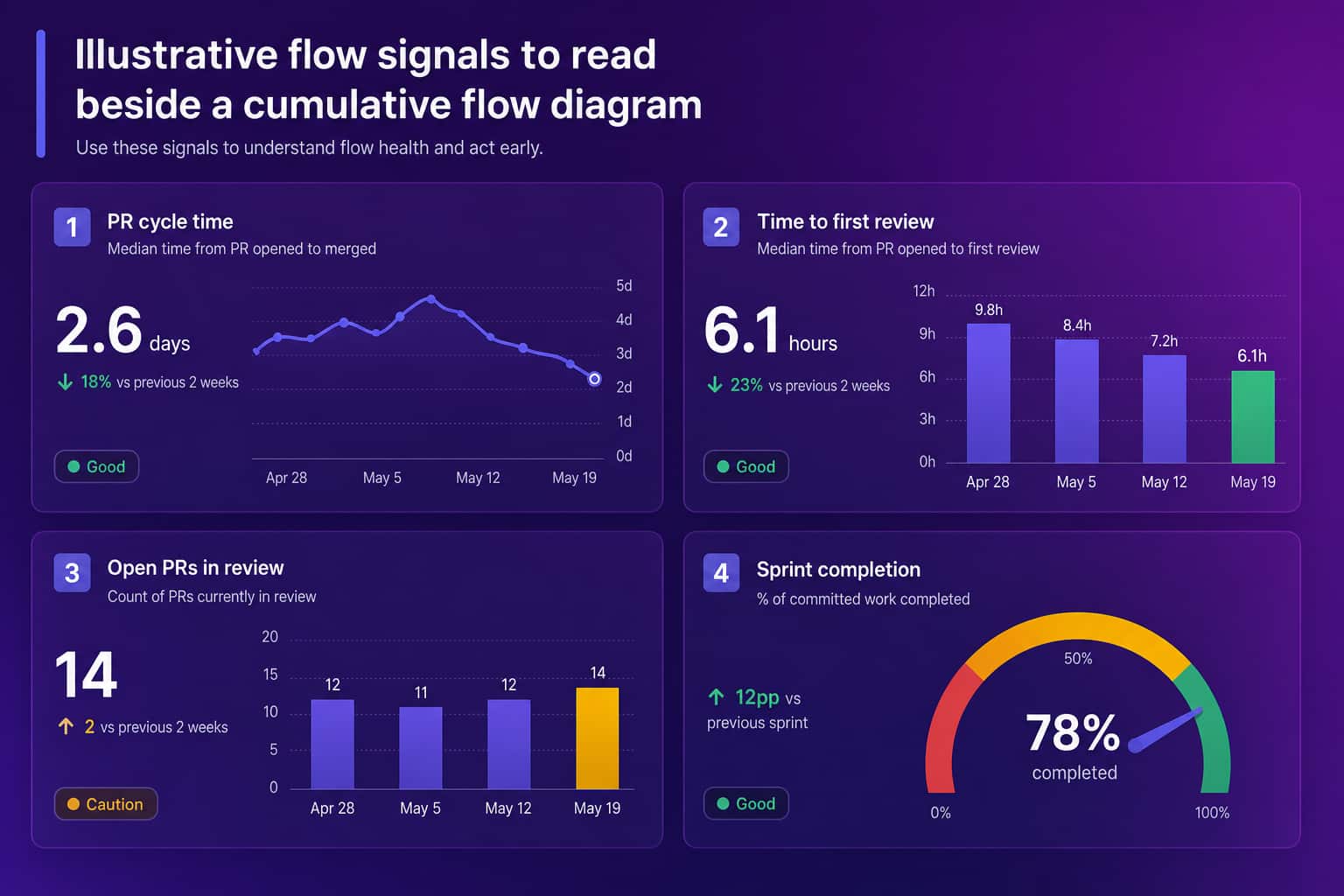
Abloomify connects to GitHub and Jira through API integrations and reports PR cycle time, review health, PR size, and sprint delivery, with the DORA metrics banded Elite, High, Medium, and Low. It is privacy-first by architecture: PII-free signals only, with no code content, no screenshots, and no keyloggers. The values in the dashboard above are illustrative sample data. If you are choosing which clock to start with, cycle time vs lead time explains where each one begins and ends, and what are DORA metrics covers the four delivery numbers.
How is a cumulative flow diagram different from a burndown chart?
A burndown chart measures progress against a plan, and a cumulative flow diagram measures the health of the flow itself. Burndown shows remaining work falling toward zero for one sprint, and it only moves when someone marks a ticket done. A cumulative flow diagram keeps every state visible, so scope changes show up as a rising top edge instead of a confusing flat line, and queues show up as thick bands. Use burndown for a quick check on one sprint, and use a cumulative flow diagram when the question is why work takes as long as it does. If you are not sure how to read the first one, see our guide to the burndown chart. Teams that run continuous flow with no sprints often skip burndown altogether, and for them CFD is the main chart.
How do you use a cumulative flow diagram without hurting your team?
Keep it as a team tool and read the system, not the people. Put it up in a retro or a weekly flow review, and ask what the widest band is waiting for. Do not compare one team's chart to another's, because the columns on each board mean different things. Do not tie it to individual reviews. The moment a leader checks the chart daily and ties it to someone's rating, cards will start moving to Done early and the bands will look fine while the work goes late. The chart then reports on the audience instead of the work.
For a wider view of the numbers around this chart, see flow metrics and team velocity.
FAQ
What is a cumulative flow diagram?
A cumulative flow diagram is a stacked area chart that shows how many work items sit in each workflow state over time. Each colored band is one state, such as backlog, in progress, review, or done. The bands stack, so the top edge is total scope and the bottom edge is finished work.
How do you read a cumulative flow diagram?
Look at band thickness and slope. A thick band means many items are sitting in that state. A vertical slice shows work in progress on that day. A horizontal slice shows roughly how long an item took to move through. Parallel bands signal steady flow, and a widening band signals a bottleneck.
What does a widening band on a cumulative flow diagram mean?
It means work is entering that state faster than it leaves. A growing in-progress or review band is the classic bottleneck sign. Items are being started and not finished, so work in progress and cycle time both climb until something is limited or unblocked.
What is the difference between a cumulative flow diagram and a burndown chart?
A burndown chart tracks remaining work against a plan, usually for one sprint. A cumulative flow diagram tracks every state continuously and shows where work is waiting. Burndown tells you whether you will make the date. A cumulative flow diagram tells you why flow slowed down.
Can you build a cumulative flow diagram in Jira?
Yes. Jira Software boards include a cumulative flow diagram report for Kanban and Scrum boards. It is only as accurate as your board columns and how consistently people move cards, so pair it with PR and review data from GitHub to confirm where work is really waiting.

Amir Tavafi
Co-Founder & CEO
Product leader and innovator with over 15 years of experience in the tech sector, grounded in AI and robotics. Previously led product development in fraud detection and AI solutions at Nasdaq Verafin.