Burndown Chart: How to Read One and What It Hides
October 13, 2026
Amir Tavafi
10 min read

A burndown chart plots the work left in a sprint against the days left to do it. It is a good early warning for one team in one sprint, and a poor judge of anything else. Abloomify's engineering productivity analytics pair sprint data from Jira with PR flow from GitHub, so the line on the chart has something real next to it.
Key Takeaways
Q: What is a burndown chart?
A: A burndown chart shows remaining work, in story points or issue count, against the days left in a sprint or release. A dashed ideal line runs from starting scope to zero. A solid line shows actual progress, and the gap between the two is the story.
Q: How do you read a burndown chart?
A: Look at the shape before the numbers. A flat line followed by a cliff means work is landing at the end. A line that rises means scope was added. A line below the ideal means the sprint was likely under-committed. Each shape points to a different conversation.
Q: Why can a burndown chart mislead?
A: It only moves when someone moves a ticket to done. If tickets are huge, or people update them in batches, the line says little about real progress. Abloomify reads PR cycle time and review speed from GitHub and Jira, which show where work is actually waiting.
Q: What should I check next to a burndown chart?
A: Start with PR cycle time, time to first review, PR size, and sprint completion. These come from repo and ticket activity, so nobody has to estimate or update anything to produce them.
What is a burndown chart?
A burndown chart is a line graph of work remaining over time. The vertical axis holds the amount of work left, usually in story points, though some teams count issues or hours. The horizontal axis holds the days of the sprint, or the weeks of a release. At the start, the line sits at total committed scope. As the team finishes stories, the line falls. A straight dashed line from the starting scope to zero on the last day is the "ideal" burndown, which is just what steady progress would look like. Where the actual line sits against that dashed line tells you, at a glance, whether the team is ahead, behind, or on track. Most Jira boards ship a sprint burndown report, so many teams already have one without building anything.
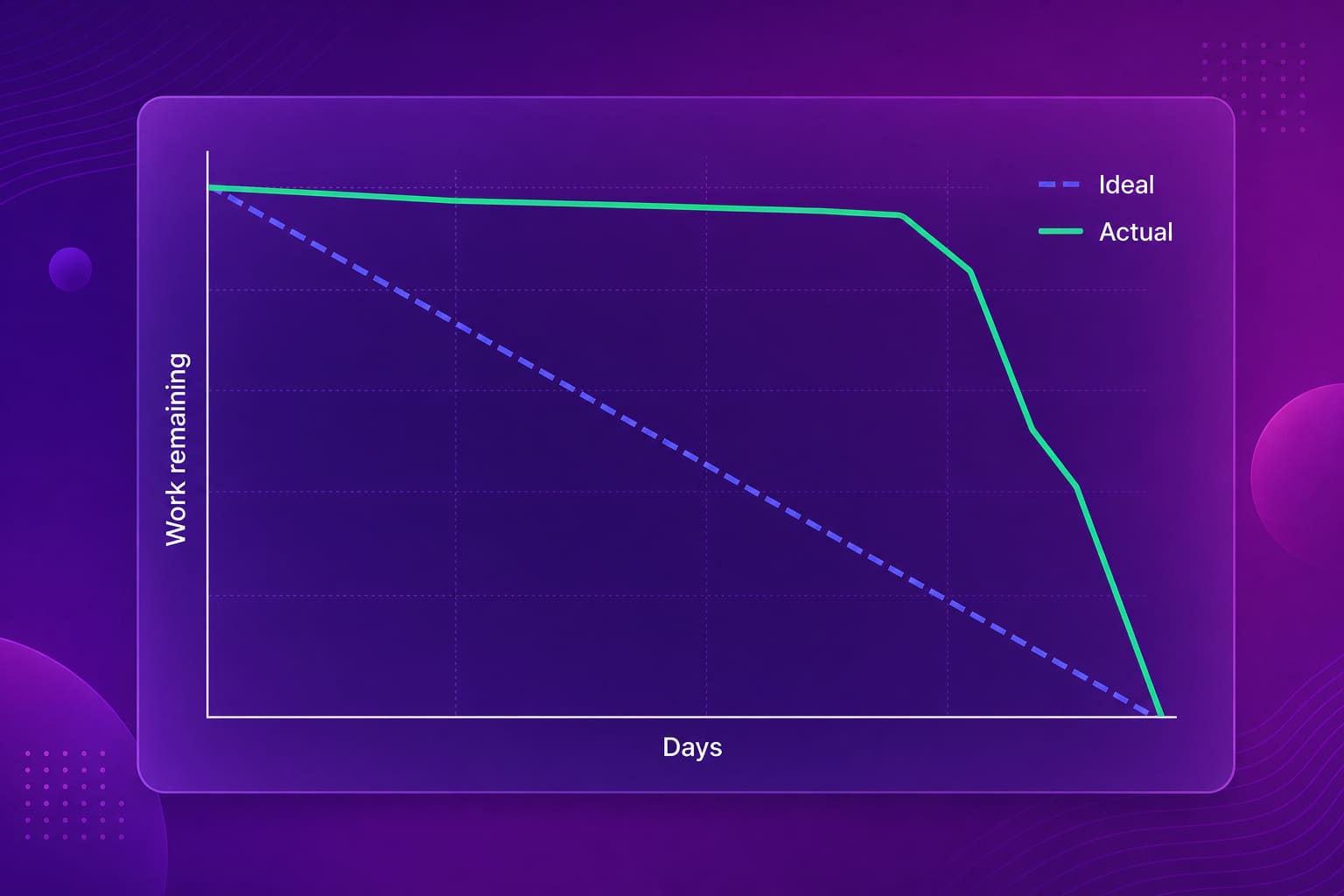
The chart is popular for a simple reason. It answers "are we going to make it?" in a few seconds, and anyone in the room can see the answer without a briefing. That is also why it gets overused. A chart that answers one question quickly invites people to treat it as the answer to every question.
How do you read a burndown chart?
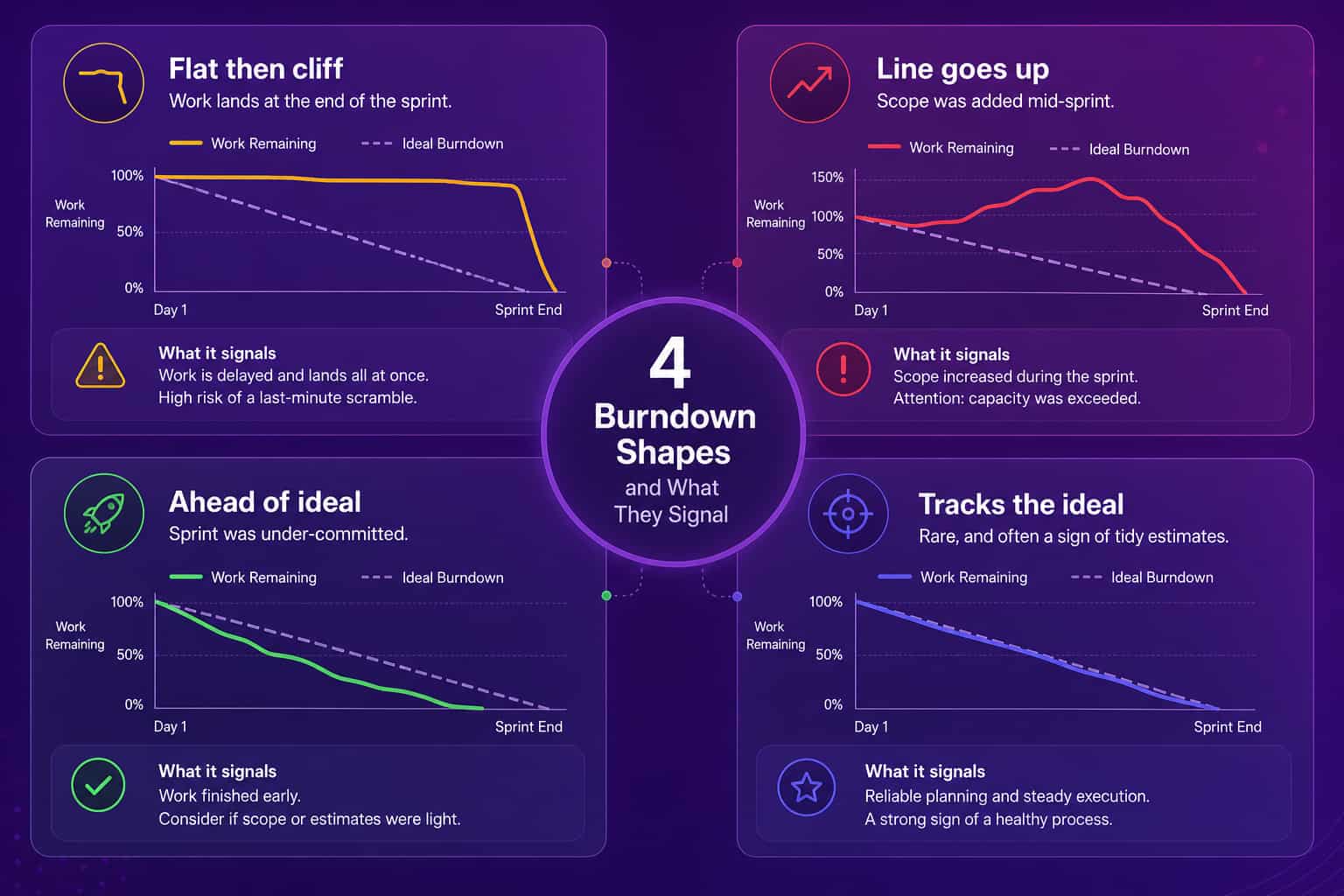
Read the shape first, then the gap to the ideal line. If the actual line sits above the ideal line, the team is behind plan for that day. If it sits below, the team is ahead. A flat segment means nothing was marked done in that stretch. A rising segment means scope was added, because the remaining total went up. The ideal line is a reference, not a target, and almost no real sprint tracks it closely. Teams that look exactly like the diagonal are often updating tickets to make the chart look tidy, which is worth a gentle question. The useful habit is to check the chart on day three or four of a ten-day sprint. By then the shape has started to form, and there is still time to act on it.
| Shape | What it usually means | What to ask |
|---|---|---|
| Flat, then a cliff near the end | Work is landing late, often waiting on review or testing | Where are PRs sitting? |
| Line rises mid-sprint | Scope was added after planning | Who agreed to the new work, and what came out? |
| Well below the ideal line | Sprint was under-committed, or estimates were generous | Was the sprint too easy, or did we pad? |
| Hugs the ideal line | Tidy estimates, or tickets updated to match the plan | Does this match what the repos show? |
What are the limits of a burndown chart?
A burndown chart is only as honest as the estimates and ticket updates behind it. It moves when someone drags a ticket to done, so it measures when people update the board and not when work finished. It also hides scope changes: if the team finishes ten points and the product owner adds ten points, the line stays flat and it looks like nothing happened. A burnup chart fixes that by drawing scope as its own line, so an increase shows up as the ceiling moving. And because the chart runs on story points, it inherits every weakness of story points, including inflation once the numbers start to matter to someone. Our guide to story points covers how that happens.
I have watched teams spend a retro arguing about the shape of a line when the real answer was sitting in a pull request queue. The chart told them something was wrong. It could not tell them where.
Burndown chart vs burnup chart: which should you use?
Use a burndown chart when scope is stable and the question is "will we finish?" Use a burnup chart when scope changes often and you need to show why the finish line moved. A burndown chart is simpler to read and faster to glance at, which suits a two-week sprint with a committed backlog. A burnup chart has two lines, completed work and total scope, so it handles mid-sprint changes without hiding them. For a release that spans many sprints, burnup is usually the better pick, because scope almost always drifts over that long a stretch. Plenty of teams run both. If your sprints rarely change scope, a burndown chart is enough. If your planning meetings are followed by "just one more thing" messages, switch to burnup, or at least watch the remaining-work line for upward steps.
What should you track next to a burndown chart?
Track the signals that explain why the line looks the way it does: PR cycle time (opened to merged), time to first review, PR size, and sprint completion (stories finished against stories committed). A flat burndown line and a long PR cycle time usually go together, because work that waits for review cannot be marked done. A cliff at the end of the sprint often pairs with large PRs that took days to review. None of these need estimating or manual updates. They come from GitHub and Jira activity, so nobody can quietly adjust them to make a chart look better without shipping something.
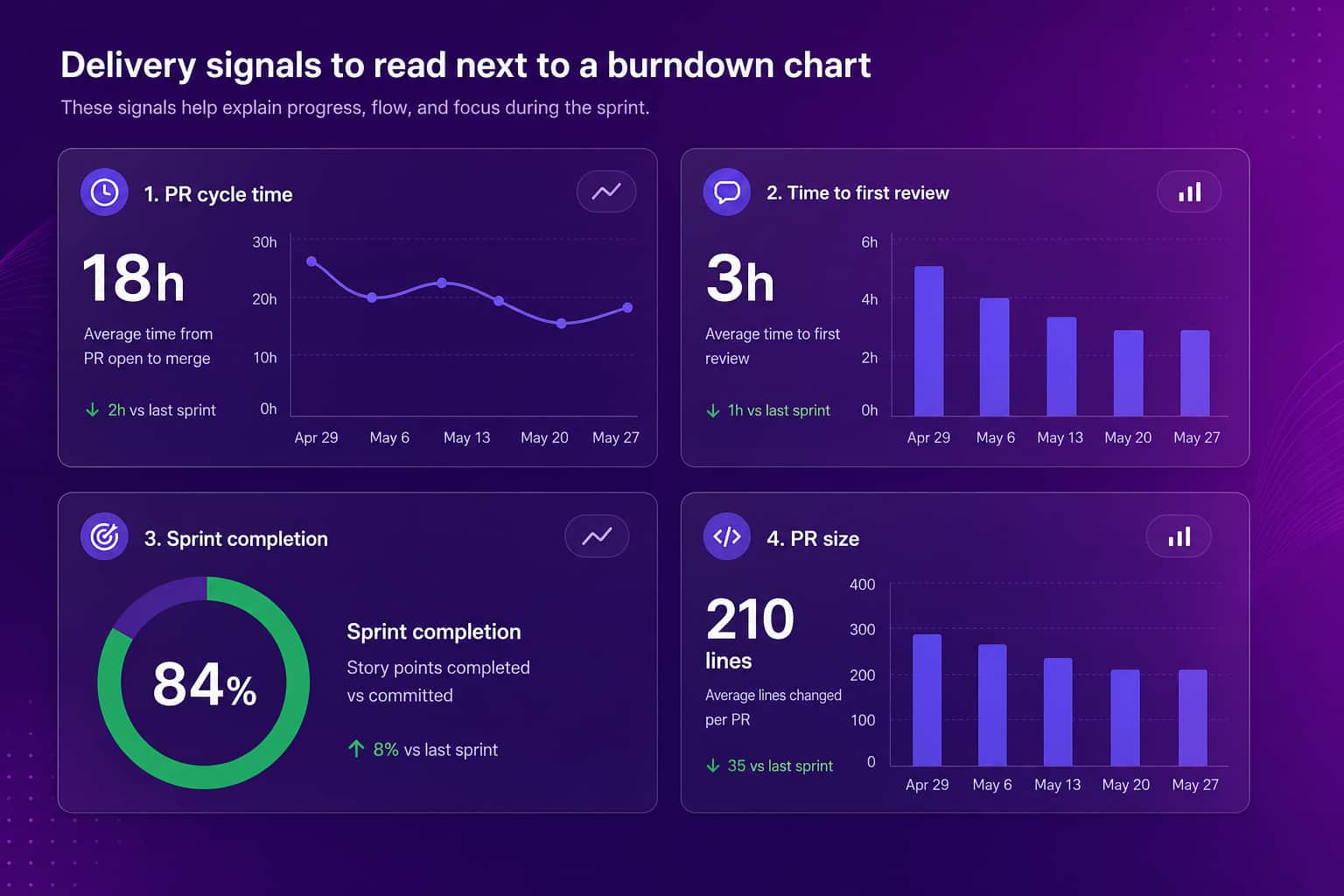
Abloomify connects to GitHub and Jira through API integrations and reports PR cycle time, review health, PR size, and sprint delivery, with the DORA metrics banded Elite, High, Medium, and Low. It is privacy-first by architecture: PII-free signals only, with no code content, no screenshots, and no keyloggers. The sample values in the dashboard above are illustrative. If you are choosing which clock to read first, cycle time vs lead time explains where each one starts, and what are DORA metrics covers the four delivery numbers.
How do you use a burndown chart without hurting your team?
Use it as a conversation starter for the team that owns it, and keep it away from performance reviews. Put it up in the standup or the retro, and ask what happened on the flat days. Do not roll burndown charts up into a department dashboard, and do not compare one team's line to another's, because the estimates behind them are not comparable. If a leader asks to see the chart every morning, expect the line to start behaving: tickets get split smaller, or closed earlier, to keep it smooth. When that happens the chart is no longer telling you about the sprint. It is telling you about the audience.
If you want a way to make small PRs reviewed fast the default, our guide to right-sizing diffs and work in progress is a good next read. For how velocity reads over several sprints, see team velocity, and for a wider view of flow, flow metrics.
FAQ
What is a burndown chart?
A burndown chart plots the work remaining in a sprint or release against time. The vertical axis is remaining work, usually story points or issue count, and the horizontal axis is days. A dashed ideal line runs from the starting scope to zero, and the actual line shows what the team really did.
How do you read a burndown chart?
Compare the actual line to the ideal line. If actual sits above ideal, the team is behind plan. If it sits below, the team is ahead. A flat stretch means nothing was finished that day, and an upward step means scope was added. The shape matters more than any single point.
What is the difference between a burndown chart and a burnup chart?
A burndown chart shows work remaining and falls toward zero. A burnup chart shows work completed rising toward a scope line. Burnup charts make scope changes visible as a moving ceiling, while on a burndown chart a scope change looks like the line going up or flattening, which people often misread.
What does a flat burndown line mean?
It means no work was marked done during that period. Common causes are stories that are too large to finish in a day, work waiting on review, and teams that only update tickets at the end. It is a prompt to look at the pull requests, not proof anyone was idle.
Is a burndown chart enough to measure team performance?
No. A burndown chart tracks progress against a plan for one sprint, and it depends on estimates and on people updating tickets. Pair it with PR cycle time, time to first review, PR size, and sprint completion, which Abloomify reads directly from GitHub and Jira.

Amir Tavafi
Co-Founder & CEO
Product leader and innovator with over 15 years of experience in the tech sector, grounded in AI and robotics. Previously led product development in fraud detection and AI solutions at Nasdaq Verafin.