Employee Attendance Tracking Templates Guide + The AI-Powered Alternative (2026)
Everything you need to know about attendance tracking templates, plus discover why AI-powered tracking is replacing spreadsheets
January 30, 2026
Walter Write
9 min read

Key Takeaways
Q: What's the best format for an attendance tracking template?A: Excel and Google Sheets offer the most flexibility with formulas and customization. PDFs work well for printable sign-in sheets. However, all spreadsheet-based tracking has limitations, manual entry errors, time theft vulnerability, and no productivity insights.
Q: How accurate are manual attendance sheets?A: Studies show manual attendance tracking has a 1-8% error rate, costing companies an average of 2% of gross payroll annually. Buddy punching (one employee clocking in for another) affects 75% of companies using manual systems.
Q: What's the difference between attendance tracking and workforce analytics?A: Attendance tracking only shows if someone was present. Workforce analytics reveals how time was spent, productive hours, collaboration patterns, focus time, and engagement levels. Modern leaders need both.
What to Include in Employee Attendance Templates
Whether you're building your own spreadsheet or evaluating existing templates, here's what effective attendance tracking should include:
1. Daily Attendance Sheet
Track daily clock-in/out times, breaks, and notes for each employee.
| Essential Field | Purpose |
|---|---|
| Employee name and ID | Identification |
| Clock-in and clock-out times | Work hours |
| Break duration tracking | Deductions |
| Overtime calculation | Compliance |
| Notes field | Absences/tardiness context |
| Supervisor approval | Sign-off |
2. Weekly Attendance Sheet
View a full week of attendance data for your team at a glance.
| Essential Field | Purpose |
|---|---|
| 7-day view per employee | Week overview |
| Total hours per day and week | Quick totals |
| Present/Absent/Late status | Status tracking |
| Weekly overtime calculation | Compliance |
| Supervisor approval section | Sign-off |
3. Monthly Attendance Sheet
Track monthly attendance patterns and identify trends.
| Essential Field | Purpose |
|---|---|
| Full month calendar view | Pattern visibility |
| Attendance status codes (P, A, L, H, V) | Quick scanning |
| Monthly totals and percentages | Analysis |
| PTO/sick leave tracking | Leave management |
| Attendance rate calculation | KPI tracking |
How to Set Up Attendance Tracking
Setting Up Your Attendance Sheet
-
Choose your format: Use Excel for customization, Google Sheets for collaboration, or PDF for simplicity
-
Customize for your business: Add your company name, adjust work hours, and modify status codes
-
Distribute to managers: Share the template with team leads responsible for tracking
-
Establish a submission process: Set clear deadlines for completed sheets to reach HR/payroll
-
Archive records: Keep attendance records for compliance (most jurisdictions require 3+ years)
Attendance Status Codes
| Code | Meaning |
|---|---|
| P | Present |
| A | Absent (unexcused) |
| L | Late |
| E | Excused absence |
| V | Vacation/PTO |
| S | Sick leave |
| H | Holiday |
| WFH | Work from home |
5 Limitations of Spreadsheet Attendance Tracking
While templates work for small teams, they have significant drawbacks:
1. Prone to Human Error
Manual data entry introduces errors. A single mistyped digit can cascade through payroll calculations, causing overpayments or underpayments that damage employee trust.
The cost: The American Payroll Association estimates manual time tracking errors cost companies 1-8% of gross payroll.
2. Vulnerable to Time Theft
Spreadsheets can't verify that the person logging time is actually the employee, or that they were working when claimed.
| Time Theft Method | What Happens |
|---|---|
| Buddy punching | One employee clocks in for another |
| Rounding up | Employees inflate hours by a few minutes daily |
| Extended breaks | Longer breaks than recorded |
| Early clock-in | Logging time before actually working |
3. No Productivity Visibility
Attendance is not productivity.An employee can be "present" for 8 hours while accomplishing very little. Spreadsheets only track presence, not performance.
4. Administrative Burden
Someone has to collect, compile, verify, and process all those spreadsheets.
The cost: For a 50-person company, this can consume 5-10 hours per payroll cycle.
5. Difficult to Analyze
Spotting patterns, chronic lateness, seasonal absenteeism, department trends, requires manual analysis across multiple spreadsheets. Most companies never do it.
The AI-Powered Alternative: Automatic Attendance + Productivity Insights
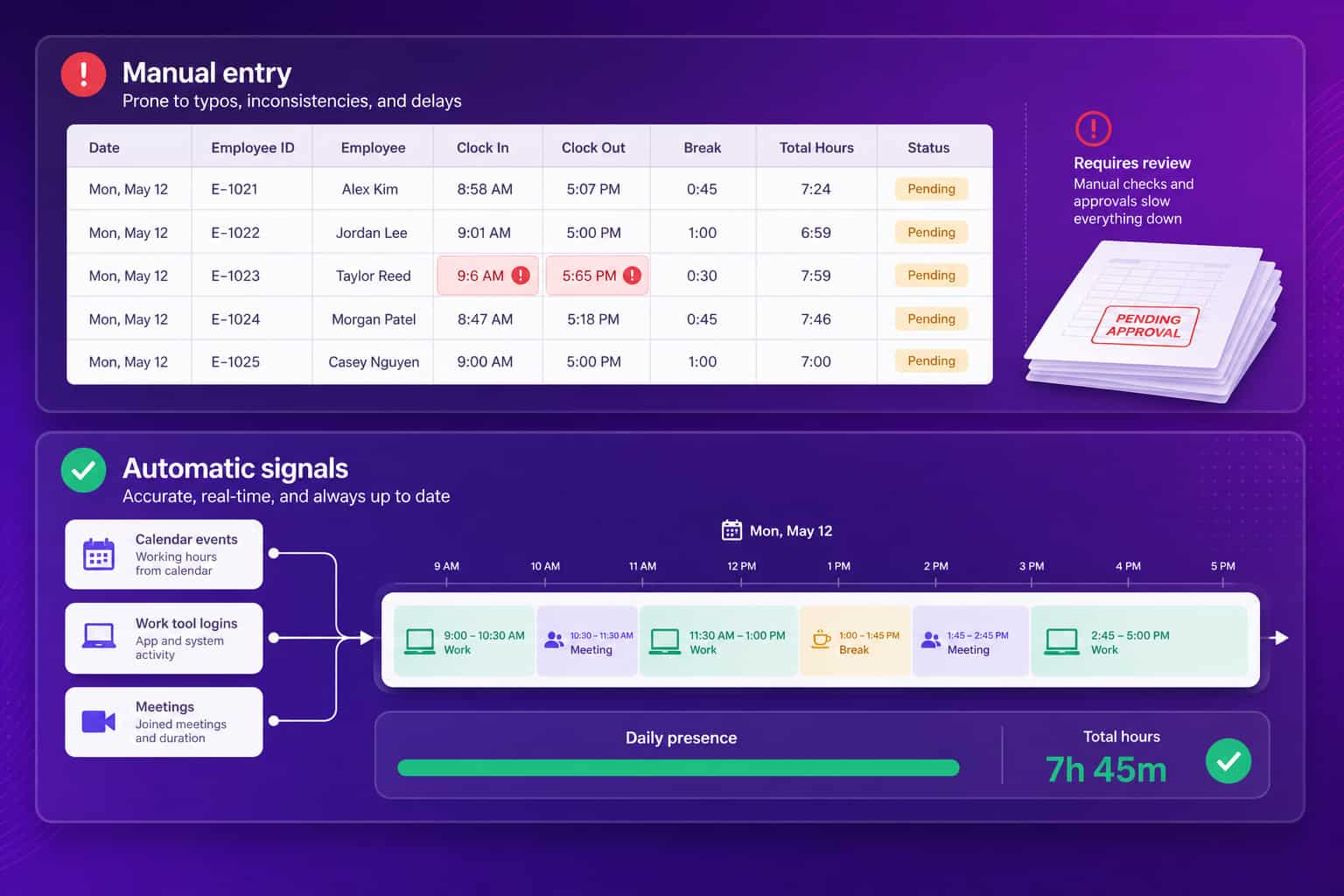
Modern workforce analytics platforms like Abloomify solve these limitations by automating attendance tracking while providing the productivity insights that spreadsheets can't deliver.
How AI-Powered Attendance Tracking Works
Instead of relying on manual entry, Abloomify tracks attendance automatically through:
| # | Method | How It Works |
|---|---|---|
| 1 | Work tool integrations | When employees log into Slack, email, or project tools, their work day begins |
| 2 | Calendar sync | Meetings and scheduled work automatically log as active time |
| 3 | Optional device agents | Privacy-first agents track active vs idle time without screenshots or keystroke logging |
| 4 | AI categorization | Automatically distinguishes work activities from personal browsing |
What You Get Beyond Attendance
| Spreadsheet Tracking | Abloomify AI Tracking |
|---|---|
| Was employee present? | Present + productive hours breakdown |
| Clock in/out times | Work patterns + peak productivity hours |
| Manual overtime calculation | Automatic overtime + burnout risk alerts |
| Nothing about collaboration | Meeting load + collaboration health |
| No insights | AI-generated recommendations |
Privacy-First Approach
Unlike surveillance tools that capture screenshots and keystrokes, Abloomify takes a privacy-first approach:
| Feature | Status |
|---|---|
| Screenshots | Never |
| Keystroke logging | Never |
| Outcome-based metrics | Measures work completion, not mouse movements |
| Employee visibility | Workers see their own data |
| SOC 2 Type II certified | Enterprise-grade security |
Why surveillance backfires:
Finding No evidence monitoring improves performance (Personnel Psychology meta-analysis) About 1 in 6 workers would quit over workplace surveillance (2026 survey research) Employees "game" surveillance systems with fake activity
Attendance Tracking for Different Team Types
Remote Teams
For distributed teams, traditional attendance sheets are nearly useless. You need:
- Work tool activity tracking: When are people actually working?
- Timezone-aware scheduling: Who's available when?
- Asynchronous work recognition: Not everyone works 9-5
Abloomify's Hybrid & Remote Productivity solution provides this visibility without surveillance.
Hybrid Teams
Hybrid teams need to track:
- Office vs remote days: Who's where and when?
- Collaboration opportunities: When are the right people together?
- Space utilization: Is the office being used effectively?
Hourly Workers
For hourly employees, accurate time tracking directly impacts payroll. Key needs:
- Exact clock in/out times: To the minute
- Overtime calculations: Automatic, compliant with labor laws
- Break tracking: Ensure required breaks are taken
- Shift scheduling: Who's working which hours
Making the Switch: Templates to AI
If you're currently using spreadsheets, here's how to transition:
Phase 1: Assess Current State
| Step | Action |
|---|---|
| 1 | Audit your process: How many hours per week go into attendance administration? |
| 2 | Calculate error cost: What's payroll error rate costing you? |
| 3 | Identify gaps: What insights are you missing about productivity? |
Phase 2: Pilot AI Tracking
| Step | Action |
|---|---|
| 1 | Start with one team: Test with a willing department |
| 2 | Run parallel systems: Keep spreadsheets during transition |
| 3 | Compare accuracy: Note discrepancies between manual and automatic |
| 4 | Gather feedback: How do employees feel about the new system? |
Phase 3: Full Rollout
| Step | Action |
|---|---|
| 1 | Communicate the "why": Explain benefits to employees |
| 2 | Provide training: Show how to use the new system |
| 3 | Sunset spreadsheets: Set a cutoff date |
| 4 | Optimize: Use insights to improve operations |
Calculate Your Attendance Tracking ROI
Use our Productivity Calculator to estimate the value of switching from spreadsheets to AI-powered tracking.
The honest math for a 50-person company, using the published error rates above rather than vendor promises: manual attendance administration commonly runs 5 to 10 hours per payroll cycle, and the American Payroll Association puts manual time tracking errors at 1 to 8% of gross payroll. At a $4M payroll, even the low end of that error band is $40K a year, before counting the admin hours. Automatic tracking removes most of the manual entry that produces both. Your numbers will differ, which is what the calculator is for.
Frequently Asked Questions
What information should an attendance sheet include?At minimum: employee name, date, clock-in time, clock-out time, break duration, and total hours. Advanced sheets also track overtime, leave type, and supervisor approval.
How long should I keep attendance records?
Retention Period Context 3 years Most labor law minimum Longer Healthcare, government contractors 7 years When in doubt, safest choice
Can attendance tracking improve productivity?Basic attendance tracking only measures presence. To improve productivity, you need insights into how time is spent, which requires workforce analytics, not just attendance sheets.
What's the best attendance tracking method for remote teams?For remote teams, spreadsheets are unreliable since you can't verify someone is actually working. AI-powered tools that integrate with work applications provide accurate tracking without surveillance.
Is employee attendance tracking legal?Yes, employers have the legal right to track work hours. However, some jurisdictions require employee notification. Always disclose your tracking methods and ensure compliance with local labor laws.
Start Tracking Smarter
Option 1: Build your own attendance spreadsheet using the templates guide above, it works for small teams getting started.
Option 2: Try Abloomify free and get automatic attendance tracking plus AI-powered productivity insights, no credit card required.
Spreadsheets work for basic tracking. But if you want to move beyond "who showed up" to understanding "how work actually gets done," AI-powered workforce analytics is the path forward.

Walter Write
Staff Writer
Tech industry analyst and content strategist specializing in AI, productivity management, and workplace innovation. Passionate about helping organizations leverage technology for better team performance.