Top 5 Platforms to Reduce Status Meeting Overload
October 19, 2025
Walter Write
13 min read

Key Takeaways
Q: Why do teams keep scheduling status meetings?
A: Because there is no other reliable way to answer two questions: is the work moving, and what is stuck? Microsoft research found that 85% of leaders lack confidence that employees are productive, while 87% of employees report being productive. The recurring status meeting is how most companies paper over that gap.
Q: Can you keep visibility without status meetings?
A: Yes, if the replacement reads status out of the systems where work already happens (Jira, GitHub, Slack, Microsoft 365) instead of asking people to retype what they did. Hand-written status disappears the week everyone gets busy, which is exactly the week you need it.
Q: What should replace a status meeting?
A: A written brief that arrives on a schedule, plus a short live slot reserved for blockers and decisions. The brief carries the facts. The conversation handles anything that needs an argument.
Q: Do async status tools hold up across time zones?
A: That is where they earn their keep. Distributed teams stop negotiating an overlap window that is nobody's morning, and each manager reads the brief at the start of their own day.
Nobody schedules a status meeting because they enjoy it. They schedule it because the alternative is guessing.
Microsoft's research on that gap makes uncomfortable reading: 85% of leaders lack confidence that their people are productive, while 87% of employees report being productive. Same work, opposite conclusions. So the calendar fills with recurring blocks whose only job is to have people say out loud what they already recorded in Jira, GitHub, and Slack.
Most advice about this stops at the meeting itself: make it shorter, tighten the agenda, rotate the facilitator, cut the invite list. That leaves the actual mechanism untouched. The mechanism is the route status takes to a leader's head, and today that route runs through somebody's memory and a calendar invite.
The five platforms below change the route in different ways. One of them is ours. I will be specific about where the other four are the better buy.
What Does Status Meeting Culture Actually Cost You?
Run the arithmetic on your own calendar before you shop for anything, because the hours number is usually bigger than people expect and it is the only number that moves a CFO.
Count the recurring meetings that exist to report rather than to decide. Multiply the weekly hours by the number of people required to attend, then by 48 working weeks. If a 50-person org carries six hours of reporting meetings per person per week, that comes to 14,400 person-hours a year spent describing work instead of doing it. Apply your own fully loaded hourly rate to that.
Direct hours are the part you can defend in a budget conversation. The costs underneath are worse and harder to prove:
- A meeting at 11am does not cost an hour. It costs the hour plus whatever was left of the morning, because deep work does not survive being sliced in half.
- Distributed teams pay twice. Somebody takes the call at 6am or 10pm, every week, forever.
- Problems wait for the meeting. A blocker raised on Tuesday sits until Thursday, because Thursday is when we talk about blockers.
- Preparation never shows up in the calendar. Slides, screenshots of dashboards, a quiet rehearsal of what to say. None of that appears in anyone's meeting-hours report.
What Makes a Status Meeting Replacement Actually Work?
There are two designs on the market, and the difference matters more than the feature lists suggest. Does the tool ask a person to write the update, or does it read the update out of the work?
Written check-ins are cheap to adopt and easy to love in week one. They also inherit the failure mode of the meeting they replaced, because they still depend on somebody remembering, summarizing, and being honest about what did not move. Discipline decays. Updates get shorter, then generic, then skipped, and visibility disappears without anyone announcing it.
Status pulled from work systems has the opposite profile: more integration work up front, then no ongoing tax. Tickets moved, PRs merged, docs edited, deploys shipped. Nobody has to remember anything, and nobody can round their week up.
The second thing that matters is whether the tool actually deletes the meeting. A platform that produces a lovely weekly digest while the Monday sync stays on the calendar has made your week worse. Cancel the invite in the same week you turn the tool on, or skip the purchase.
1. Abloomify: the brief writes itself and lands before Monday starts
Abloomify connects by API to the tools where work already lives: GitHub, Jira, Linear, Slack, Microsoft Teams, Google Workspace, Microsoft 365, CRM and HRIS systems, across 100+ integrations. Status comes from what the team shipped rather than from what the team wrote about what it shipped.
The part that replaces a status meeting is Bloomy Tasks. You schedule Bloomy to run daily, weekly, monthly, or once. Each run reasons over the connected data fresh and emails a decision-ready report. The Monday engineering brief is the template that maps directly onto this article: PRs merged, velocity, review health, and the work that has stalled. It arrives before anyone opens a calendar.
Every run persists as a resumable conversation. Click through from the email and keep asking: why is that PR stuck, who is carrying two projects at once, what changed since last week. That is the follow-up discussion the meeting existed to host, minus the scheduling.
Dashboards you check. Bloomy checks in on you.
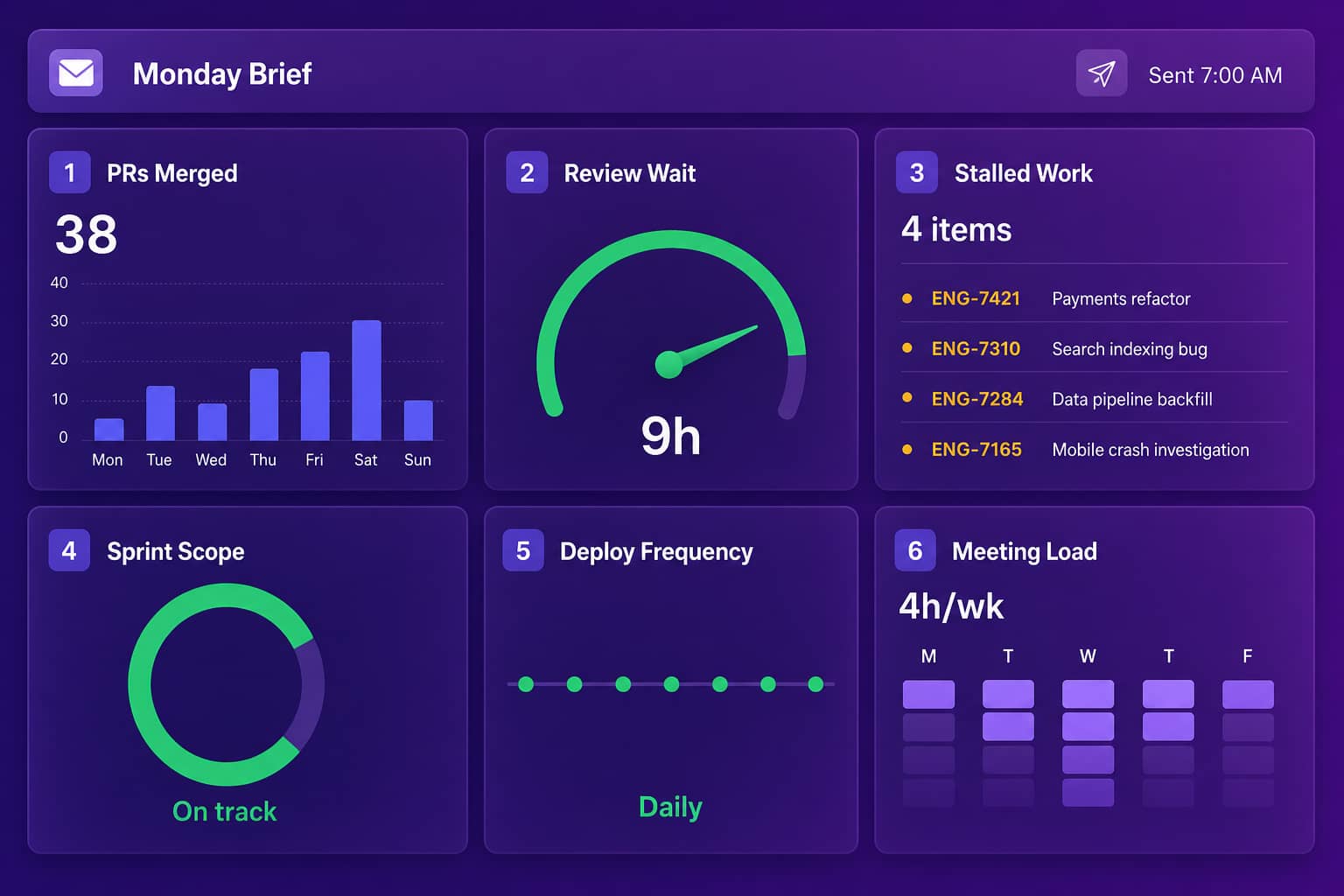
There are roughly 35 ready-made task templates across nine business domains, so the same mechanism can retire the weekly pipeline review, the Monday marketing readout, and the meeting-prep scramble, not only the engineering standup.
Privacy is load-bearing for this use case, because the fastest way to make a team defend its status meeting is to replace it with something that feels like surveillance. Abloomify is privacy-first and PII-free by architecture: no screenshots, no keyloggers, no screen recording, no content capture. The optional Mac and Windows device agents collect aggregated usage metrics and deploy through any MDM (Intune, Jamf, Rippling, Kandji, and more). Hosting is available in North America or the EU, and the platform is SOC 2 Type II certified. If you are weighing this against a monitoring tool, the Abloomify and ActivTrak comparison lays out the architectural difference.
If the objection in your company is "we already use ChatGPT and Claude," External AI Access covers it. Abloomify exposes an MCP server, so those tools answer from your company knowledge, scoped to what each person is already allowed to see and revocable instantly. Plenty of vendors ship MCP servers now, including Visier, Lattice, Jellyfish, LinearB, and Steady further down this list. Ours is the permission-scoped layer over PII-free cross-tool work data.
Pricing is $9 per seat per month billed annually, free up to 5 users. The Tasks module is enabled per company and per user by an admin.
Where it is not the fit: if you manage twelve people, everything happens in one Slack channel, and all you want is a bot that asks three questions at 9:30am, Abloomify is more platform than the problem deserves. Buy Geekbot and get on with your day.
2. Range: structured rituals for teams that like their standup
Range replaces the daily standup with structured async check-ins in Slack. Templates cover standups, retros, and planning, and responses aggregate into a digest a manager can read in a couple of minutes.
Range is the right buy when your rituals are messy but you still want them. It has opinions about how a check-in should be shaped, and those opinions are good ones, so teams that adopt it usually stop arguing about standup format.
The limits are structural. People still write the updates, so the value tracks the discipline of the least consistent person on the team. Range reads little from Jira or GitHub on its own, so status stays self-reported. You have converted a meeting into a daily writing task, which is progress, but it is not the same as removing the task.
3. Geekbot: the cheapest exit from a daily standup
Geekbot lives inside Slack and Teams. It asks the questions you configure at the time you configure, collects answers, and posts a compiled summary to a channel. Setup takes an afternoon, adoption takes about a week, and nobody has to open a new tool.
For a small team spending 15 minutes a day standing in a circle, this is the highest-return change on the list. Nothing else here is that cheap or that fast.
What you get back is a transcript, not an analysis. Geekbot runs entirely on manual input and verifies none of it, so it does not know whether the ticket someone mentioned actually moved, and it will not notice that the same person has been "finishing up the migration" for three weeks running.
4. Polly: async decisions, not async status
Polly runs polls and surveys inside Slack and Teams. It was never built to replace status meetings, and teams use it that way anyway, mostly for the decisions that padded those meetings out in the first place.
The anonymous option is the underrated part. "Is this project actually going to hit its date?" gets a more honest answer in an anonymous poll than it does in a room with the project sponsor sitting in it.
The ceiling is obvious: you only ever learn about the things you thought to ask. Treat Polly as a supplement to a status system, not as the system.
5. Status Hero, now Steady: the hybrid middle ground
Worth knowing before you go looking: statushero.com now redirects to runsteady.com, and the product has been rebranded as Steady, repositioned around keeping people and AI agents coordinated, with its own MCP server.
The core mechanic survived the rename. Steady still combines written check-ins with activity pulled from connected tools including GitHub, Jira, Slack, and Google Calendar, so the update a person writes sits next to what the systems already recorded. That is a genuinely useful middle ground for a team that will not accept fully automatic status but resents writing into a blank box every morning.
The dependency on human input remains. The bigger caveat is that the product you would evaluate today is not the Status Hero somebody recommended to you three years ago, so go look at what it is now before you shortlist it on an old reputation.
What Is the Difference Between Written Check-ins and Automatic Status?
Written check-ins (Range, Geekbot, Polly)
Status pulled from work systems (Abloomify, partly Steady)
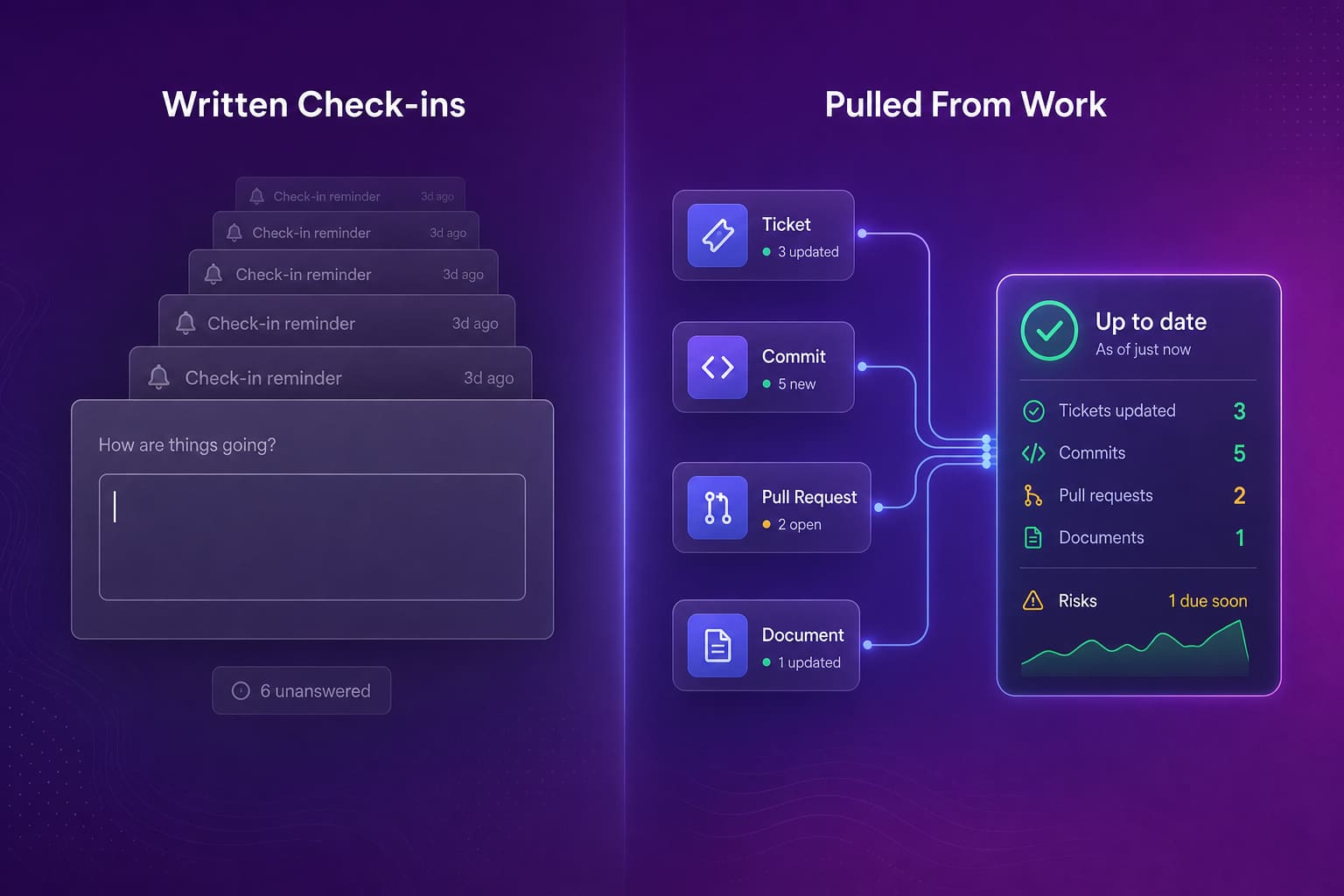
Most teams should run both. Automatic status answers "did it move." Written input answers "how does it feel," which no integration will ever tell you. The expensive mistake is buying a written-check-in tool and expecting it to answer the first question.
How Do You Actually Delete the Meeting?
- Cancel the recurring invite the same week the tool goes live, and announce it as a deletion, not a trial. Anything you keep "just for a few weeks" you keep forever.
- Write down what still earns synchronous time: decisions where smart people disagree, anything with bad news in it, planning that needs an argument. Everything else is a document.
- Keep one short blocker slot. Ten minutes on what is stuck, with no round-the-table recap. Teams that go fully async and skip this step tend to wonder six weeks later why work quietly stalls.
- Train the managers who used that meeting as their only source of visibility. Their resistance is usually honest, not political, and the fix is showing them where to look now.
- Judge the system on outputs. The moment you start measuring whether people filed their check-in, you have rebuilt the status meeting in a new format.
How Do You Know It Worked?
| Signal | Where to get it | What good looks like |
|---|---|---|
| Reporting hours per person per week | Calendar analytics in Google Workspace, Microsoft 365, or Abloomify | Down against your own baseline, and still down after 60 days |
| Longest uninterrupted block in a day | The same calendar data | Long enough to finish something, on more than one day a week |
| Time from blocker raised to blocker handled | Ticket comment history in Jira or Linear | Hours, not "whenever Thursday comes around" |
| Delivery throughput | GitHub and Jira | Flat or better. A drop means the brief is not carrying what the meeting carried |
| Manager confidence | Ask them one question a month | They stop asking for the meeting back |
What Else Can You Delete Besides the Status Meeting?
Once status is continuous, other meetings lose their reason to exist.
Performance conversations stop depending on manager memory of the last three weeks, because contribution data accumulates through the whole cycle. That is the same data behind performance management, which is why the two problems tend to get solved together.
Planning gets shorter when capacity and velocity are already visible instead of being reconstructed from estimates in a room. Escalation meetings give way to alerts that fire when a project starts slipping, which is a much better moment to hear about it. And rebalancing work across teams turns into a Slack message once you can see who is buried and who is idle.
Which One Should You Pick?
- Geekbot if you have a small team, a daily standup, and no appetite for a new tool.
- Range if the check-in ritual itself is the problem and you want good structure quickly.
- Polly as a supplement for async decisions and honest pulse checks.
- Steady if your team will write check-ins but wants real activity data sitting next to them.
- Abloomify if you want status assembled from work systems and delivered on a schedule, with engineering metrics, capacity, and AI tool ROI in the same place, and a privacy model that survives a security review.
The honest test is this. If your team will faithfully write updates every day for the next year, the lightweight tools are cheaper and completely sufficient. If you already know from experience that they will not, buy the one that does not ask them to.
Reclaim Your Calendar
Status meeting overload is a solvable problem, and a better-run meeting is not the solution. Decide where status is going to come from, wire it up, then delete the invite.
Request a demo and we will look at what your calendar load actually is and what a scheduled brief would replace. If you want the longer version of our thinking first, start with meeting optimization.
Pick one recurring status meeting this week and delete it. Usually nothing breaks.
Related reading:
Hybrid productivity without surveillance
·
Reduce context switching to boost focus

Walter Write
Staff Writer
Tech industry analyst and content strategist specializing in AI, productivity management, and workplace innovation. Passionate about helping organizations leverage technology for better team performance.