Top 6 Software Solutions to Track Context Switching and Boost Focus Time
October 19, 2025
Walter Write
17 min read

Key Takeaways
Q: What is context switching and why does it hurt productivity?
A: Context switching is the mental cost of moving between tasks, projects, or types of work. Part of your attention stays stuck on the last thing, so the minutes right after an interruption go to reloading rather than producing. The number people quote is 23 minutes to get back into a task, and it is worth treating as a rough shape rather than a measurement of your team. What matters is that a day chopped into 30-minute gaps produces less than the same hours in two long blocks, and the work that comes out of it carries more mistakes because nobody ever holds the whole problem in their head at once.
A: Context switching is the mental cost of moving between tasks, projects, or types of work. Part of your attention stays stuck on the last thing, so the minutes right after an interruption go to reloading rather than producing. The number people quote is 23 minutes to get back into a task, and it is worth treating as a rough shape rather than a measurement of your team. What matters is that a day chopped into 30-minute gaps produces less than the same hours in two long blocks, and the work that comes out of it carries more mistakes because nobody ever holds the whole problem in their head at once.
Q: What are the main causes of excessive context switching?
A: Meetings scattered across the calendar instead of clustered, and chat tools carrying an unwritten expectation of near-instant replies. Underneath both sits the number of projects each person owns at once, plus managers who model constant availability and teach everyone else to do the same. Tool sprawl adds its own tax, since every application has a different layout and mental model.
A: Meetings scattered across the calendar instead of clustered, and chat tools carrying an unwritten expectation of near-instant replies. Underneath both sits the number of projects each person owns at once, plus managers who model constant availability and teach everyone else to do the same. Tool sprawl adds its own tax, since every application has a different layout and mental model.
Q: How do you measure context switching objectively?
A: Platforms read calendar structure (how many meetings, and how they are spaced), application and project transitions, and communication response patterns, then report how much genuinely uninterrupted time each team has. Privacy-first tools do this from patterns rather than screenshots or keystrokes, so you get the shape of the day without reading anyone's work.
A: Platforms read calendar structure (how many meetings, and how they are spaced), application and project transitions, and communication response patterns, then report how much genuinely uninterrupted time each team has. Privacy-first tools do this from patterns rather than screenshots or keystrokes, so you get the shape of the day without reading anyone's work.
Q: Can you really protect focus time in collaborative environments?
A: Yes, if the protection is structural rather than aspirational. Shared no-meeting blocks that leaders also honor, published response-time expectations for non-urgent messages, and clustering meetings into fewer days all work. Telling people to protect their own focus while leaving the calendar untouched does not.
A: Yes, if the protection is structural rather than aspirational. Shared no-meeting blocks that leaders also honor, published response-time expectations for non-urgent messages, and clustering meetings into fewer days all work. Telling people to protect their own focus while leaving the calendar untouched does not.
A developer sits down at 9 AM to build something complicated. A 9:15 meeting takes 30 minutes. She is back at 9:45, actually thinking again by 10:00, gets twenty good minutes, then Slack lights up with a question that takes fifteen. Another meeting at 10:30. Three more scattered between 1 and 5.
Eight hours at work, maybe ninety minutes of real thinking, and the feature is still not done. Nobody was slacking off. The calendar just never gave her a room big enough to work in.
If you run a team, you already recognize the pattern. People are busy and delivery is slow. They finish the week tired without finishing much. The hard part is not believing it happens, it is proving where the hours go, because "we have too many meetings" is an opinion until you can show a manager their team's actual longest uninterrupted block.
That is what this category of software is for. Below are six platforms that measure context switching, what each one can see, and where each one stops.
Why Does Context Switching Destroy Productivity?
Context switching leaves attention residue, where part of your mind stays on the previous task while you start the next one, so fragmented days produce less finished work and more rework than the same number of hours in long blocks. Tools like Abloomify quantify this by analyzing calendar spacing, project transitions, and application switching.
Switching costs time to unload one problem and load another, and the more complex the work, the longer that reload takes. Debugging a race condition has a much higher reload cost than answering an email, which is why the same interruption hurts an engineer far more than it hurts someone working a support queue.
The cost then compounds in ways that never show up on anyone's dashboard. People redo thinking they had already done, errors slip through and need a second pass to find, and afternoon output drops because the switching itself is tiring. Decision quality goes with it. The people carrying the most fragmented calendars usually notice all of this long before their manager does.
Four patterns cause most of it, and each one leaves a different signal.
| Pattern | Signal to watch | Recommended intervention |
|---|---|---|
| Meeting fragmentation | 30 to 45 minute gaps between meetings, spread across the whole day | Cluster meetings, add meeting-free blocks, merge or shorten |
| Communication interruption | High notification volume, response norms measured in minutes | Async defaults, published response times, batched messaging |
| Project juggling | Three or more concurrent projects per person | WIP limits, single-tasking sprints, dedicated blocks per project |
| Tool switching | Ten or more apps a day, short dwell time in each | Tool consolidation, workflow integration, keyboard workflows |
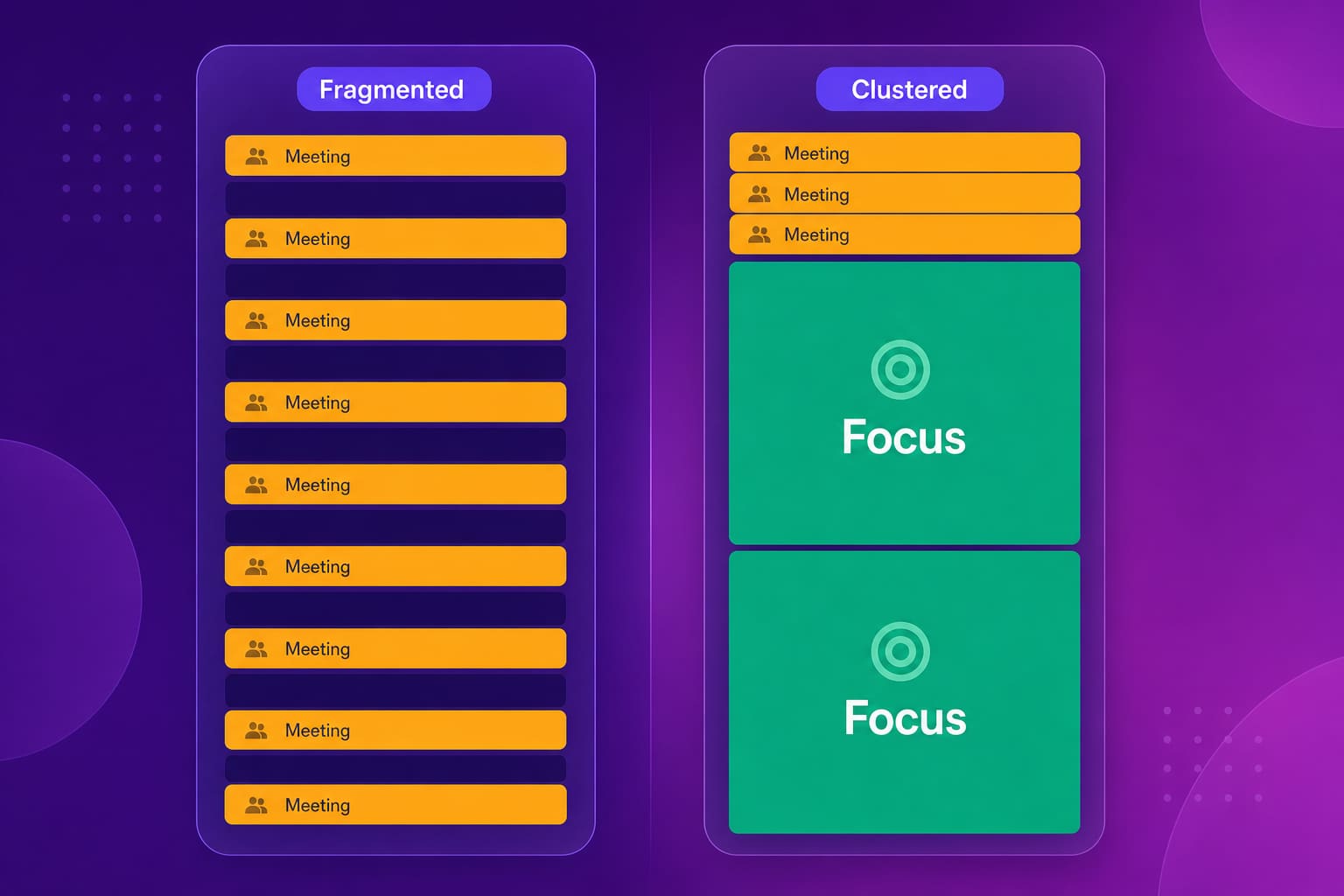
A feature that takes four hours of continuous work can easily take three days when those four hours arrive in 30-minute pieces, and the version that ships from the fragmented path tends to need more fixing afterward. Making that gap visible is the whole job of the tools below.
What Makes Context Switching Tracking Platforms Effective?
Effective platforms measure interruptions objectively through calendar analysis, application usage, and communication patterns, then tell you when and why focus disappears rather than only reporting that it did. Abloomify, Clockwise, and RescueTime each cover part of this from a different angle.
Four things separate a tool that changes behavior from a tool that produces a chart:
- It measures rather than surveys. Asking people how fragmented their week was gets you a mood, not a baseline.
- It shows the cause next to the effect. "Focus time is low" is useless. "Focus time is low because meetings are spread across five days instead of two" is a decision.
- It reports at team level. Meeting culture is a structural problem, and structural problems get fixed by managers looking at a shared view, never by individuals defending their own calendars one decline at a time.
- It stays on the right side of the privacy line. Tools that read content to measure focus buy their insight with employee trust, and that trade is worse than it looks. A Personnel Psychology meta-analysis found no evidence that monitoring improves performance, and 2026 survey research found about 1 in 6 workers would quit over workplace surveillance.
1. Abloomify, AI-Powered Productivity Ops Platform
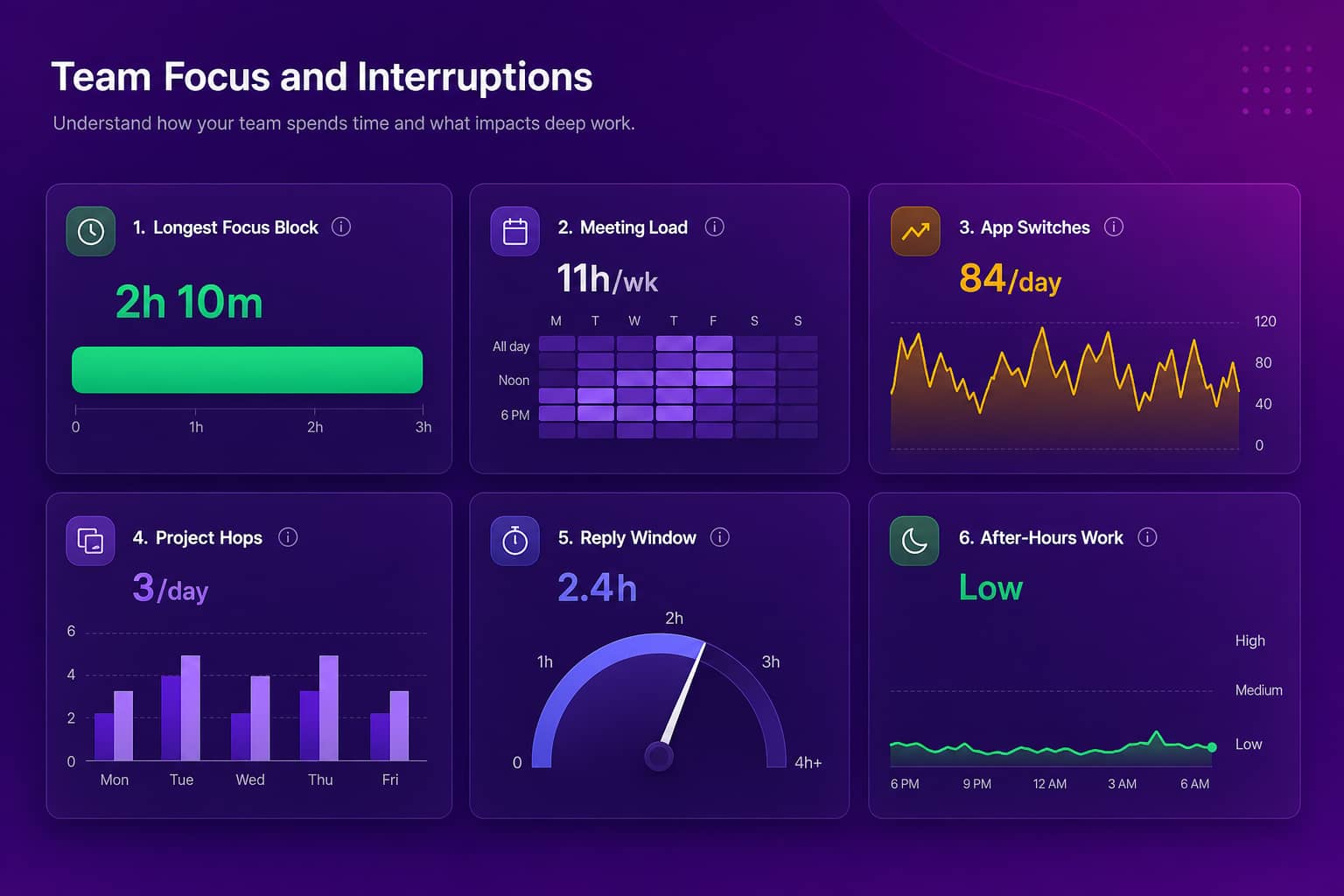
Abloomify analyzes calendar patterns, Slack and Microsoft Teams communication flows, Jira and Linear project transitions, and application switching across connected systems to show how interruptions fragment the day and how much genuinely uninterrupted time a team has.
It sees more than a calendar tool because it reads more than the calendar. Meeting density explains part of the problem; the rest hides in chat response patterns, ticket churn, and how often people bounce between projects in the same afternoon. Pull those together and you can tell a VP Engineering which of the four causes is doing the damage on their team, which is the difference between a policy that works and one that gets quietly ignored.
It does this without watching anyone's screen. Two data layers feed it: 100+ API integrations that pull PII-free signals from tools the company already runs, and optional privacy-first device agents on Mac and Windows that report aggregated usage by application category. No screenshots, no keyloggers, no screen recording, no content capture. If you deploy the agent, it rolls out through any MDM (Intune, Jamf, Rippling, Kandji, and more), and hosting can sit in North America or the EU.
What sets Abloomify apart
Bloomy, the AI layer, answers questions like "how much focus time does the platform team actually have on Wednesdays" in plain language against live data. More useful for this particular problem: Bloomy also runs on a schedule. With Bloomy Tasks, you set a weekly focus-and-meeting-load brief, it mines the connected data on its own, and the result lands in your inbox as a report you can then keep interrogating in a resumable conversation. Dashboards you check. Bloomy checks in on you.
That matters here because context switching is a drift problem. Nobody schedules a meeting-heavy quarter. It accumulates one recurring invite at a time, and a report that arrives every Monday catches the drift months before the retro does.
If your team already lives in ChatGPT, Claude, or Cursor, External AI Access connects those tools to your Abloomify knowledge through MCP, so they answer from your company's data instead of guessing. Each connection is scoped to what that person is already allowed to see and can be revoked instantly.
Pricing is $9 per seat per month billed annually, free up to 5 users, and the platform is SOC 2 Type II certified.
Where it is not the right pick: if you want software that rearranges calendars for you automatically, Abloomify measures and recommends, it does not move your meetings. Clockwise is the better tool for that job.
See how Abloomify measures focus time or request a demo to look at your own team's numbers.
2. Clockwise, Calendar Optimization Platform
Clockwise uses AI to reshuffle Google Calendar and Outlook schedules automatically, moving flexible meetings so that longer uninterrupted blocks emerge.
Along with Reclaim.ai, it acts on the calendar instead of only reporting on it, and for meeting-driven fragmentation that is a real advantage. If your diagnosis is already "our meetings are scattered" and you just want them gathered up, this is the shortest path.
Strengths
- Proactively rearranges flexible meetings to create focus blocks
- Clear visualization of how much focus time each person has
- Native Google Calendar and Outlook integration
- Low friction to adopt for an individual before rolling it out widely
Considerations
- Calendar-only, so it misses chat interruptions, project juggling, and tool switching
- Needs broad adoption to have room to move anything
- Cannot fix a meeting culture problem, only reshuffle its symptoms
- Little help for leaders trying to make a structural case with data
3. Reclaim.ai, Intelligent Calendar Assistant
Reclaim.ai defends time by auto-scheduling focus blocks, habits, and priorities, then adaptively rescheduling them when conflicts appear.
The design center is the individual. It is good at making sure your own deep work does not get quietly eaten, and less useful for a manager trying to understand a team.
Strengths
- Automatically books and defends focus blocks, and reschedules them gracefully instead of dropping them when conflicts hit
- Priority-based time allocation for tasks and habits
- Strong for individual contributors managing their own week
Considerations
- Individual view rather than team-level analysis
- Requires users to define priorities clearly for the automation to help
- Does not address organizational meeting culture
- Limited visibility into anything outside the calendar
4. RescueTime, Time Tracking and Focus Platform
RescueTime tracks desktop and mobile application usage to show where time actually goes, which tools pull attention away, and how long focus sessions last.
Of the six, it is the most detailed on tool-driven switching, which is the type most other platforms cannot see at all.
Strengths
- Detailed application and website usage tracking
- Good at surfacing tool-switching patterns
- Focus session tracking and distraction blocking
- Useful personal feedback loop for people who want it
Considerations
- Individual-focused, with limited team-level insight
- Requires an agent on desktop and mobile
- Reads activity at a level that can feel invasive if it is rolled out badly, so positioning matters
- Blind to meeting-driven fragmentation, which is usually the bigger cause
If you are weighing this class of tool against a privacy-first alternative, our ActivTrak comparison and the alternatives hub go through the trade-offs in more detail.
5. Clockify, Time Tracking Platform
Clockify tracks time against projects and tasks, which makes project-level switching visible if people log their hours honestly.
It is the simplest tool here and the cheapest to try, with the obvious catch that the data quality depends entirely on manual entry.
Strengths
- Clear project and task time allocation
- Good for spotting project-switching patterns
- Simple interface, easy adoption
- Free tier available
Considerations
- Manual time entry adds work to the day it is measuring, and the data is only as honest as the logging
- Does not see meeting fragmentation at all
- No proactive focus protection, and insight stops at time distribution
6. Microsoft Viva Insights, Workplace Analytics
Microsoft Viva Insights analyzes Microsoft 365 calendar, Teams, and Outlook patterns to report meeting effectiveness and recommend focus time.
For a Microsoft-centric organization it is the lowest-friction option on this list, because the data is already there and there is nothing new to buy.
Strengths
- Native Microsoft 365 integration with no extra tool to deploy
- Meeting effectiveness analysis
- Focus time booking built into the flow people already use
- Familiar admin and compliance story for IT
Considerations
- Value drops fast once real work happens outside Microsoft 365
- Depth depends on how thoroughly the org actually lives in Microsoft 365
- Misses collaboration happening in Slack, GitHub, Jira, or anywhere else
- Recommendations lean generic rather than team-specific
What Are the Four Types of Context Switching?
The four types are meeting-driven (a scattered calendar), communication-driven (Slack and Teams interruptions), project-driven (too many concurrent projects), and tool-driven (constant application switching). Each has a different intervention, and platforms like Abloomify separate them so you fix the one actually costing you.
| Type | Pattern | Impact | Solution |
|---|---|---|---|
Meeting-driven | Calendar fragmented with scattered meetings leaving only 30 to 45
minute gaps | No block long enough for complex work | Meeting clustering, meeting-free days, async alternatives |
Communication-driven | Constant Slack and email interruptions with an expectation of fast
replies | Focus never lands, even during "meeting-free" time | Async norms, published response times, batched communication |
Project-driven | Too many projects at once, jumping between contexts within a day | Ramp-up cost paid repeatedly, nothing finishing quickly | WIP limits, sequential focus, dedicated project blocks |
Tool-driven | Moving between ten or more applications daily | Cognitive load from different interfaces and mental models | Tool consolidation, workflow integration, keyboard-driven workflows |
Most teams have more than one type running at once, which is why generic advice fails. Cutting meetings on a team whose real problem is five concurrent projects buys you nothing except a quieter calendar and the same stalled work.
How Do You Design Organizations for Deep Work?
You design for deep work by changing the calendar, the communication norms, and the number of things each person owns at once, then measuring whether delivery actually improves. Abloomify tracks those changes against velocity and delivery data so you can see whether the policy stuck or quietly eroded.
Start with meeting architecture, because it is the most visible and the easiest to get agreement on. Cluster meetings into specific days or afternoons instead of spreading them evenly, protect the first two to three hours of the day across a team, and set a floor on meeting length so nothing gets scheduled as a reflex. You are aiming for fewer boundaries between blocks of work, which is a different target than simply holding fewer meetings.
Then fix the communication expectations, which is the part most companies skip. If a non-urgent Slack message carries an implicit five-minute response clock, no calendar policy survives contact with Monday. Publish real response windows for non-urgent messages, make async the default for status, and tell people explicitly that notifications off during a focus block is correct behavior rather than something to apologize for.
Work structure is the third lever and usually the least popular. Cap concurrent projects per person, and give teams full weeks on a single thing where the work allows it. This one costs a manager something real, because it means saying no to a stakeholder, which is exactly why it works when it happens.
Culture is what makes any of it hold. Leaders who protect their own focus time visibly give everyone else permission to do the same, and leaders who send Slack messages during the no-meeting block quietly cancel the policy. We wrote about the failure mode in more detail in why meeting-free days fail, and there is a team-level version of this playbook in reducing context switching for engineering teams.
How Do You Measure Focus Time Protection ROI?
Measure it by tracking delivery velocity, cycle time, quality, and retention signals before and after the change, then checking whether focus time moved with them. Abloomify correlates uninterrupted focus blocks with delivery data so the connection is visible instead of assumed.
Pick a small set of numbers and hold them steady for a quarter. The ones that tend to move first:
| Metric category | Key indicators | What good looks like |
|---|---|---|
Delivery | Cycle time, PR review latency, work finished per sprint | Cycle time falls in the weeks focus blocks are protected |
Wellbeing | After-hours activity, burnout signals, retention | Evening and weekend work actually trends down, not flat |
Meeting load | Total meeting hours, recurring status meetings | Status meetings shrink while decision meetings hold steady |
Context switching | Longest uninterrupted block, switches per day | At least one multi-hour block most days, per person |
One caution on the wellbeing column. Fragmentation and after-hours work usually move together, because people who cannot think during the day go find the quiet at night. Abloomify surfaces burnout and disengagement signals 60+ days earlier than manager observation alone, and in practice the calendar is often where the story starts.
How Do You Choose the Right Context Switching Platform?
Choose based on whether the problem is organizational or personal, and on how many switching sources you need to see. Abloomify covers calendar, chat, project, and application switching for teams. Clockwise and Reclaim.ai fix calendar-driven fragmentation directly. RescueTime and Clockify go deep on one signal each for individuals.
Pick Abloomify if you need a team-level and org-level picture, you want the cause identified rather than the symptom charted, and you care that the measurement is PII-free so the rollout does not cost you trust. It fits when context switching is one piece of a larger visibility problem alongside capacity, engineering velocity, and tool ROI.
Pick a calendar optimizer if meetings are clearly the whole story, your communication and project practices are already healthy, and you want software that moves things rather than reports on them. Pick an individual tracker if you are one person trying to understand your own week, or you want a cheap experiment to run before making a case to anyone else.
Four questions cut through most of the evaluation. Does it see every switching source or just one? Does it report at team level or only per person? Does it recommend a specific intervention or hand you a chart? And can it show the business outcome afterward, so the policy survives the first quarter it becomes inconvenient?
Where to start on this
Most advice about context switching is aimed at individuals, which is why it rarely works. A calendar assembled by fifteen other people is a structural condition, and structural conditions need data before they need willpower.
Every tool above makes some part of the day visible. Pick the one that covers the part actually costing you, and remember that you will eventually have to make this case to a manager who is quite sure their meeting is the important one.
See how Abloomify measures focus time and meeting load, or request a demo and we will show you what your team's week actually looks like.

Walter Write
Staff Writer
Tech industry analyst and content strategist specializing in AI, productivity management, and workplace innovation. Passionate about helping organizations leverage technology for better team performance.