Bloomberg Terminal Utilization: The Seat That Never Takes Focus
September 3, 2026
Amir Tavafi
12 min read

Bloomberg Terminal utilization is usually measured by which window has focus, and that number is wrong for the people who use the terminal most. A trader keeps Bloomberg open on the second monitor all day and places orders in another application on the first. Focus-based tracking scores that seat as barely used. Abloomify now records whether an allow-listed application was visible on screen, minimized, or running in the background, whatever else had focus at the time.
Key Takeaways
Q: Why does focus-based tracking undercount Bloomberg Terminal utilization?
A: Because a terminal on a second monitor is read, not clicked. Focus events only fire when someone works inside a window. A trader can watch Bloomberg for six hours while their keyboard stays in an order-entry application, and a focus-only tracker records those six hours as zero terminal time.
Q: What does Abloomify record instead?
A: For each application on the company allow-list, the device agent records one of five states every two seconds: running with no window, minimized, visible on screen (primary or secondary monitor, with the share of the window uncovered), focused, or away when the session is locked. Windows agent 1.12.0 and macOS agent 1.16.0 or newer.
Q: Is "visible on screen" the same as "used"?
A: No. Visible measures window placement. The number to quote before a renewal is attended time: visible or focused while the analyst was active by your company idle rule, the same rule Abloomify already applies to active time. A terminal glowing on a monitor nobody is sitting at earns nothing.
Q: Does this need screenshots or new permissions?
A: No. It reads window geometry, stacking order and the on-screen flag from the operating system, never window titles or content. No Screen Recording permission on macOS, nothing new on Windows. It is a company-level switch, off by default, and only available once the app allow-list is enforced.
Q: What does the report look like?
A: Per analyst and per application: hours focused, visible, minimized and running, attended hours, and the share of visible time spent on a secondary monitor. The same rows feed Bloomy, so "how many hours was Bloomberg visible for the trading desk last week" gets the same answer in chat as on the page.
Why focus-based tracking undercounts Bloomberg Terminal utilization
Focus-based tracking undercounts terminal utilization because it only credits an application when the user is typing or clicking in it, and a market-data terminal is the one application on a trading desk that is mostly read rather than operated. Every usage tool that grew out of employee monitoring, ours included until this week, works from the foreground window: which application owns the window the user is interacting with, for how long. That is the right measure for a spreadsheet or an IDE. It is the wrong measure for a terminal that sits on the right-hand monitor showing prices, news and chat while the trader works the order book on the left. The terminal never takes focus. The tracker never sees it. At $31,980 a year per seat, list price, that blind spot is expensive in both directions: a heavy user looks idle, and an idle seat looks the same as a heavy one.
The CTO of a European trading firm evaluating us found this the honest way. He installed a Bloomberg Terminal on his own PC, ran a test where the terminal stayed open in the background while he worked elsewhere for two minutes, and then checked our activity log. Nothing. His question was direct: is there a way to see whether the terminal process was running from one time to another, whether it was on screen, and how busy it was? A fair question about a product that claimed to measure terminal usage. We built the answer the same week.
What "in use" should mean for a $31,980 seat
For a terminal seat, "in use" has to be a set of states rather than a single yes or no, because the same application can be alive on a desk in five distinct ways and only some of them are worth paying list price for. A process can be running with no window at all, which is what Bloomberg's feed and launcher components look like all day. A window can exist but be minimized, hidden, or parked on another virtual desktop. A window can be visible on a monitor, fully or partly covered by other windows. The application can be focused, meaning the user is working in it right now. And the whole desk can be away, with the session locked or disconnected, in which case every window is technically visible and none of it counts. Collapse those five into "open" and you cannot tell a terminal the trader reads all day from one that was never restored from the taskbar.
Here is how Abloomify labels them, and what each one is worth in a renewal conversation.
- Running, no window: the process is alive, nobody can see it. Worth nothing on its own. Bloomberg's background components sit here permanently.
- Minimized: open but put away. Also covers hidden windows and other virtual desktops or Spaces. Worth nothing until it comes back.
- Visible on screen: a window is on the primary or a secondary monitor, with a percentage of it uncovered. This is the state focus trackers miss and traders live in.
- Focused: the foreground window belongs to the terminal. The state every tracker already counts.
- Away: locked or disconnected session. Overrides everything else.
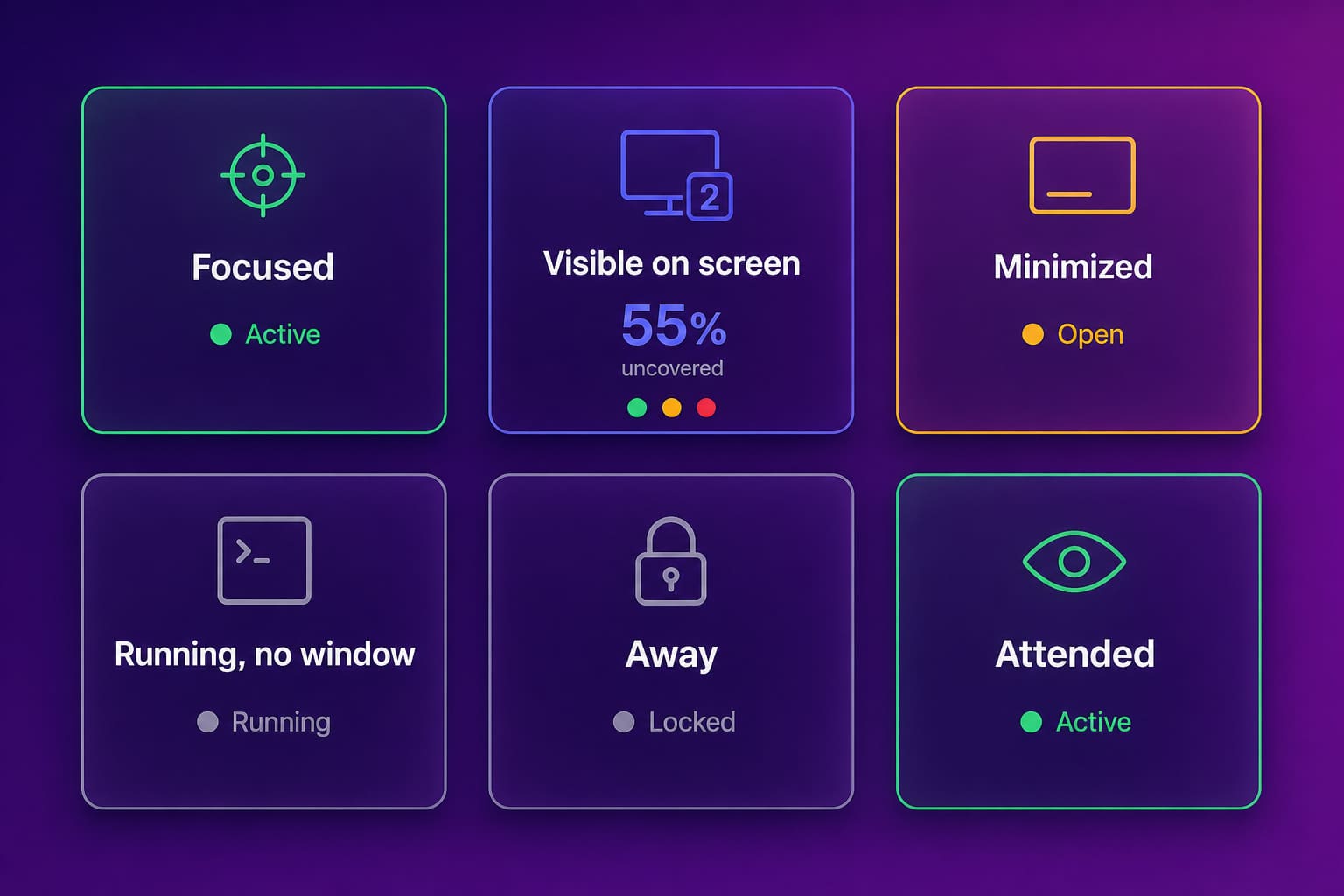
On top of the five states sits one derived number, attended time: visible or focused while the analyst was active by your idle rule. That is the number I would put in front of a CFO. Visible time on its own is window placement. Attended time is a person, at the desk, with the terminal in front of them.
How Abloomify measures background terminal activity without surveillance
Abloomify measures background terminal activity by asking the operating system about windows rather than looking at them: every two seconds the device agent checks, for each application on the company allow-list, whether the process is running, whether it owns a window, whether that window is minimized, which monitor it lands on, and how much of it is covered by the windows stacked above it, then reports a state change or a once-a-minute heartbeat. On Windows this is the same window enumeration the taskbar uses; on macOS it is the window list the Dock uses. Neither path reads a window title or a pixel of content, so there is no Screen Recording permission on macOS and nothing new to grant on Windows. The allow-list still decides what exists at all. Nothing outside the approved market-data applications is written to the agent log, and the background switch cannot be turned on until that allow-list is enforced with at least one application, because the applications it follows are exactly the allow-listed ones.
A few design choices matter if you are going to trust the numbers.
- Two checks agree before a state changes. Window drags and focus flicker flap at a two-second tick; the agent waits for two consecutive readings, so a one-second hop to Task Manager does not open and close an interval.
- Idle is decided once, on the backend. The agent reports only what it alone knows: locked, disconnected, displays asleep. Your idle threshold is applied in the pipeline with the same keyboard and mouse data behind active time, so attended time and active time can never disagree for the same minute.
- Covered is a percentage, not a verdict. A terminal at 55 percent uncovered behind Task Manager is still visible; the uncovered share is stored per interval so you can set your own line.
- Monitor is primary or secondary, never a number. Monitor 2 on one desk is monitor 3 on the next; the report says "on a secondary monitor" and leaves it there.
- CPU rides along on heartbeats, memory does not. The CTO asked for it, and it proves the process was alive. It says nothing about attention, because a terminal streams data whether anyone looks or not.
The switch lives with the other collection rules: company-level, off by default, disclosed in the agent's own Device Usage window on the employee's machine when it is on, and forced off by every EU and UK compliance profile until an admin decides otherwise. Windows agent 1.12.0 and macOS agent 1.16.0 or newer.
What the seat report looks like
The report is one row per analyst and per allow-listed application, showing hours in each state for the selected period, attended hours, and the share of visible time that was on a secondary monitor, so a Head of Market Data can sort a whole floor of seats by attended time in one click. It lives on the Activity Log tab of Usage Insights, above the session table, and it only appears for companies that have the switch on. The stacked bar per row is the fastest read: mostly green and indigo is a working seat, mostly amber is a terminal that spends its life minimized, mostly grey is a process nobody restores. Bloomy reads the same rows, so a question typed in chat, "which desks had a Bloomberg window visible for under five hours last week", gets the same numbers the page shows, with the same definitions attached.
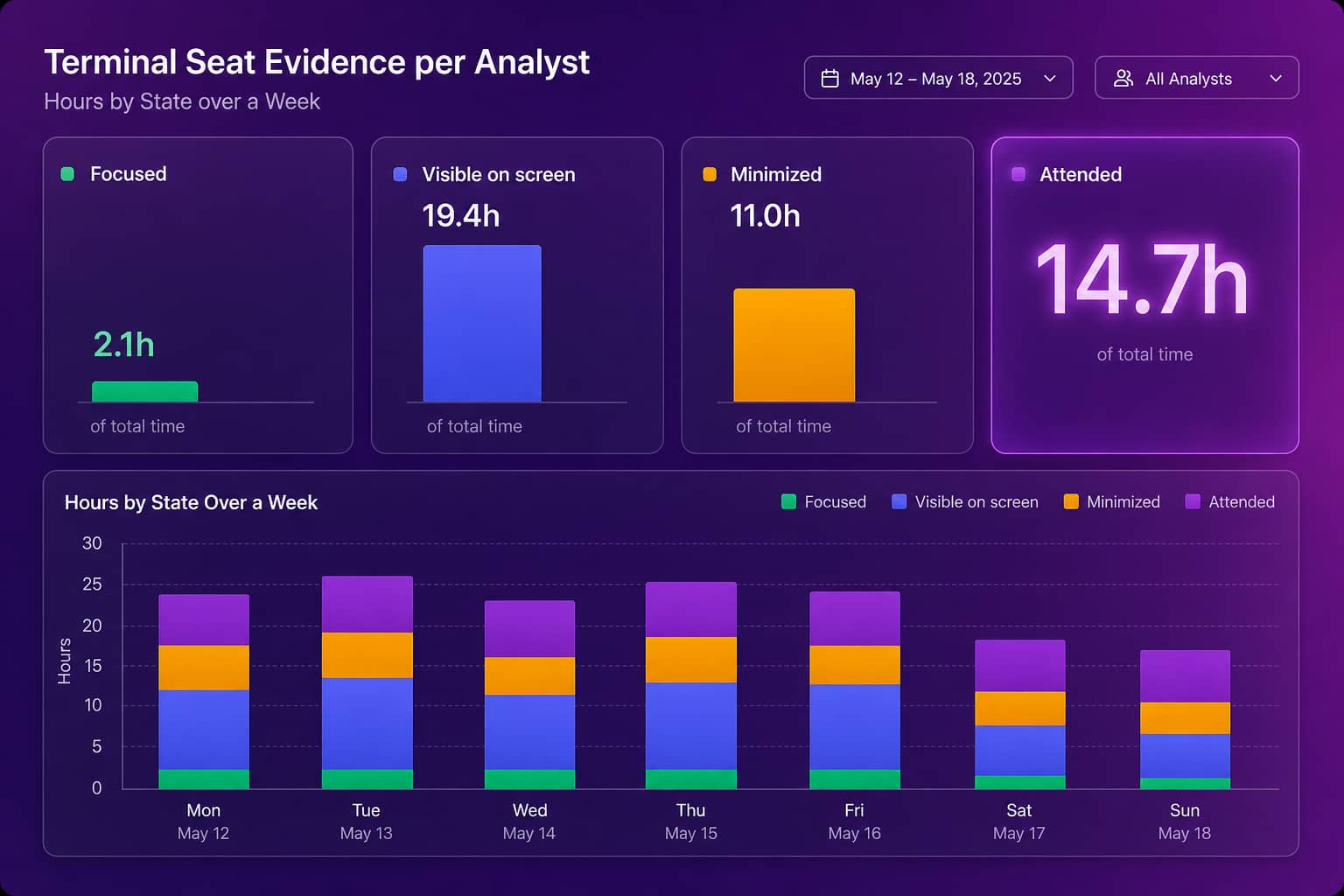
On our own test machine, the first hour after switching it on read: 33 minutes running, 1 minute focused, 1 minute visible with 55 percent of the window uncovered while Task Manager sat on top of it, 2 minutes attended. That is one engineer poking at a demo account. Multiply the pattern by a trading floor and the interesting rows are the ones where visible is high and attended is low: the terminal is furniture on that desk.
Reading the numbers before a renewal
Read the report by pairing attended time with the price of the seat, because a Bloomberg seat costs the same $31,980 whether the analyst reads it all day or restores it twice a month, and the pairing is what turns a usage chart into a renewal position. Seats with high focused and attended hours are your power users; leave them alone. Seats with high visible hours and low attended hours are the second-monitor trap in reverse: the terminal is on screen, the person is not, and a downgrade to a lighter product or a data feed is the conversation to have. Seats that show mostly running or minimized time with no attended hours are the ones an entitlement report cannot distinguish from your best trader, and they are the seats the terminal cost calculator prices for you.
Two things this does not do, so nobody is surprised in the DPO meeting. It does not read Bloomberg function codes; that is the separate window-title workflow analytics layer, which stays under its own switch. And it does not see inside a Bloomberg Anywhere session delivered over Citrix or a browser; there the agent sees one Citrix window, not the terminal within it, so ask how the terminal is delivered before you plan a review around it.
If you already run our terminal usage assessment, background activity is one more column in the same evidence, gathered under the same allow-list. If you are starting from the cost side, or comparing us with entitlement tools like TRG Screen, this is the piece that makes the utilization number honest for the desks that read the terminal instead of clicking it.
Entitlement reports count seats. This counts the terminal the trader is actually looking at.
FAQ
Does Abloomify see what is on the Bloomberg screen?
No. Background app activity reads window geometry from the operating system: whether a window exists, whether it is minimized, which monitor it is on, and how much of it other windows cover. It never reads window titles or content for this feature, and it needs no screenshot or screen-recording permission on Windows or macOS.
What if the terminal is open but covered by other windows?
The agent records the share of the window that is uncovered, using the stacking order of every window on the desk. A terminal at 55 percent uncovered on a second monitor is visible; a terminal fully buried under a maximized spreadsheet still counts as visible, but the uncovered figure shows it, and attended time will not credit it unless the analyst was active.
Which agents support background app activity?
Windows agent 1.12.0 and macOS agent 1.16.0 or newer. It is a company-level switch, off by default, and it only becomes available once the platform app allow-list is enforced with at least one application, because the apps it follows are exactly the allow-listed ones.
How is attended time calculated?
Attended is visible or focused time during which the analyst was active by the company idle rule, the same threshold Abloomify already applies to active time. The agent does not decide idle on its own; the pipeline applies one rule to both numbers so they can never disagree for the same minute.
Does it work with Bloomberg Anywhere over Citrix?
Only for a locally installed terminal. When Bloomberg is delivered as a published Citrix app or through a browser, the device agent sees the Citrix or browser window, not the terminal inside it. Ask your market-data team how the terminal is delivered before you plan a utilization review around this.

Amir Tavafi
Co-Founder & CEO
Product leader and innovator with over 15 years of experience in the tech sector, grounded in AI and robotics. Previously led product development in fraud detection and AI solutions at Nasdaq Verafin.