How to Monitor Bloomberg Terminal Usage Without Surveilling Analysts
July 17, 2026
Amir Tavafi
11 min read

Most firms can quote the price of a Bloomberg Terminal from memory, $31,980 per seat per year, and still cannot tell you how many of those seats got opened yesterday. That blind spot is expensive. To monitor Bloomberg Terminal usage properly you need seat-by-seat evidence of who actually works in the terminal, not just who is provisioned to log in, and you need to gather it without turning a cost project into a surveillance project. Abloomify's terminal usage analytics were built for exactly that gap.
Key Takeaways
Q: What does it mean to monitor Bloomberg Terminal usage?
A: It means measuring how each seat is actually used at the desktop: active versus idle time, session frequency, and the kind of work happening inside the terminal. That is different from an entitlement report, which only tells you who can log in. Abloomify captures the usage layer entitlement tools miss.
Q: How do you measure usage without spying on analysts?
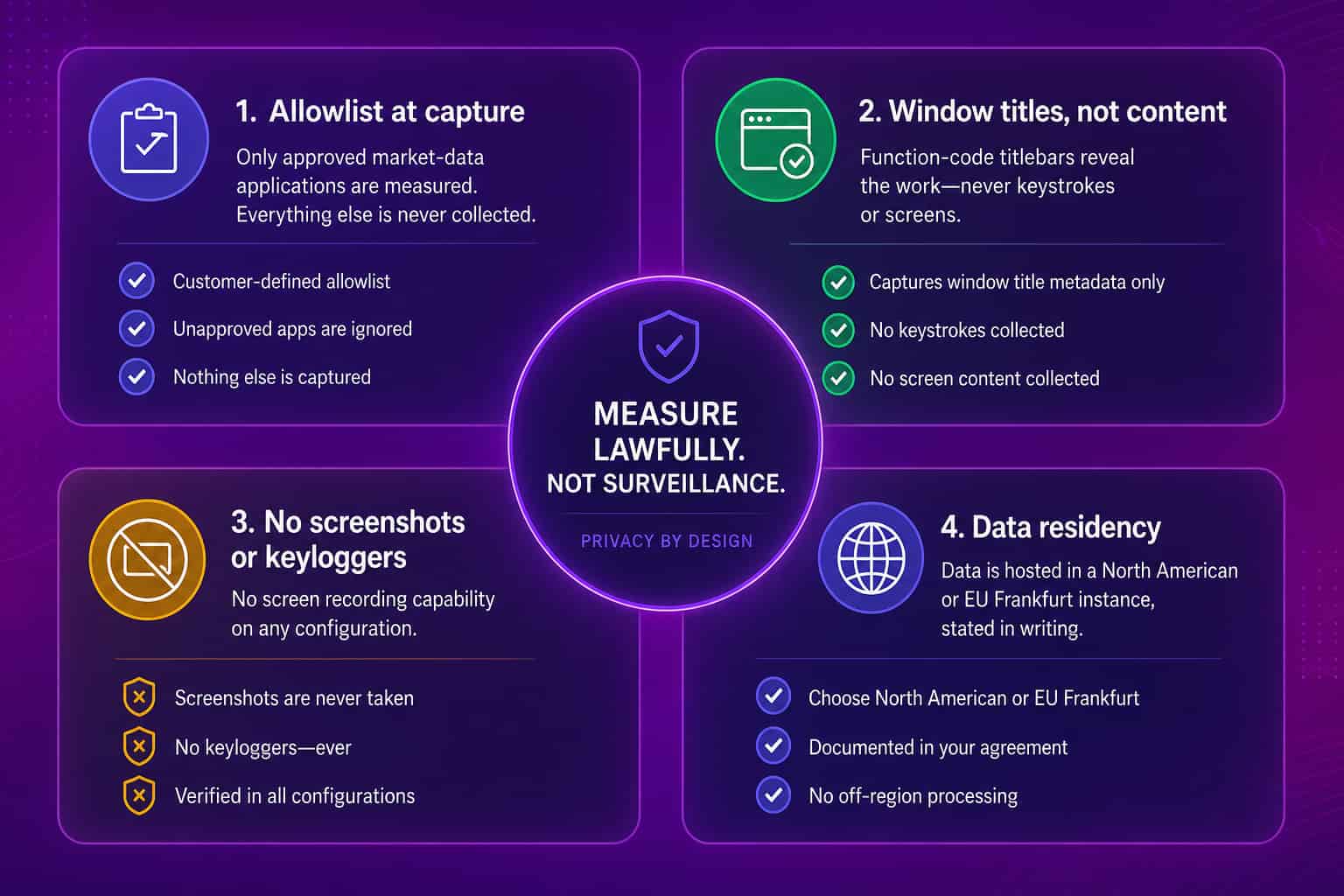
A: With a capture-time allowlist. Admins approve which market-data apps get measured, and the device agent enforces that list at capture, so nothing outside it is ever collected. No screenshots, no keyloggers, no screen recording on any configuration. You meter an expensive asset, you do not watch a person.
Q: Why does usage evidence matter before a renewal?
A: Because a Bloomberg contract renews at full price whether a seat is a daily working tool or a status symbol. Around two-thirds of firms report insufficient transparency into how their market-data services are actually used (A-Team Group via TRG Screen). Evidence turns the renewal from a reflex into a negotiation.
Q: What can you do once you can see usage?
A: Sort every seat by how it is used. Daily power users keep full terminals, occasional users move to lighter tiers, and desks running repetitive lookups shift to an API or data feed. In a typical 100-seat fleet that pattern is worth an estimated $300K to $1M a year.
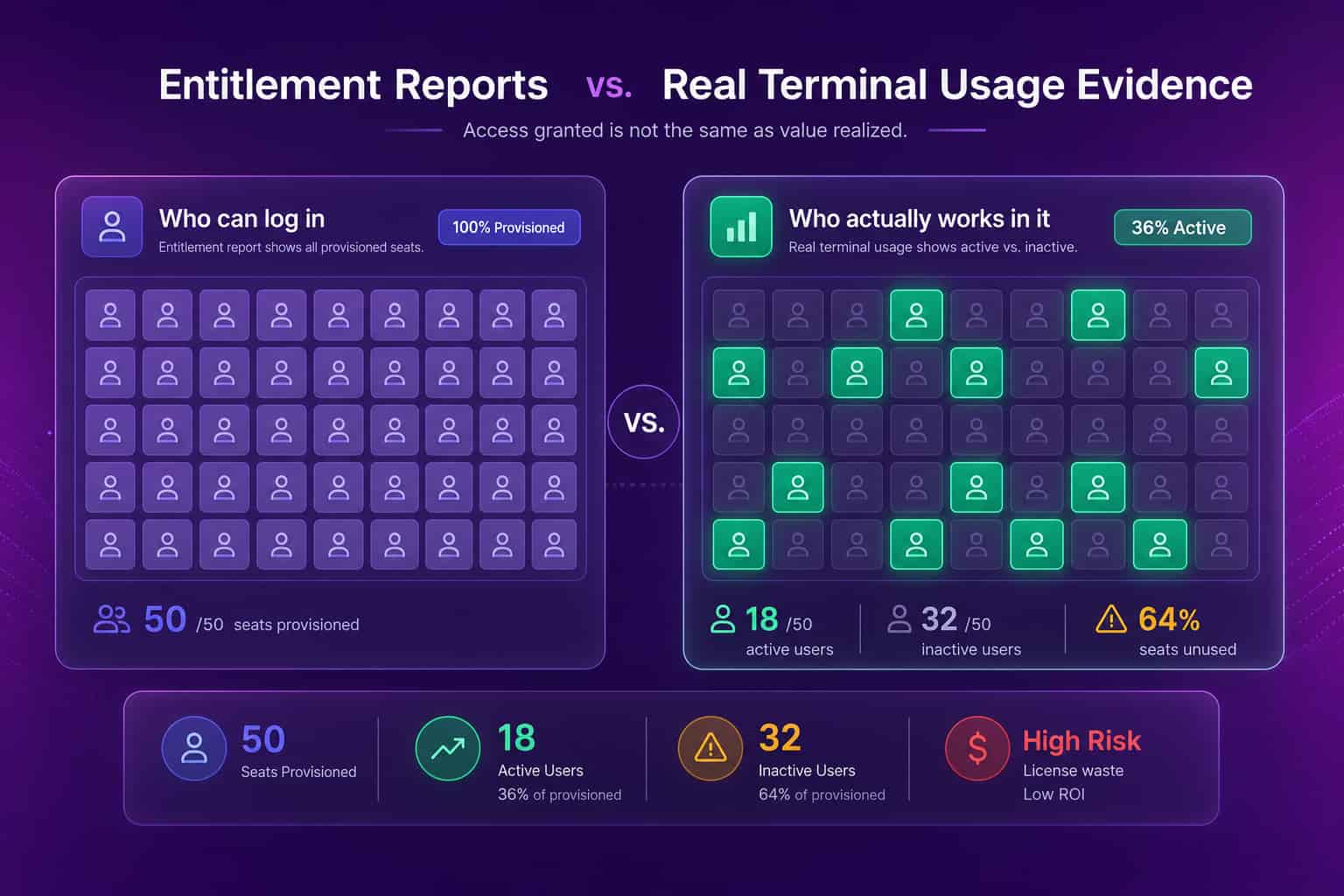
Why entitlement reports do not tell you who actually uses a terminal
An entitlement report answers a procurement question, who is provisioned and what you pay, and it says nothing about whether a seat gets used, which is the question that decides the real cost. This is the trap most market-data teams fall into at renewal time. The subscription management suite shows 420 active licenses, finance signs for 420, and nobody in the room can say how many of those terminals a person actually logged into last quarter. Usage lives in a different layer entirely. It is not in the invoice and not in the entitlement console. It is on the desktop, in session frequency and active time and the specific functions a desk leans on. Bloomberg holds firm on uniform pricing, so a seat a junior analyst opens twice a month costs the same $31,980 as a portfolio manager who lives in the terminal all day. Without usage evidence you cannot tell those two seats apart, and the renewal treats them as identical.
Global market data spend hit $49.2B in 2025, up 6.5% year over year (Burton-Taylor). At the institutions running hundreds to more than a thousand terminals, that makes market data a nine-figure line item, and one of the last large ones that renews on habit rather than evidence. The fix is not a bigger spreadsheet. It is a measurement layer that sits below the entitlement report and tells you, seat by seat, which terminals earn their price.
What to actually measure on each seat
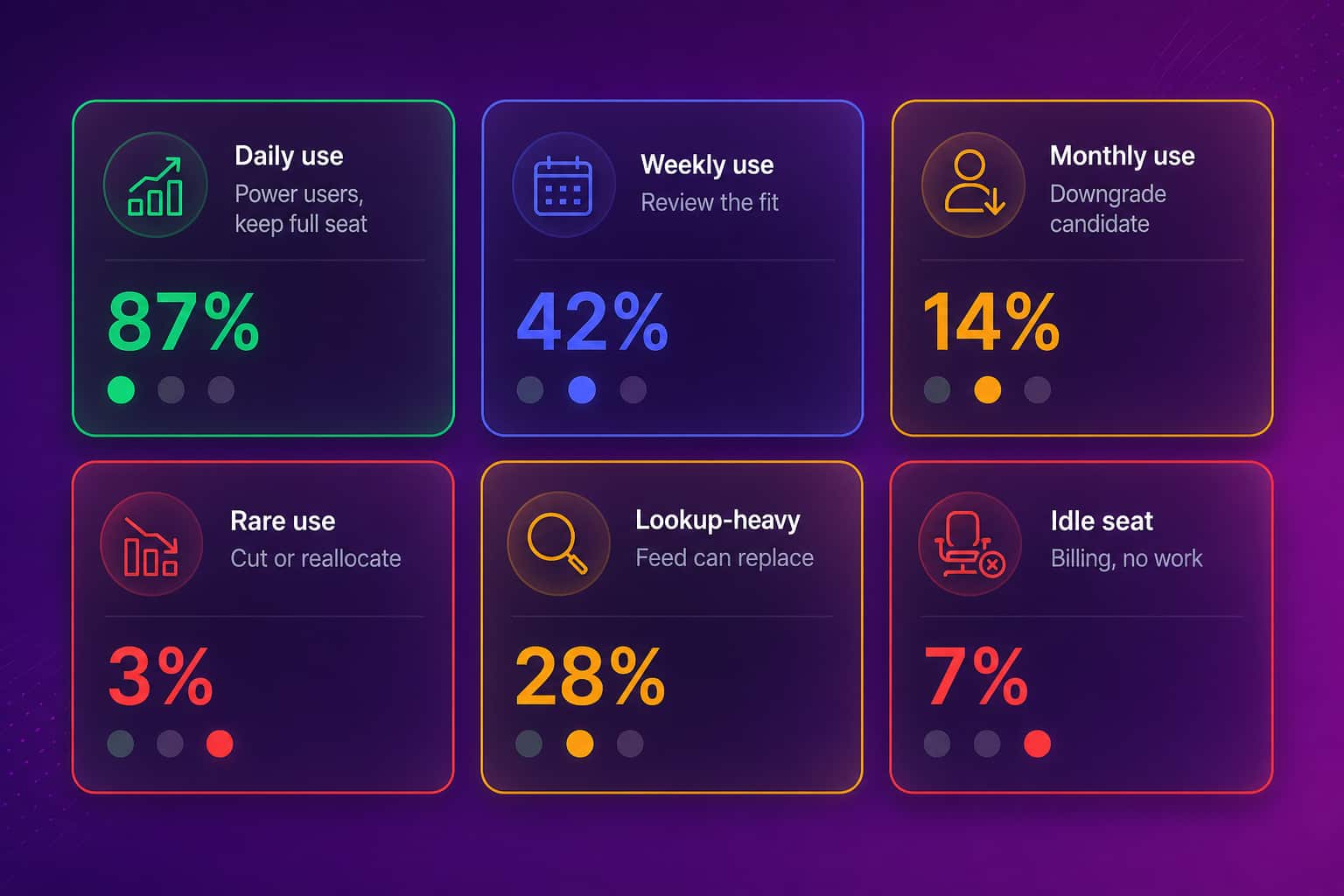
Start with three signals per seat: how often it is opened, how long it stays active, and what kind of work happens inside it, then sort every terminal into usage bands from that data. Session frequency and active time separate the daily working tools from the seats that renew on inertia. The third signal, the type of work, is where the money hides. A desk that spends most of its sessions pulling the same reference data every day is doing lookup-style work an API or data feed can serve for a fraction of an interactive seat. A desk that lives in pricing, analytics, and execution is a power user you never touch. You cannot see that difference from a login count, and you cannot see it from an invoice. You see it from the pattern of work at the desktop.
Sorted into bands, a fleet usually looks like this, and each band maps to a different decision.
How to monitor Bloomberg Terminal usage without surveilling analysts
You measure usage lawfully by minimizing data at the point of collection, not by hoovering up everything and promising to be careful with it later. This is the part that kills most terminal-usage projects, because the obvious tools are surveillance tools. Screenshot-and-keylogger agents fail GDPR data minimization, and they fail the works-council meeting, and they fail the trust of the analysts whose seats you are trying to right-size. Abloomify was built the other way around. Admins approve the market-data applications to measure, and the device agent enforces that allowlist at capture on the device. Activity outside the approved apps is never written to a log and never transmitted, so there is nothing to leak, subpoena, or delete later, because it never existed. For the allowlisted terminals, the agent reads window titles, never content. Bloomberg's function-code titlebars already tell you the work is pricing, chat, data lookup, or admin, without a single screenshot or keystroke.
That architecture is what lets the project survive a DPO review instead of dying in it. Regulators have made the stakes concrete: authorities fined H&M €35.3M and Amazon France €15M over employee-data practices, and Italy's Garante has fined firms for over-retaining browsing logs. Collect-everything monitoring is hard to defend under rules like Italy's Statuto dei Lavoratori Article 4. An allowlist enforced at capture is defensible because the data outside your market-data apps simply does not exist.
Turning usage evidence into a smaller bill
Once you can see usage, most seats sort into a short decision tree, and the interesting money is not in the idle seats but in the busy ones doing cheap work. Daily power users keep the full terminal, because for them it earns its price many times over. Occasional users who log in a handful of times a month often move to a lighter or remote access tier. The group worth the most attention is the desks whose sessions are mostly lookup-style, the same data pulls every day, which a feed or API subscription serves for a fraction of an interactive seat. That last move is invisible without window-level usage detail, which is why entitlement tools never surface it.
- Full Terminal for daily power users who work across pricing, analytics, and execution.
- Lighter or remote tiers for occasional users who log in a handful of times a month.
- API or data feed for desks running repetitive lookup-style workflows a feed can serve.
- Cut or reallocate the seats that show rare-to-never usage across a full quarter.
This is the job Abloomify's terminal usage analytics do. Bloomy, the AI analyst, clusters the window-title patterns across your fleet, flags the lookup-heavy seats, and drafts the feed-replacement proposal with estimated savings per desk. It can also email a seat-by-seat utilization brief 90 days before every renewal window, so the negotiation starts with evidence instead of a scramble. One reclaimed Bloomberg seat covers roughly 200 device-months of Abloomify at $9 per seat a month, which is why most firms find the first downgrade pays for the whole deployment. You can model your own fleet with the terminal cost calculator before you talk to anyone, and the full Bloomberg Terminal cost breakdown shows where the price comes from.
How to run a terminal usage assessment
Run a 30-day terminal usage assessment: scope an agent to your market-data apps, gather seat-by-seat evidence, and bring a downgrade shortlist to the renewal. The agent deploys silently through whatever MDM your fleet already runs, Intune, Jamf, Rippling, and others, in an afternoon, and the capture-time allowlist means it only ever measures the terminals you named. Over 30 days it returns usage bands, a downgrade shortlist, and the lookup-style workflows a feed could absorb, plus a DPIA-ready compliance pack that describes exactly what is collected and what architecturally cannot be. For EU institutions all of it runs on a Frankfurt instance where telemetry, analytics, and AI processing stay in the EU, and Abloomify is SOC 2 Type II certified. North American institutions run on a North American instance, with residency stated in writing before procurement either way. Entitlement tools like TRG Screen manage the subscription; usage analytics measure the work, and many institutions run both together, which is the honest way to read our comparison with TRG Screen.
The sticker price of a terminal is fixed. The waste around it is not. Measure the seats before you sign.
FAQ
How do you monitor Bloomberg Terminal usage without surveilling employees?
Abloomify uses a capture-time application allowlist. Admins approve the market-data applications to measure, and the device agent enforces that list at capture, so activity outside it is never written to a log or transmitted. There are no screenshots, no keystroke logging, and no screen recording on any configuration. Employees are not watched; an expensive asset is metered.
What is the difference between entitlement reports and terminal usage analytics?
Entitlement and inventory tools answer "who can log in" and "what do we pay." Terminal usage analytics answers "who actually works in it and on what." The gap between the two is where idle seats hide, each still billing $31,980 a year. Many institutions run both layers together, using entitlements for provisioning and usage evidence for right-sizing.
Is monitoring Bloomberg Terminal usage legal under GDPR?
It can be, when the architecture minimizes data at collection. Abloomify enforces an allowlist at capture, so activity outside approved market-data apps is never collected, with no screenshots or keyloggers on any configuration. EU customers run on a Frankfurt-hosted instance where telemetry, database, analytics, and AI processing all stay in the EU, supported by a DPIA-ready compliance pack.
How much can measuring terminal usage actually save?
In a typical 100-seat deployment, usage analysis commonly flags 10 to 30 percent of seats as underused or running lookup-style work a data feed could serve, an estimated $300K to $1M a year at current Bloomberg pricing. These are modeled estimates, and your own usage evidence sets the real number before any renewal decision.
What does it take to get started?
A 30-day terminal usage assessment. A lightweight agent deploys through your existing MDM in an afternoon, scoped to your market-data apps by a capture-time allowlist, and returns seat-by-seat usage bands, a downgrade shortlist, and the lookup-style workflows a feed could serve. Most firms find the first reclaimed seat pays for the deployment.

Amir Tavafi
Co-Founder & CEO
Product leader and innovator with over 15 years of experience in the tech sector, grounded in AI and robotics. Previously led product development in fraud detection and AI solutions at Nasdaq Verafin.