What Is an MCP Server? How It Works, Examples, and Risks (2026)
November 12, 2026
Reza Vatani
15 min read

An MCP server is a small program that lets an AI tool like Claude Code, Cursor, or ChatGPT talk to a system it can't reach on its own, such as GitHub, Jira, or your company knowledge base. We built one at Abloomify this year, and the part that took the longest had nothing to do with the protocol. It was deciding who gets to see what.
Key Takeaways
Q: What is an MCP server in simple terms?
A: An MCP server is a connector that exposes a system's actions and data to AI assistants using the Model Context Protocol, an open standard Anthropic introduced in November 2024. The assistant discovers what the server offers, then calls it when a task needs that system. One protocol replaces a pile of custom integrations.
Q: How is an MCP server different from an API?
A: An API is written for developers. An MCP server is written for AI clients: it describes its tools in plain language and a schema the model can read, and every server speaks the same protocol. Most MCP servers wrap an existing API rather than replacing it. Abloomify's MCP server sits on top of its own permission model.
Q: Which AI tools can connect to MCP servers?
A: Cursor, Claude Code, Claude Desktop, ChatGPT, OpenAI Codex, and GitHub Copilot's agent mode all act as MCP clients, along with any tool built on the open standard. Abloomify's External AI Access connects to these tools through one hosted MCP server, with a personal or company-wide connection.
Q: Are MCP servers safe to use at work?
A: They can be, if you control scope. The main risks are servers with broader access than the person using them, unvetted community servers, and instructions hidden in tool output. Abloomify's MCP connections only grant what the person can already see, every call is audited, and access can be revoked instantly.
Q: Do I need to build my own MCP server?
A: Usually not at first. Most teams start by installing servers that vendors already ship for GitHub, Atlassian, Figma, and browsers like Playwright. You build your own when you want an assistant to reach an internal system, and you should start with read-only tools.
What is an MCP server?
An MCP server is a program that exposes a specific system's capabilities to AI applications through the Model Context Protocol (MCP), an open standard introduced by Anthropic in November 2024 and now supported by most major AI coding and chat tools. The server tells a connected AI client what it can do (search issues, read a file, run a query, open a pull request), describes each action in a structured format the model can understand, and then executes those actions when the model decides a task needs them. The AI app never needs custom integration code for that system, because every MCP server speaks the same protocol. So one GitHub MCP server works with Cursor, Claude Code, and ChatGPT alike. Think of it as a standard plug: the assistant has one socket, and any system with an MCP server fits into it.
Before MCP, every AI tool shipped its own plugin format, and every vendor had to build a separate integration for each one. That is an N-times-M problem. MCP turns it into N plus M: tools implement the client side once, systems implement the server side once.
The interesting bit for engineering leaders is what this does to adoption. Once connecting a new data source takes a config line instead of a project, engineers will connect things. Fast. That is good for productivity and a headache for whoever owns access control.
How does an MCP server work?
An MCP server works inside a three-part architecture of host, client, and server, where the host is the AI application the person uses (Claude Desktop, Cursor, an IDE), the client is a connector inside the host that keeps a session open with one server, and the server is the program that exposes a system's tools and data. When the host starts, each client connects to its server and asks what it offers. The server replies with a list of tools, resources, and prompts, each with a name, a plain-language description, and an input schema. During a conversation, the model reads those descriptions, decides a tool fits the task, and the client sends a structured request. The server runs the action against the real system and returns the result, which goes back into the model's context. All of these messages use JSON-RPC 2.0, so the format is the same no matter which system sits behind the server.
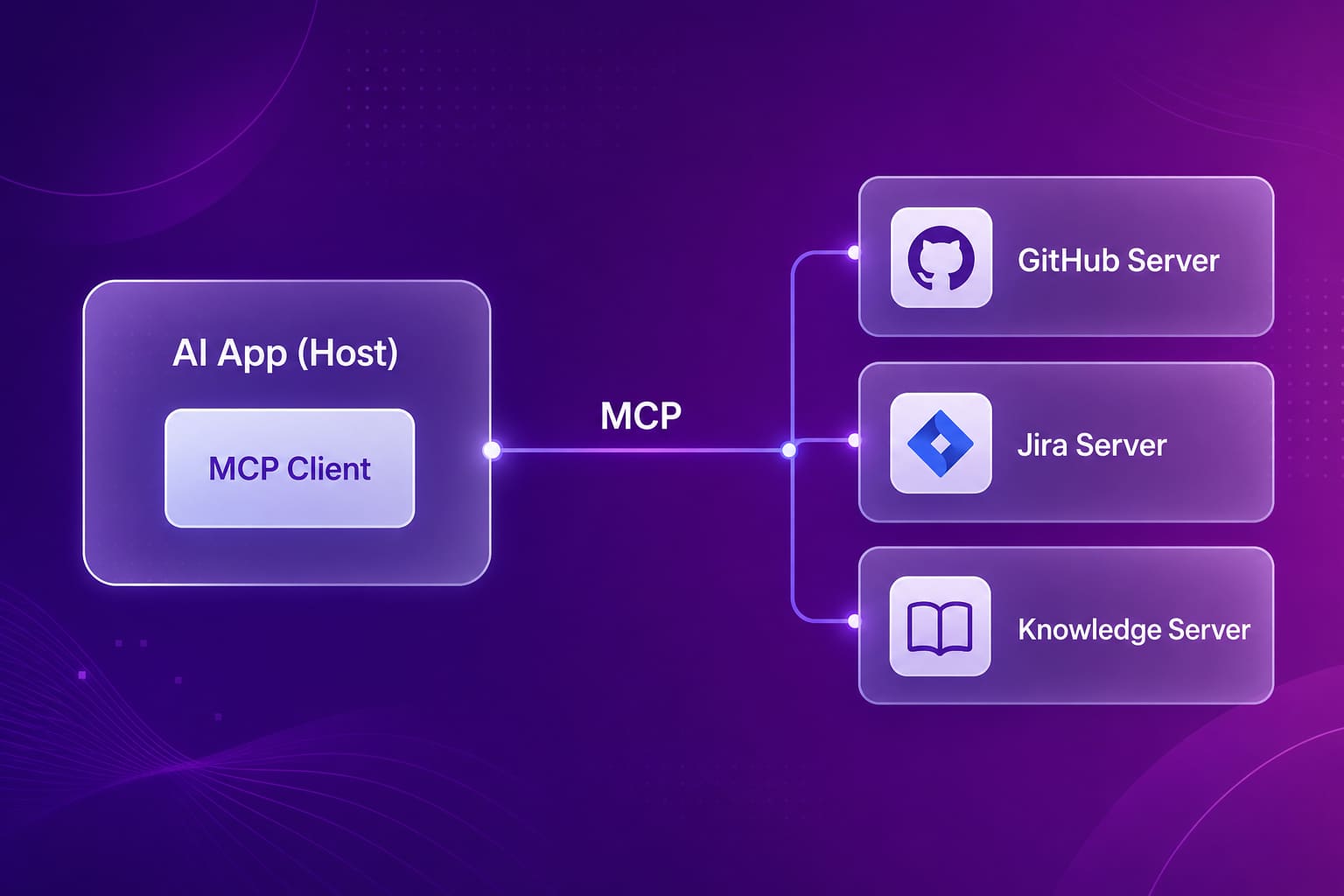
A concrete example. An engineer in Claude Code types "summarize the open PRs waiting on review in the payments repo." Claude Code has a GitHub MCP server connected. The model sees a tool for listing pull requests, calls it with the repo name and a filter, gets back structured results, and writes the summary. The engineer never opened a browser tab.
The model only knows what the tool descriptions tell it. A vague description like "gets data" leads to wrong calls or no calls at all. If you build a server, the descriptions are the part worth rewriting three times.
What does an MCP server expose?
An MCP server can expose three kinds of capabilities to an AI client: tools, which are actions the model can call (create a ticket, run a search, query a database); resources, which are pieces of data the client can read into context (a file, a document, a record); and prompts, which are reusable templates the server suggests for common tasks. Most servers in the wild lean heavily on tools, because tools are what let an assistant do work instead of only reading. On top of these three, every server has to answer an unofficial fourth question that the spec leaves to the implementer: what is this caller allowed to touch? A server that exposes great tools with no permission model is the risky kind. A server that maps each call to the identity and scope of the person behind it is the kind you can roll out to a whole company.
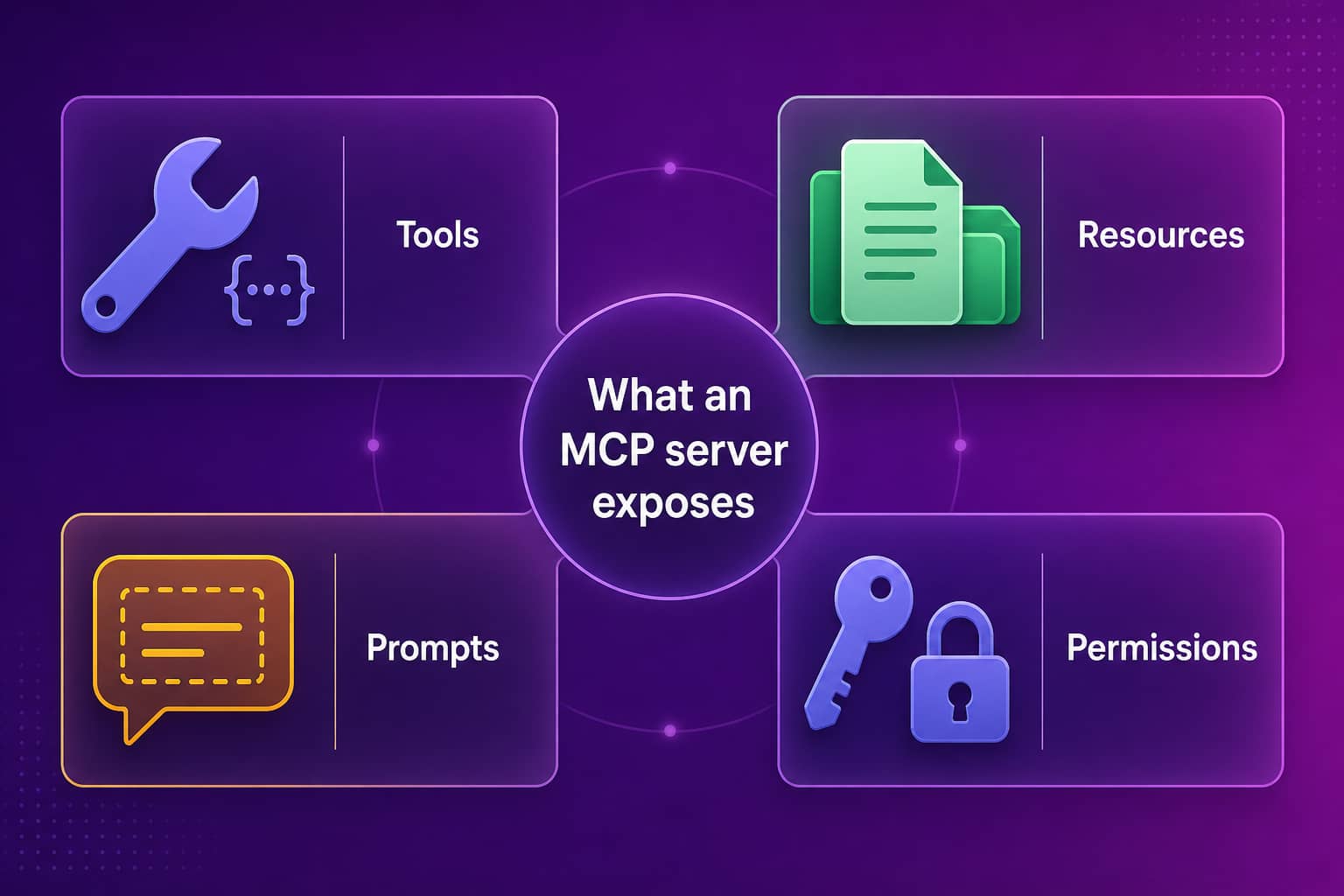
Here is how those capabilities tend to look in practice:
- Tools such as
search_issues,create_pull_request,run_sql_query, orsearch_knowledge - Resources such as a README, a design doc, a database schema, or a log file
- Prompts such as "review this PR for security issues" or "draft release notes from merged PRs"
The client side can offer things back to the server too, like asking the user for missing input mid-task. Most teams won't touch those features early on.
MCP server examples
MCP server examples now cover most of the tools an engineering or operations team already uses, and many of them are published by the vendors themselves rather than by hobbyists. GitHub ships an MCP server for repos, issues, and pull requests. Atlassian has one for Jira and Confluence. Figma has one that gives coding assistants design context. Microsoft maintains Playwright MCP, which lets an assistant drive a real browser for testing. The official MCP project keeps reference servers for things like filesystem access and Git. Cloud providers and databases have their own. Beyond that, community directories list thousands of servers of very mixed quality. Plenty of B2B vendors ship one too now, including people analytics and engineering analytics tools, so "has an MCP server" alone isn't a differentiator anymore. What matters is what the server exposes and how it decides who can see it.
A rough way to group what's out there:
| Category | Typical MCP server examples | What the assistant gets |
|---|---|---|
| Code and delivery | GitHub, GitLab, Git reference server | Repos, PRs, issues, commit history |
| Planning | Jira, Linear, Confluence | Tickets, sprints, specs |
| Design and testing | Figma, Playwright | Design context, a browser it can drive |
| Data | Postgres, cloud databases | Schemas and read queries |
| Company knowledge | Internal docs, Abloomify | Searchable docs, past AI sessions, work context |
If you're picking your first few, start where engineers already copy-paste the most. For most teams that's the ticket tracker and the code host.
MCP server vs API vs RAG
An MCP server, an API, and RAG solve different problems and usually work together rather than compete. An API is the developer-facing interface a system exposes, documented for humans who write integration code against it. RAG (retrieval-augmented generation) is a pattern for pulling relevant text from a search index into a model's context before it answers. An MCP server is the AI-facing layer that packages a system's actions and data so any MCP client can discover and call them without custom code. In practice, an MCP server often calls an existing API under the hood, and a "search knowledge" tool on an MCP server is often RAG running behind it. So the honest answer to "MCP vs RAG" is that MCP is the plug and RAG is one of the things you can put behind the plug. Choosing one doesn't rule out the other.
| API | RAG | MCP server | |
|---|---|---|---|
| Built for | Developers writing code | Answering with retrieved context | AI clients calling tools |
| Discovery | Read the docs | Fixed retrieval step | Client asks the server at runtime |
| Can take actions | Yes | No, retrieval only | Yes, through tools |
| Standard format | Varies per vendor | Varies per implementation | One protocol (JSON-RPC 2.0) |
| Typical role | Foundation | A tool's internals | The connector layer |
Local vs remote MCP servers
MCP servers run in one of two ways: locally on the user's machine, where the AI app starts the server as a subprocess and talks to it over standard input and output (stdio), or remotely as a hosted service the client reaches over HTTP using the protocol's Streamable HTTP transport, usually with OAuth or an API key for authentication. Local servers are simple and fast to try, which is why most early MCP tutorials use them, but each one runs with the permissions of whoever installed it and lives on every laptop separately. Remote servers take more work to build and host, though they give you one place to manage authentication, scopes, audit logs, and revocation. For a solo developer, local is fine. For a company rolling AI tools out to a few hundred people, remote servers with central control are the setup security teams will actually sign off on.
A remote server connection in Cursor looks like this, a URL and a credential:
{
  "mcpServers": {
    "Abloomify": {
      "url": "https://mcp.abloomify.com/mcp",
      "headers": { "Authorization": "Bearer abk_your_key_here" }
    }
  }
}
Some tools only load local servers. Claude Desktop's config file, for example, expects stdio, so people bridge to remote servers with a small local proxy. Our MCP setup guide for Cursor, Claude Code, Claude Desktop, and Codex walks through each tool.
What are the risks of MCP servers?
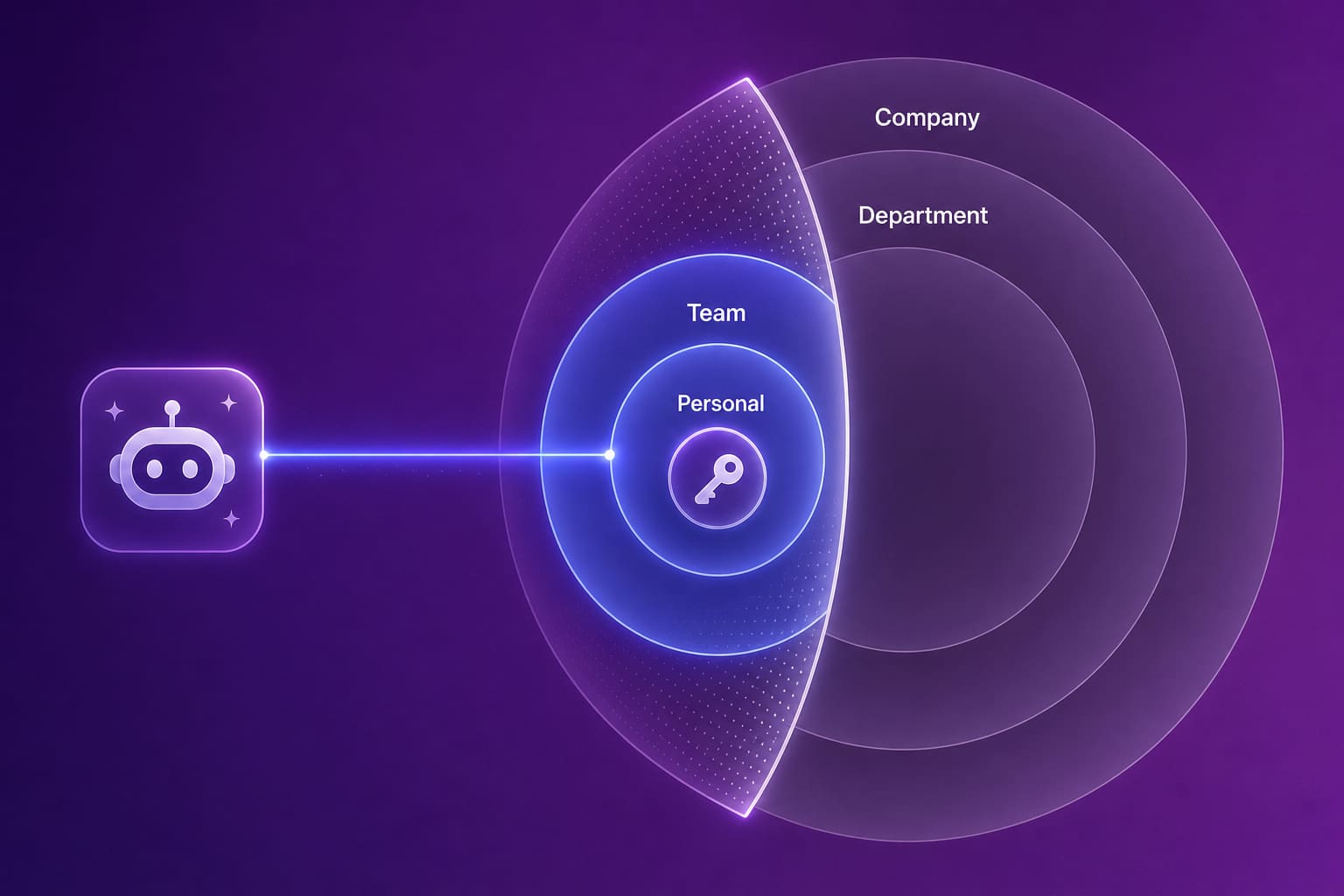
The main risks of MCP servers come from access, not from the protocol itself: a server can give an AI assistant broader access than the person using it should have, a community server can run code you never reviewed with your credentials, and text returned by a tool can carry hidden instructions that steer the model (a form of prompt injection). There's a quieter risk too. When connecting a server is one line of config, engineers connect them without telling anyone, and you end up with shadow AI access to production systems that nobody can list, let alone audit. None of this is a reason to block MCP. Engineers will route around a ban, the same way they routed around bans on AI coding tools. It is a reason to decide early which servers are approved, what scopes they get, and how you'd revoke access the day someone leaves.
A short checklist I'd use before approving any MCP server for a team:
- Does every call run as the actual user, with their permissions, or as a shared service account?
- Can access be scoped narrower than "everything the token can see"?
- Is there an audit log of which tool was called, by whom, and when?
- Can you revoke one person's connection without breaking everyone else's?
- Did someone on your team read the code, or at least the tool list, of any community server?
If you're building the policy side of this, our guides on AI agent governance and shadow AI detection cover how to approve tools without slowing teams down.
How Abloomify uses an MCP server
Abloomify runs a hosted MCP server, called External AI Access in the product, that connects the AI tools a team already uses (Cursor, Claude Code, Claude Desktop, ChatGPT, OpenAI Codex, and Claude Team or Enterprise connectors) to the company's Abloomify knowledge. A connection only ever grants what that person is already allowed to see in Abloomify, never more. Each key is scoped to personal, team, department, or company knowledge, capped at the user's own access, and tied to their identity. Every call is audited, and revocation is instant. Admins can create one shared company connection instead of setting up every device, and individuals can set up a personal connection in under a minute. The tools on the server include knowledge search, document listing, and search across past Bloomy chats and AI coding sessions that the device agent syncs from Cursor, Claude, and Codex.
That last part is the one I care about most as an engineer. Every day, people on your team solve problems inside Cursor or Claude Code, and the reasoning disappears when the session closes. With AI memory sync, those sessions land in the company knowledge base, and through MCP the next person's assistant can find them. One person figures out the payments webhook, and the rest of the team doesn't have to figure it out again.
On the metrics side, Abloomify stays privacy-first and PII-free: usage and output signals from Cursor, Claude, and GitHub, no screenshots, no keyloggers, no reading of code content. The MCP layer gives your assistants context and adds zero monitoring. Pair it with AI governance controls like model access, audit logs, and shadow AI detection, and you get one place to answer "which AI tools can reach which data, for whom."
FAQ
Why would I need an MCP server?
You need one when you want an AI tool to work with a system it can't see by default, like your Git repos, your ticket tracker, or your internal docs. Without it, someone copies context into a chat window by hand. With it, the assistant can call the system directly, within whatever permissions the server enforces.
What is the difference between MCP and a REST API?
A REST API is built for developers who read the docs and write code against it. MCP is built for AI clients: the server describes its tools in a format a model can read, the client discovers them at runtime, and every server speaks the same JSON-RPC protocol. Many MCP servers are thin wrappers around an existing REST API.
Is GitHub Copilot an MCP client?
Yes. GitHub Copilot's agent mode can use MCP servers, and so can Cursor, Claude Code, Claude Desktop, ChatGPT, and OpenAI Codex. Support details differ by tool and plan, so check each vendor's docs for local versus remote server support before you standardize on one setup.
What is an MCP gateway vs an MCP server?
An MCP server exposes one system's tools and data to AI clients. An MCP gateway sits in front of many servers and handles shared concerns like authentication, logging, rate limits, and which servers each user may reach. Small teams usually start with servers. Gateways show up once security wants one control point.
Are MCP servers free?
The protocol is open and free to use, and many community and vendor servers are free to install. What you pay for is the system behind the server, such as a SaaS subscription, API usage, or hosting for a remote server you run yourself. Treat free community servers like any third-party code and review them first.
How do I create an MCP server?
Pick one of the official MCP SDKs, such as Python or TypeScript, define the tools your server exposes with clear names, descriptions, and input schemas, then run it locally over stdio or host it over Streamable HTTP. Start with read-only tools and add write actions only after you have permissions and logging in place. The Model Context Protocol documentation has the spec and SDK links.
The protocol is the easy part. Deciding who can see what is where the real work is. See how Abloomify connects your team's AI tools to company knowledge, permission-scoped and revocable →

Reza Vatani
Co-Founder & CAIO
AI-driven entrepreneur with a strong background in robotics and advanced analytics. PhD from Old Dominion University and former Product Development leader at Nasdaq Verafin.