Cursor vs Claude Code (2026): Which One Actually Ships Faster
September 3, 2026
Reza Vatani
12 min read

Cursor vs Claude Code is the comparison engineering leaders keep having in 2026, usually after one engineer expenses Cursor and another starts running Claude Code from a terminal tab. Both tools write real code. Both save real time on the right task. The harder question, the one most comparisons skip, is whether either one is actually moving your team's delivery numbers, and that's the question Abloomify was built to answer.
Key Takeaways
Q: Cursor vs Claude Code, which should my team pick?
A: Cursor is the stronger pick for engineers who want a full AI-native editor with visual multi-file diffs. Claude Code is the stronger pick for longer, more autonomous tasks you can run from a terminal or script into CI. Plenty of teams end up using both for different jobs, but the tool worth standardizing on is the one your PR cycle time rewards.
Q: What is Claude Code, in plain terms?
A: Claude Code is Anthropic's coding agent. You invoke it from a terminal or a lightweight editor extension, describe a task, and it reads your repo, plans a change, edits files, runs tests, and iterates with less hand-holding than a chat-based assistant. It doesn't ask you to leave your current editor.
Q: What is Cursor, in plain terms?
A: Cursor is a standalone code editor, a fork of VS Code, built around an AI agent instead of a sidecar plugin. You describe an outcome and it proposes edits across multiple files with a visual diff you review before accepting, all inside the editor itself.
Q: Do I have to choose one over the other?
A: No, and a real number of teams don't. The tradeoff is that running two AI coding tools splits your usage signal across two systems, which makes it much harder to answer the one question that matters: is either of them making the team ship faster?
Cursor vs Claude Code: the short answer
The short answer is that Cursor and Claude Code aren't really competing for the same moment in your workflow, and that's exactly why the comparison is more useful than it first looks. Cursor wants to be your editor: you open it in the morning, and every edit, from a one-line fix to a cross-service refactor, happens inside its interface with a visual diff to review. Claude Code wants to be a tool you reach for: a terminal command or an extension you invoke when a task is big enough to hand off, then walk away from while it reads files, runs your test suite, and iterates on its own. Teams that live in a large monorepo and want tight, visible control over every edit tend to gravitate toward Cursor. Teams that want to hand off a genuinely large task, a migration, a dependency bump across forty files, a scripted cleanup, and come back to a result tend to reach for Claude Code. Neither preference shows up on a feature list. It shows up in how much of your team's PR volume each tool actually touches.
Cursor vs Claude Code: the core architectural difference
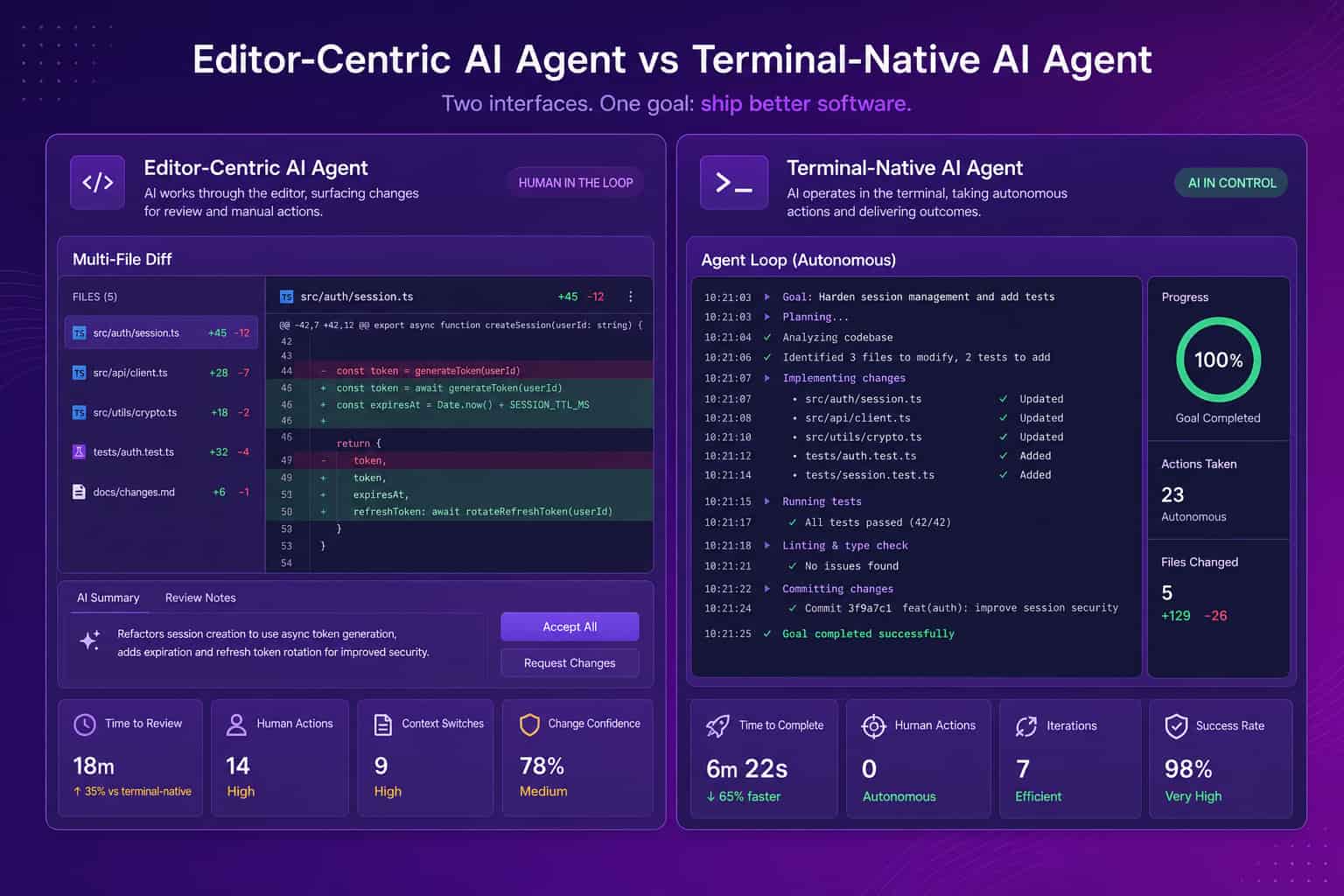
The core architectural difference between Cursor and Claude Code is where the agent lives, and that single choice explains almost every other difference on this page. Cursor built an entire editor around its agent: it indexes your codebase, holds context across files, and gives you a visual diff view for every proposed change, all inside an interface you have to switch to. That's a real switching cost, and it buys real IDE integration, model choice across multiple frontier providers, and an interactive loop where you see and approve each step. Claude Code took the opposite bet. It's terminal-native, invoked from the command line or a thin extension inside an editor you already use, VS Code, JetBrains, even Cursor's own built-in terminal, and it's built to run longer and more independently once you hand it a task: reading files, running your test suite, editing, checking its own work, and looping until the task is done or it needs you. One changes your editor to gain a more agentic workflow. The other changes how long you're willing to look away.
Where Cursor wins
Cursor wins in the moments where you want to stay close to the change: reviewing a diff line by line, steering a refactor as it happens, or working across a codebase your agent has deeply indexed so it can pull in the right file without being told where to look. Because it's a full editor, Cursor gives you the muscle memory of a normal IDE plus an agent that can plan and execute multi-file edits, with the diff sitting right there for you to accept, adjust, or reject before it ever reaches a commit. It also lets you pick from multiple frontier models depending on the task, rather than locking you into one provider's stack. The tradeoff is real: you're asking your team to adopt a new primary editor, and the more agentic the workflow gets, the more disciplined your review habits need to be, because it's easy to rubber-stamp a diff that looks right at a glance.
Where Claude Code wins
Claude Code wins in the moments where the task is big enough that you don't want to babysit it, and where scripting matters as much as editing does. Because it runs from a terminal, it fits into workflows an editor-bound tool can't reach: kick off a large refactor before a meeting and come back to a working branch, wire it into a CI job to triage a failing test suite, or run it non-interactively as part of a script. It doesn't require anyone to change editors, since it layers onto whatever your team already uses, which lowers the adoption bar for teams that are attached to their current setup. Claude Code also ships with native MCP support, meaning it can pull in company context beyond your codebase if you connect it, which matters more as engineering teams start expecting their AI tools to know more than just what's in the repo. The tradeoff is that longer autonomous runs take longer wall-clock time on a given task, and a terminal-first workflow has a real learning curve for engineers who have only ever worked inside a GUI.
Cursor vs Claude Code: feature comparison
On a feature comparison, Cursor competes as a complete editor while Claude Code competes as a portable agent, and the right read depends on which form factor fits how your team already works. The table below reflects how each tool is positioned as of mid-2026; both change fast, so verify current plans and pricing on each vendor's site before you budget against these numbers.
| Dimension | Cursor | Claude Code |
|---|---|---|
| Form factor | Full AI-native editor (VS Code fork) | Terminal-native agent, plus editor extensions |
| Strongest at | Interactive multi-file edits with visual diffs | Long, autonomous multi-step tasks |
| Works inside your current editor | No, requires switching to Cursor | Yes, via CLI or a lightweight extension |
| Model choice | Multiple frontier models, user-selectable | Anthropic's Claude models |
| Automation / CI use | Interactive-first, limited headless use | Built to run non-interactively, scriptable into CI |
| MCP support | Yes | Yes, native |
| Public pricing | Free; paid individual and team tiers | Bundled into Claude subscription plans, or usage-based via the API |
Cursor
Claude Code
The question the Cursor vs Claude Code debate keeps missing
The question almost every Cursor vs Claude Code comparison skips is the one an engineering leader actually needs answered: did either tool move your delivery numbers, and can you prove it to your board. You'll find plenty of threads ranking which agent "feels" smarter on a given prompt, and almost none that connect either tool back to PR cycle time, throughput, or review health. That gap gets expensive fast. Companies now run 7+ AI coding and productivity tools on average, up from 2 in 2023, and most engineering leaders can name the seat count for each without being able to say whether the seats are earning their keep. "Engineers say it helps" is a self-report, not evidence, and more AI-generated code sitting in a PR queue is not automatically the same thing as more shipped value.
How to measure which one is actually paying off
You measure whether Cursor or Claude Code is paying off by connecting tool usage to engineering output, not by asking engineers how it feels. This is the part Abloomify was built for. It imports usage signals directly from Cursor, Claude Code, and GitHub Copilot, then correlates them with PR cycle time, throughput, and review health, and separates human from AI agent contribution across tasks, code, and reviews. The result is an adoption picture by team, plus an honest answer to whether either tool's spend is translating into faster, safer delivery. It does this PII-free: no reading of code content, no screenshots, no keyloggers, just usage and output signals correlated the same way a CFO reads a P&L without watching an accountant's screen.
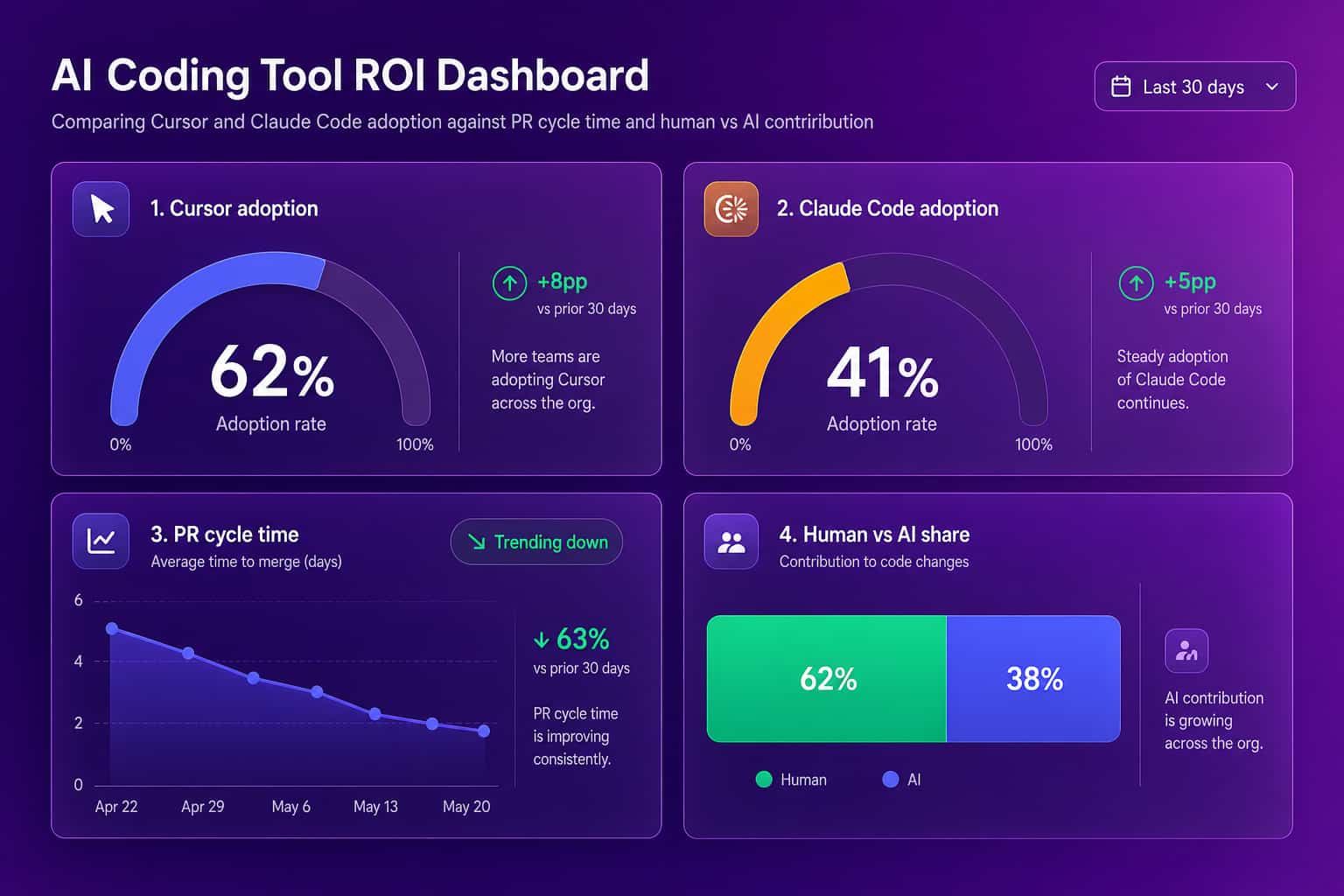
A few signals separate a tool that's earning its seat cost from one that's just installed:
- Active usage, not licenses: agent runs or accepted edits per engineer, not how many seats you bought.
- PR cycle time trend: the span from first commit to merge, measured against your pre-rollout baseline.
- Review wait time: whether faster authoring just pushed the bottleneck into review instead of removing it.
- Human vs AI agent share: how much of any throughput gain is human-written versus agent-drafted, so the read stays honest.
- Rework rate: reverted or heavily-edited commits, so speed isn't bought at the cost of quality.
For the broader picture beyond these two tools, see our guides to AI coding tools for engineering leaders and measuring AI adoption impact across your stack. If Copilot is also in the mix on your team, Copilot vs Cursor covers that pairing specifically.
How to decide between Cursor and Claude Code
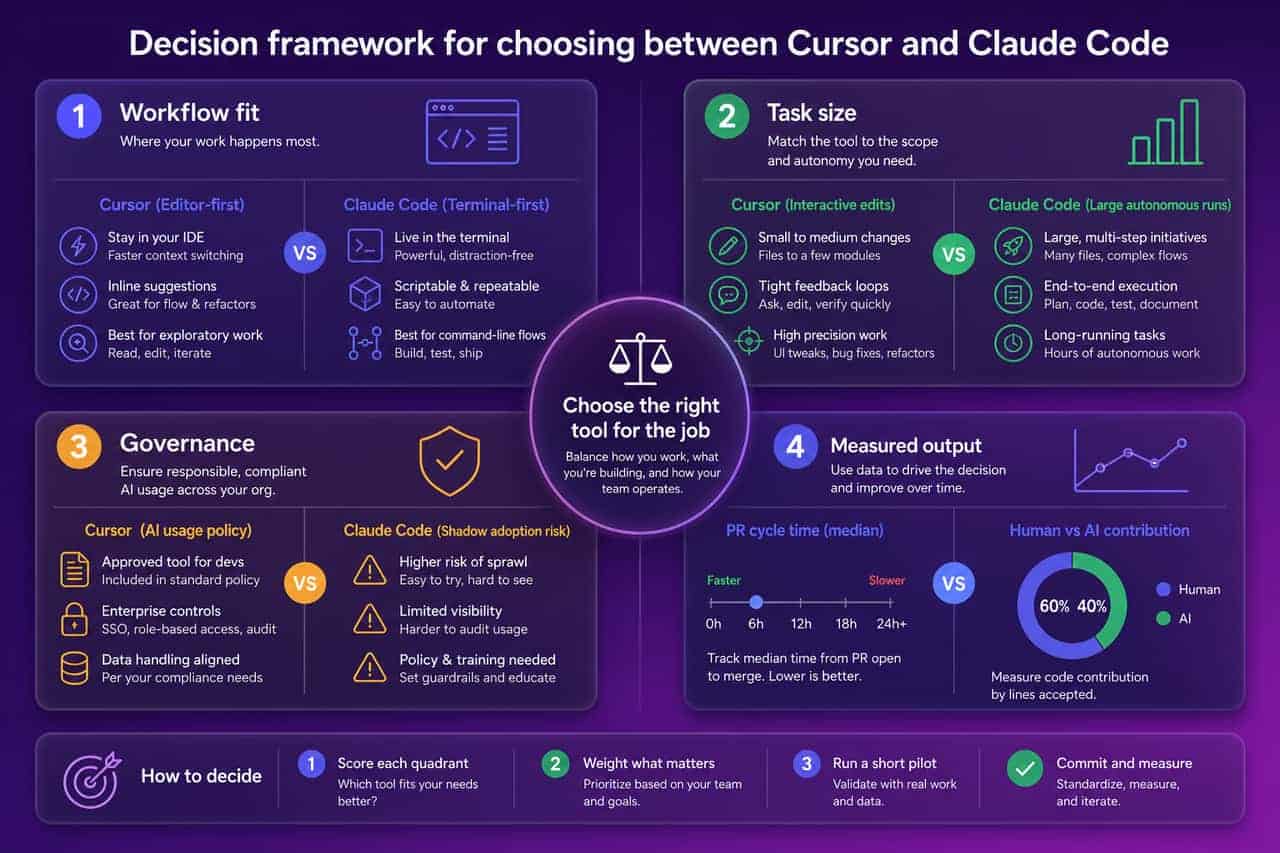
Decide between Cursor and Claude Code by weighing four things in order: how your team already works, the size and shape of the tasks you hand off, your governance requirements, and how you plan to measure the result. If your engineers want to stay inside one editor and review every change as a visual diff, Cursor is the natural fit, and the switching cost is the price of that control. If the tasks you want automated are large enough that babysitting them isn't worth your engineers' time, or you want a tool you can script into CI, Claude Code's terminal-native, longer-running model fits better, and it doesn't ask anyone to change editors first. Regulated teams should pair either rollout with real AI governance, so shadow adoption of a new agentic tool doesn't outrun policy before anyone notices. Whichever you pick, or if you run both for different jobs, instrument it from day one. Big vendors ship comparison pages that pick a winner. Your codebase gets to have the final word instead.
FAQ
Cursor vs Claude Code: which is better in 2026?
Neither wins outright. Cursor is a full AI-native editor built for interactive, multi-file edits with visual diffs. Claude Code is a terminal-native agent built for longer, more autonomous tasks that layers onto whatever editor you already use. The better question is which one your delivery data rewards on your codebase, not which one wins a feature checklist.
What's the core difference between Cursor and Claude Code?
Cursor asks you to switch your primary editor in exchange for deep IDE integration and visual multi-file diffs. Claude Code asks you to change how you invoke AI, from the terminal or a lightweight extension, in exchange for longer autonomous runs (reading files, running tests, iterating) without needing a dedicated editor at all.
Is Claude Code the same as Cursor?
No. Cursor is a standalone code editor with AI built into its core. Claude Code is Anthropic's coding agent, usable from a terminal or as an extension inside an editor you already have, including inside Cursor itself. They solve overlapping problems with different form factors, and plenty of teams end up running both.
Should you use Claude Code and Cursor together?
Many engineering teams do, using Cursor for fast interactive editing with visual diffs and Claude Code for longer autonomous tasks like large refactors or scripted CI runs. Running both fragments your usage signal, though, so the decision that matters is measuring what each one actually contributes to delivery, not defaulting to both because neither has been proven out.
How do you measure whether Cursor or Claude Code is actually paying off?
Tie usage to delivery output instead of trusting self-reports. Abloomify imports usage signals from Cursor, Claude Code, and GitHub Copilot and correlates them with PR cycle time, throughput, and review health, then separates human from AI agent contribution across tasks, code, and reviews. That turns "which tool is better" from an opinion into a number.
Is Claude Code slower than Cursor?
It depends on the task, not the tool. Cursor's interactive loop gives you fast, visible round-trips on a single edit. Claude Code often takes longer wall-clock time on a given run because it works more autonomously, reading files, running tests, and iterating before handing back a result. Neither number means much without your own workload attached to it.
Cursor vs Claude Code isn't a debate you settle once. It's a question your delivery data should keep answering as both tools change under you. See how Abloomify measures AI coding tool ROI across Cursor, Claude Code, and Copilot →

Reza Vatani
Co-Founder & CAIO
AI-driven entrepreneur with a strong background in robotics and advanced analytics. PhD from Old Dominion University and former Product Development leader at Nasdaq Verafin.