AI Coding Tools: A 2026 Guide for Engineering Leaders
June 3, 2026
Reza Vatani
11 min read

AI coding tools went from a curiosity to a budget line in about two years. Most engineering teams now run several at once: GitHub Copilot for completion, Cursor or Claude Code for agentic edits, an AI reviewer on pull requests. The tools are real. The harder question for a VP of Engineering is whether any of them made the team ship faster, and Abloomify exists to answer that with data, not vibes.
Key Takeaways
Q: What are AI coding tools?
A: AI coding tools are software that uses large language models to help engineers write, edit, review, and understand code. The main categories in 2026 are code completion (GitHub Copilot), agentic editors (Cursor, Claude Code), AI code review, and codebase chat. Most teams run more than one.
Q: What are the best AI coding tools in 2026?
A: There is no single best. GitHub Copilot leads on completion and integration, Cursor and Claude Code lead on agentic multi-file edits, and tools like CodeRabbit focus on AI code review. The right pick depends on your editor, codebase size, and which one your delivery data rewards.
Q: Do AI coding tools actually improve productivity?
A: Sometimes, and rarely in the way engineers assume. More generated code is not more shipped value. The honest test is whether tool usage correlates with faster, safer delivery: shorter PR cycle time, stable review wait, and low rework. Most teams never measure it.
Q: How do you measure AI coding tool ROI?
A: Connect tool usage to engineering output. Abloomify imports usage signals from Cursor, Claude Code, and GitHub Copilot, correlates them with PR cycle time, throughput, and review health, and separates human from AI agent contribution. That turns a seat count into a defensible ROI number.
What are AI coding tools?
AI coding tools are developer tools that use large language models to write, edit, review, explain, and test code, usually inside or alongside the editor an engineer already uses. In 2026 they span four rough categories: code completion that finishes lines and functions as you type, agentic editors that plan and apply changes across many files from a single prompt, AI code review that comments on pull requests automatically, and codebase chat that answers questions about an unfamiliar repository. The line between them blurs, because most leading products now ship features from more than one category. What unites them is that they shift some share of authoring and review from a human to a model, which is exactly why measuring their impact gets harder. When a model writes part of the code and a human ships it, the contribution split stops being obvious.
For an engineering leader, the category that matters is the one that touches your biggest bottleneck. If review is your constraint, faster authoring may just move the queue downstream. If onboarding to a large codebase is slow, codebase chat and strong context handling help more than faster typing. Pick tools against the constraint, not the launch video.
| Category | What it does | Example tools |
|---|---|---|
| Code completion | Inline autocomplete as you type | GitHub Copilot, Tabnine |
| Agentic editors | Multi-file edits from a single prompt | Cursor, Claude Code, Windsurf |
| AI code review | Automated pull request feedback | CodeRabbit, Graphite |
| Codebase chat | Q&A over an unfamiliar repo | Sourcegraph, plus most of the above |
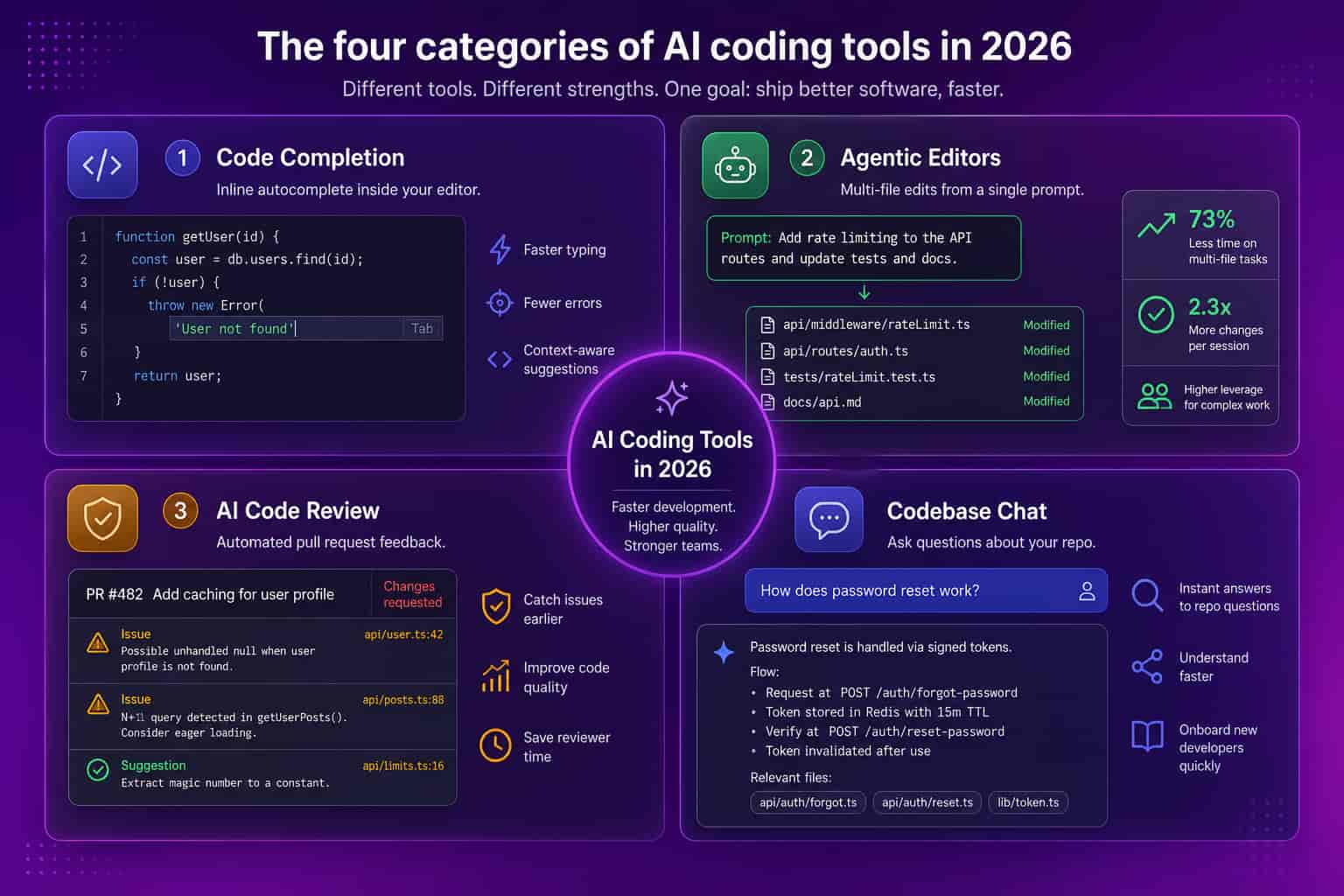
The leading AI coding tools, by what they do
The leading AI coding tools in 2026 cluster around a few jobs, and the smart way to read the market is by job rather than by brand. GitHub Copilot remains the default completion assistant because it lives inside VS Code and JetBrains and ties tightly to GitHub workflows, which keeps adoption friction near zero. Cursor and Claude Code lead the agentic tier, where you describe an outcome and the tool edits across routes, services, and tests, then shows a diff for you to accept. Windsurf competes in that same agentic space. On pull requests, dedicated AI reviewers like CodeRabbit comment on diffs and flag issues before a human looks. None of these is strictly better than the others, because they optimize for different constraints, and a 40-person team on a monorepo will weigh them differently than a 200-person org spread across many small services.
GitHub Copilot is the low-friction default. It autocompletes the obvious next line and test, and for teams already on GitHub Enterprise the governance and billing story lands in tooling procurement already approved. Cursor and Claude Code are the higher-ceiling agentic options: they shine when changes span many files and when holding a large codebase in context is the difference between minutes and an afternoon. Our own engineering team at Abloomify switched from Copilot to Cursor and saw a large jump in product velocity, which was one of the better tooling calls we made that year. For a direct head-to-head, see our Copilot vs Cursor comparison. AI reviewers sit one layer up, triaging pull requests so human reviewers spend attention where it actually counts.
Do AI coding tools actually make teams faster?
AI coding tools can make teams faster, but far less reliably than the marketing or the internal enthusiasm suggests, and the gap between perceived and real impact is where budgets quietly leak. The trap is simple. A model that generates more code feels productive, so engineers report that the tool helps, and leaders take the self-report as proof. More generated code is not more shipped value, though. If faster authoring just piles larger diffs onto an already slow review queue, cycle time can stay flat or get worse while everyone feels busier. The only honest test is whether usage correlates with delivery outcomes you actually care about: pull request cycle time, throughput, review wait, and rework. That correlation is measurable, and when teams finally measure it, the results are usually more uneven than anyone expected, with real wins on some teams and pure license spend on others.
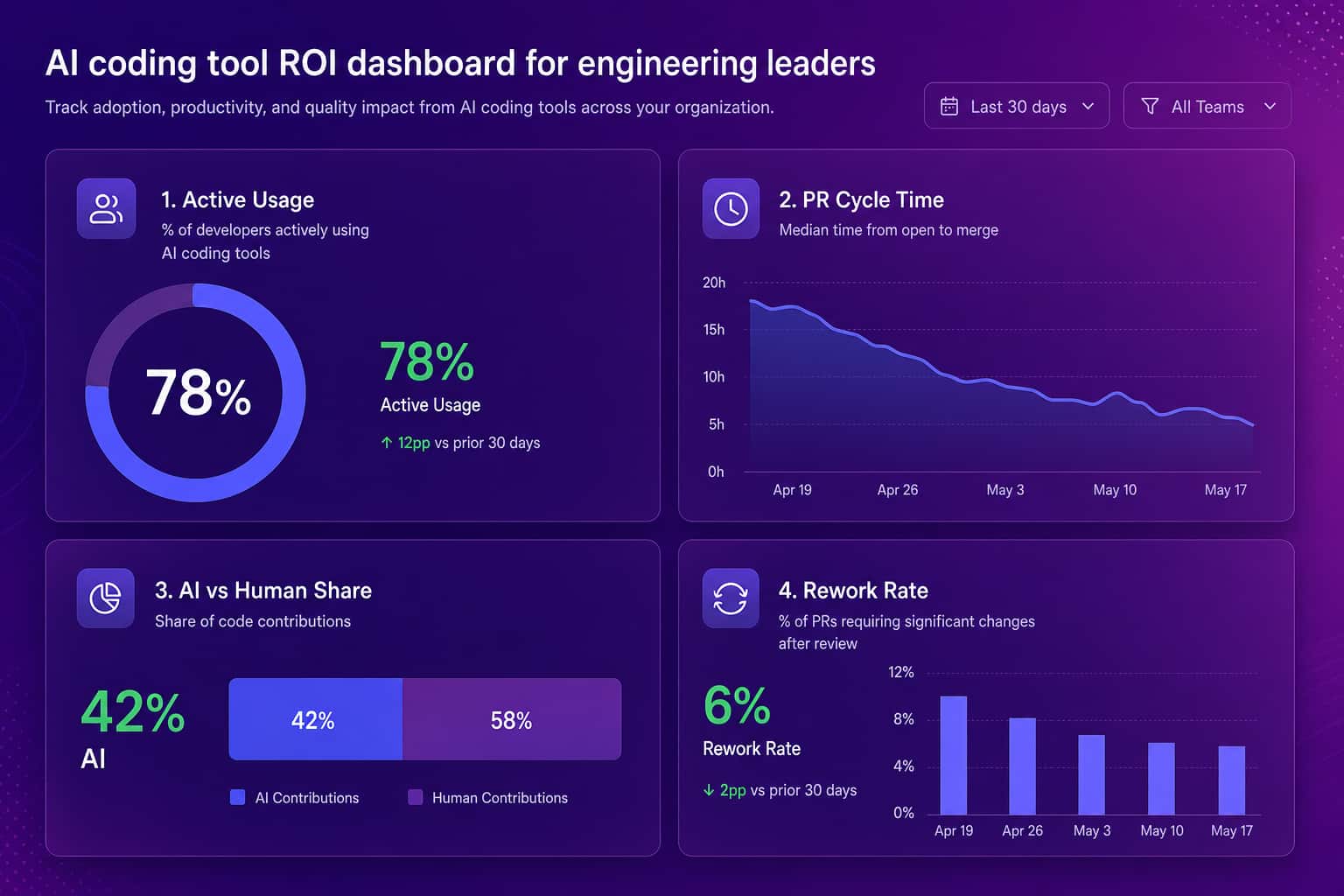
This is also where the unused-seat problem hides. License management tells you who has a seat, not who gets value from it. A 200-developer org can pay for AI coding tools nobody effectively uses and never know, because the usage data lives in each vendor's console and never meets delivery data.
How to measure AI coding tool ROI
You measure AI coding tool ROI by connecting tool usage to engineering output and watching the trend after rollout, not by surveying engineers about how the tools feel. This is the part Abloomify was built for. It imports usage signals from Cursor, Claude Code, and GitHub Copilot, then correlates them with delivery metrics like PR cycle time, throughput, and review wait, and separates human from AI agent contribution across tasks, code, and reviews. The output is an adoption heatmap by team plus a direct answer to whether the spend translates into faster, safer delivery. It does this PII-free, through APIs, with no screenshots, no keyloggers, and no reading of code content, so engineers do not experience it as surveillance. The result is a number a VP of Engineering can take to the board, instead of an anecdote, when the inevitable question about AI tool ROI arrives.
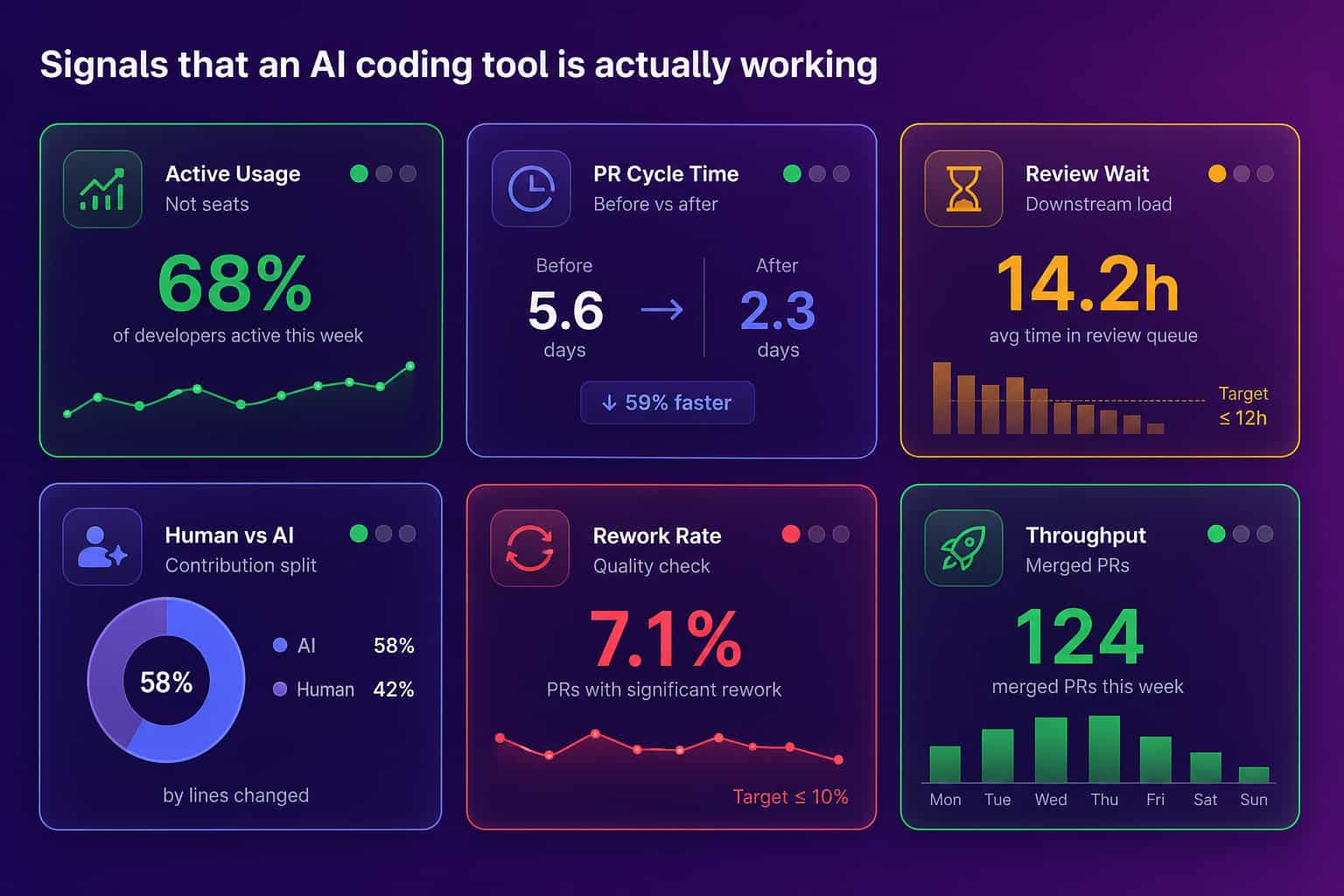
A few signals separate a tool that is working from one that is merely installed:
- Active usage, not seats: accepted suggestions or agent runs per engineer, not how many licenses you bought.
- PR cycle time trend: the span from first commit to merge, compared against your pre-rollout baseline.
- Review wait time: whether faster authoring just moved the bottleneck downstream into review.
- Human vs AI agent share: how much of the throughput gain is human work versus agent-drafted code.
- Rework rate: churned or reverted code, so speed is not bought with quality.
For the underlying delivery signals, see our guide to developer productivity metrics and how to measure AI adoption impact across your stack. Abloomify pulls these through your existing GitHub integration and engineering productivity analytics.
How to choose AI coding tools for your team
Choose AI coding tools the way you would choose any other engineering investment: against your real constraint, with a plan to measure the result. Start by naming the bottleneck. If authoring is slow on a large codebase, weight the agentic editors and run a real trial. If review is the queue that backs everything up, an AI reviewer plus tighter pull request hygiene may beat a faster completion engine. Match governance to the tool, because agentic editors that touch many files and route to external models raise data-handling questions a completion plugin does not, and shadow adoption tends to outrun policy. Then pick one team, standardize on one tool for a sprint or two, and compare cycle time and throughput against the prior period. The tool that wins on your codebase is the one worth standardizing on, and the one your data cannot justify is the one to cut at renewal.
Whatever you roll out, instrument it from day one. Most teams discover the expensive truth at renewal, when finance asks what the AI line item bought and engineering has only self-reports to offer. Pair any rollout with AI governance so shadow adoption does not outrun policy, and treat the trial as a measurement exercise, not a popularity contest.
The tools are good. The discipline is rare. Pick against the constraint. Then prove it with cycle time.
FAQ
What are the best AI coding tools in 2026?
There is no single winner. GitHub Copilot leads on completion and editor integration, Cursor and Claude Code lead on agentic multi-file edits, and tools like CodeRabbit focus on AI code review. The best choice depends on your editor, codebase size, and which tool your delivery data actually rewards.
Are AI coding tools worth the money?
They can be, but the value is uneven across teams. Some teams cut real cycle time, others pay for seats nobody effectively uses. The way to know is to connect usage to output. Abloomify correlates Cursor, Claude Code, and Copilot usage with PR cycle time and throughput so you can see which seats pay off.
Do AI coding tools replace developers?
No. They shift part of authoring and review from a human to a model, which changes the contribution mix rather than removing the human. That is why separating human from AI agent contribution matters: it keeps you honest about how much of a velocity gain is the team and how much is the tool.
How do I measure if an AI coding tool is making my team faster?
Tie usage to delivery output and watch the trend after rollout. Track active usage rather than seats, PR cycle time before and after, review wait, and rework rate. Abloomify imports these signals PII-free and separates human from AI agent contribution, turning the question from opinion into a number.
Is it a problem to run several AI coding tools at once?
Not inherently, but it fragments the signal. Mixing tools across a team makes it harder to tell which investment is paying off. Standardizing one primary tool per team for a measurement window makes adoption and ROI far easier to read, then you can compare across teams.

Reza Vatani
Co-Founder & CAIO
AI-driven entrepreneur with a strong background in robotics and advanced analytics. PhD from Old Dominion University and former Product Development leader at Nasdaq Verafin.