What Is Productivity Software? A Founder Definition for 2026
May 7, 2026
Amir Tavafi
12 min read

Productivity software in 2026 has three honest definitions and one dishonest one. Most COOs and VPs of Engineering at 100 to 500-person tech companies I talk to are searching for the same thing: a way to see where work actually happens and where it leaks, without installing a screenshot tool that 1 in 6 employees would quit over. This guide draws the lines.
Key Takeaways
Q: What is productivity software in plain language?
A: Productivity software is any tool that helps a person or team produce more output in less time. In 2026 the category splits into four: personal apps like Notion and Todoist, collaboration suites like Google Workspace, workforce intelligence platforms like Abloomify, and surveillance monitoring tools like Insightful or Hubstaff.
Q: How is productivity software different from monitoring software?
A: Productivity software helps people get work done or shows leaders where output leaks, by measuring patterns. Monitoring software captures content: screenshots, keystrokes, screen recordings. About 1 in 6 workers would quit over surveillance, per 2026 research, so the categories should not be confused on a shortlist.
Q: What does modern productivity software actually measure?
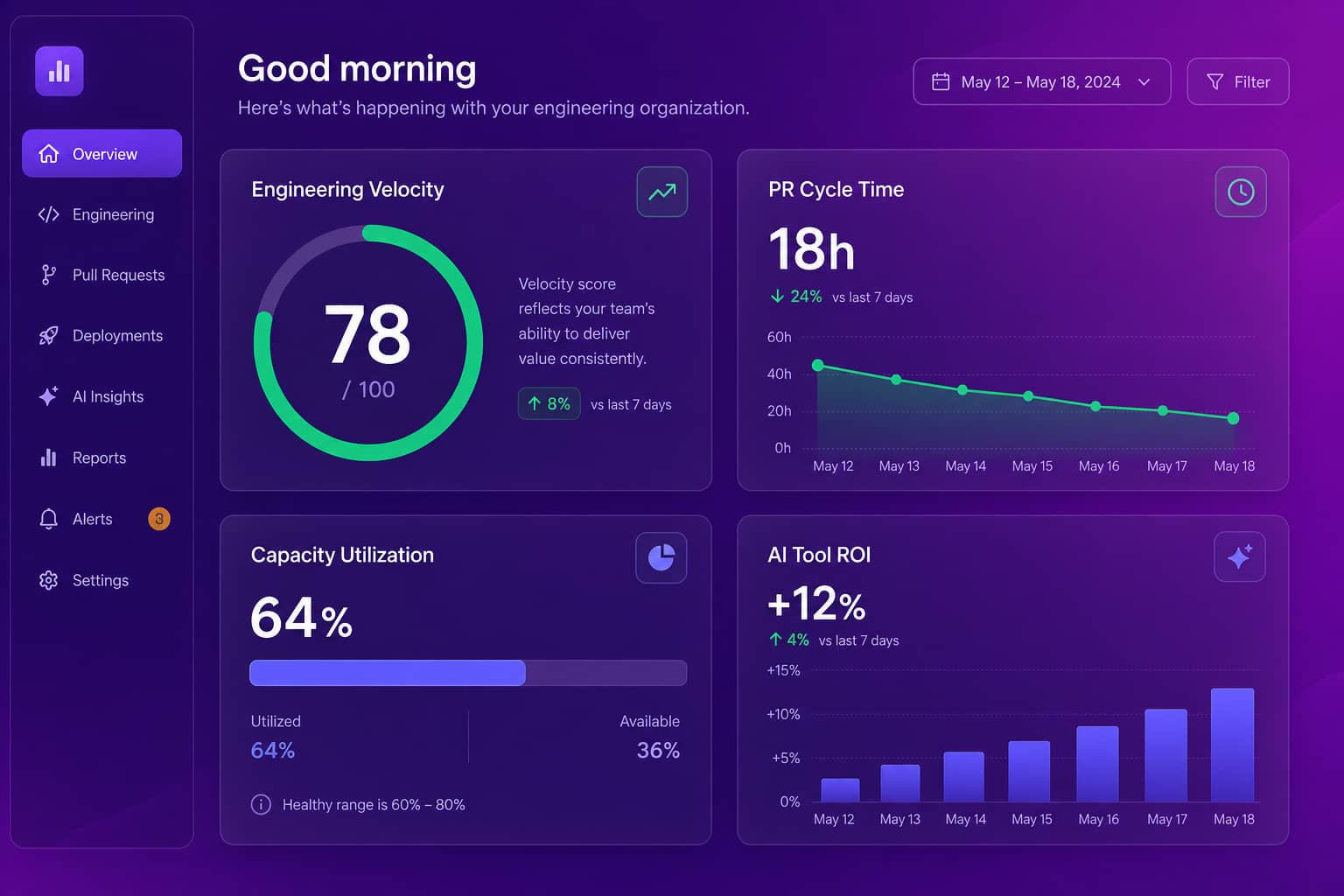
A: Focus time, collaboration patterns, capacity utilization, PR cycle time, meeting load, recognition rate, and AI tool ROI from Cursor, GitHub Copilot, and Claude Code. Abloomify pulls these from 100+ API integrations and a privacy-first device agent without screenshots, keyloggers, or content capture.
Q: Who buys productivity software for a tech company?
A: Personal apps are bought by employees or rolled out by IT. Collaboration suites are bought by IT or the COO. Workforce intelligence platforms are bought by the COO, VP of Engineering, or CIO with HR and legal at the table. Monitoring tools are usually bought by HR or compliance, often over engineering's objection.
Q: How much does productivity software cost?
A: Personal tools sit at $5 to $15 per seat per month. Collaboration suites run $6 to $22. Workforce intelligence platforms typically run $9 to $25 per seat per month on annual plans. Abloomify is $9 per seat per month annually with engineering velocity, AI tool ROI, and capacity analytics included on every plan.
What is productivity software in 2026?
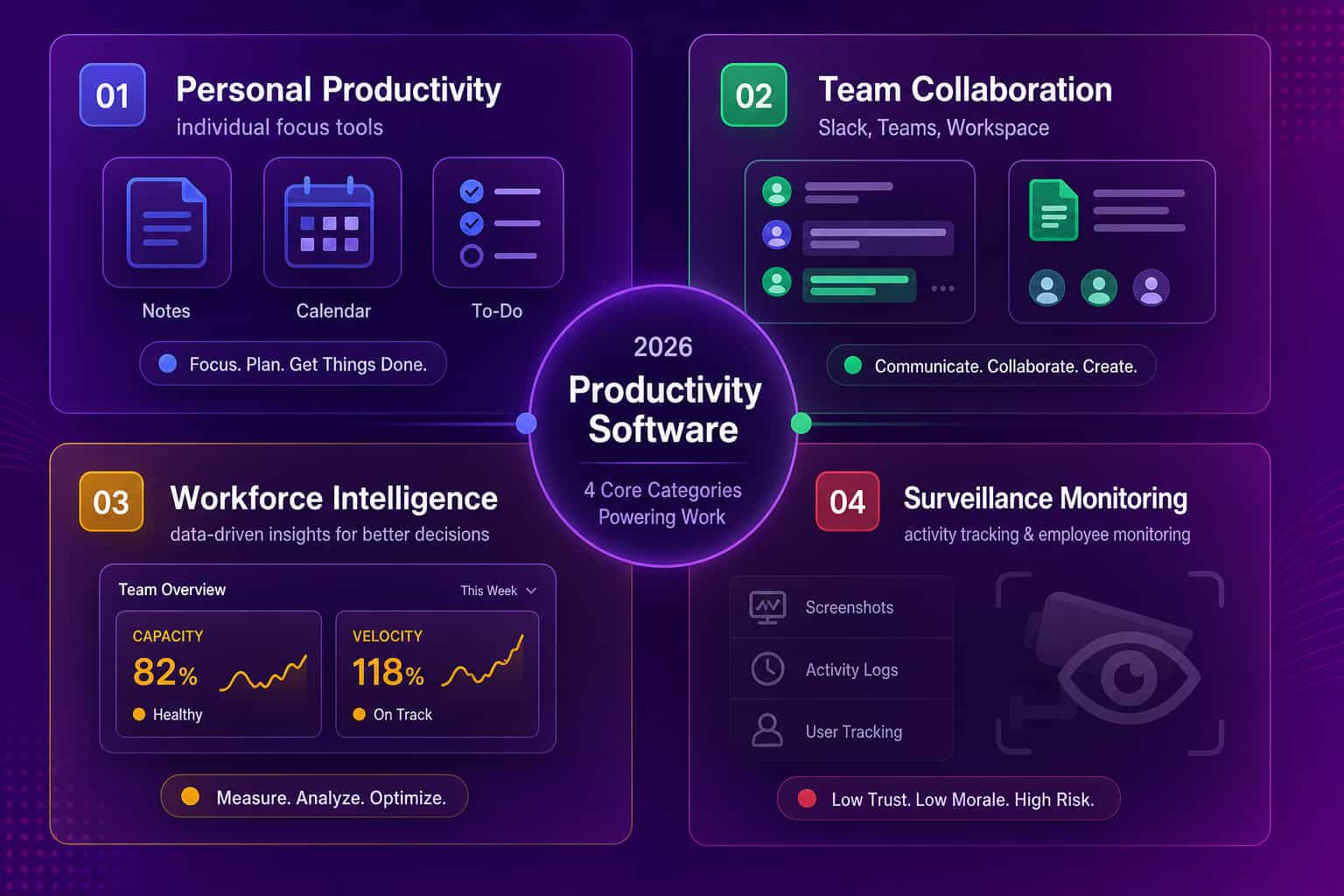
Productivity software is any tool that helps a person or a team produce more output in the same time, or the same output in less time. The honest 2026 version of the category covers four very different things that vendors lump together in marketing copy: personal productivity apps like Notion and Todoist, collaboration suites like Google Workspace and Microsoft 365, workforce intelligence platforms like Abloomify, Worklytics, and ActivTrak, and surveillance monitoring tools like Insightful, Hubstaff, and Time Doctor. The first two help people do work. The third measures where work actually happens and where leverage leaks. The fourth records what people do at their desks, which is a different problem with a different ethics profile and a different buyer. Most articles you will read on this topic mash all four together, which is why buyers end up confused about which tool actually belongs in which evaluation.
A useful test: ask "if I bought this tool, who is the user, and what is the asset on the dashboard?"
- Personal productivity software, the user is the individual contributor. The asset is their own day.
- Collaboration software, the user is everyone, mediated by IT. The asset is shared work.
- Workforce intelligence software, the user is a leader (COO, VP of Engineering, CIO, HR head). The asset is the patterns of how work happens across the org.
- Surveillance monitoring software, the user is also a leader, but the asset is captured employee activity, with all the trust risk that implies.
Each category has its own buyer, success metric, and price point. Confusing them in a budget conversation is how teams end up paying for three overlapping subscriptions and still not knowing whether engineering is over capacity.
The four categories of productivity software
To pick the right productivity software, start by naming which category you actually need. Personal productivity software optimizes one person's day: capture, organize, schedule, focus. Collaboration software optimizes how a team writes, talks, and shares: docs, chat, video, calendars, file storage. Workforce intelligence software optimizes how a leader sees the work itself: who is over capacity, where PRs are stuck, which AI coding tools are paying back, and whether engagement is decaying in any team. Surveillance monitoring software answers a fifth and very narrow question: what specifically is each employee doing on their machine right now. Each category has different vendors, different buyers, different price points, and very different risks. Getting the category wrong is the most common mistake I see in evaluation calls. A buyer asks for productivity software and the sales team sells them a screenshot tool, or vice versa.
A short cheat sheet by category:
- Personal: Notion, Todoist, Asana, Trello, ClickUp. Bought per-seat or by the individual. Success metric: did they keep using it after 30 days.
- Collaboration: Google Workspace, Microsoft 365, Slack, Teams, Zoom. Bought by IT. Success metric: adoption and reliability.
- Workforce intelligence: Abloomify, Worklytics, ChartHop, Visier (enterprise tier), ActivTrak (insights line). Bought by the COO or VP of Engineering. Success metric: dollarized waste found, capacity surfaced, velocity exposed, AI ROI quantified.
- Surveillance monitoring: Insightful, Hubstaff, Time Doctor, ActivTrak (legacy core). Bought by HR or compliance. Success metric: hours captured per seat. Risk: trust damage and quiet attrition.
What modern productivity software actually measures
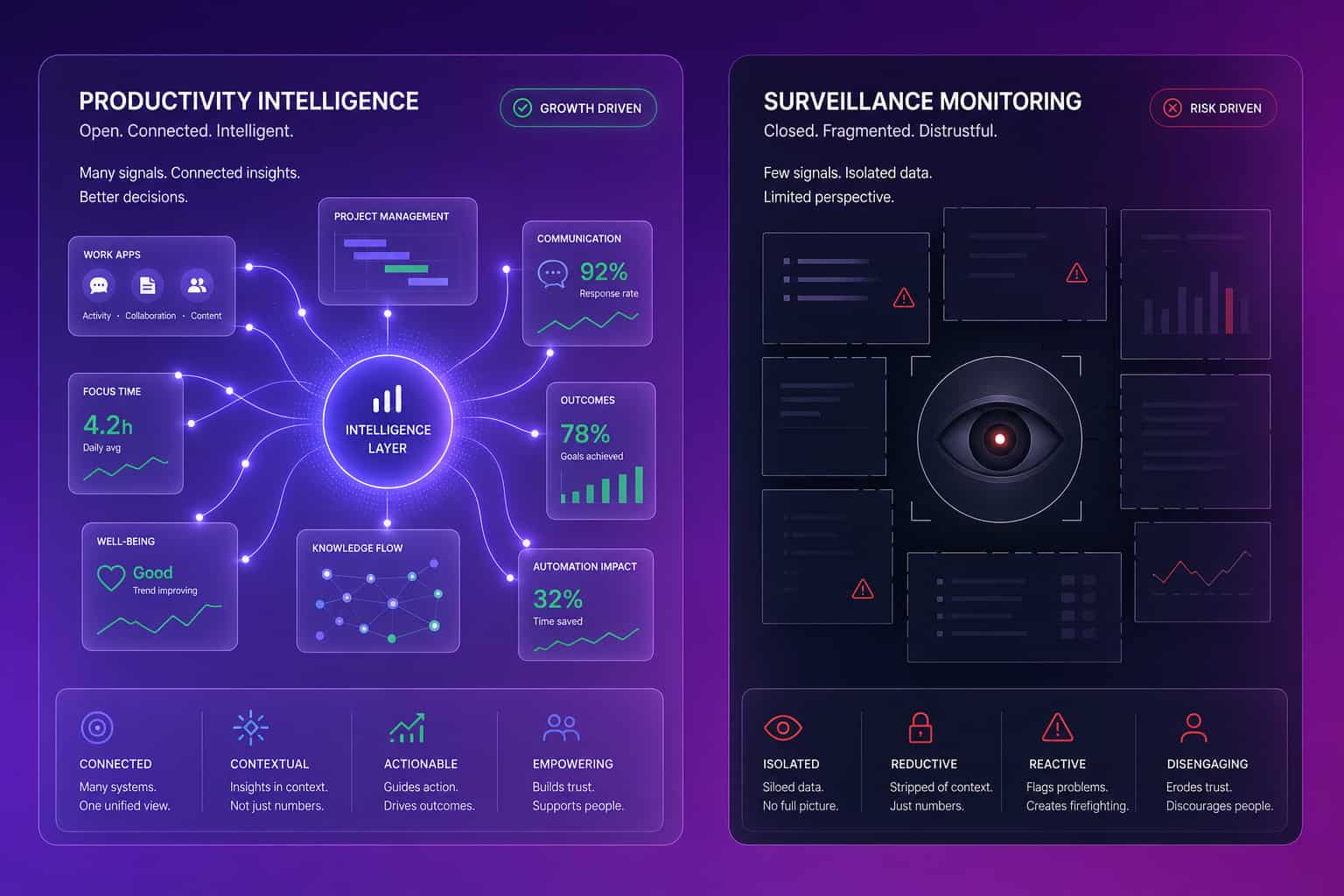
Modern productivity software at the workforce intelligence layer measures observable signals from the systems your team already uses, not what they typed or what their screen showed at 2:14pm. The signals that actually matter for a tech company in 2026 are: focus time per role, collaboration patterns across teams, calendar load and meeting density, PR cycle time and review health on GitHub or GitLab, ticket flow on Jira or Linear, capacity utilization across ICs and managers, recognition rate (kudos, mentions, peer thanks), AI tool usage and output correlation across Cursor, Copilot, and Claude Code, and SaaS license usage to identify the seats that nobody opened in 90 days. Abloomify reads all of those from 100+ API integrations plus a privacy-first device agent that captures aggregated app-category time without screenshots, keystrokes, or content capture. None of it requires sitting on top of an employee's keyboard.
The reason that mix matters is leverage. A productivity tool that only measures hours-on-keyboard misses where most of the velocity actually lives. Two engineers logging the same hours can have wildly different outputs because one is stuck in a 72-hour PR review cycle and the other ships in 18. Two managers with identical calendar loads can have very different team health, because one runs three 1:1s a week and the other runs none. Hours alone do not see this. Pattern data does.
Productivity software vs employee monitoring software
Productivity software and employee monitoring software are different categories, even though some vendors use the words interchangeably to make the surveillance pill easier to swallow. Productivity software in the workforce intelligence sense measures patterns: focus time, capacity, velocity, recognition, AI tool ROI. Monitoring software in the surveillance sense captures content: screenshots at random intervals, keystrokes per minute, full screen recordings, application titles and URL strings tied to a named employee. The Personnel Psychology meta-analysis on monitoring is blunt: there is no evidence that this style of surveillance improves performance. There is, however, strong evidence that it damages trust. About 1 in 6 workers say they would quit over employee monitoring. If your reason for shopping productivity software is "I need to see what my team is doing," you have to decide which version of that question you are actually asking, because the answer points to two very different tools.
The two architectures are easy to tell apart when you look past the marketing site. ActivTrak, Insightful, Hubstaff, and Time Doctor are endpoint agents that capture activity off the device, often with optional screenshots and screen recording. Abloomify connects to your existing systems via 100+ API integrations (PII-free signals only, no email content, no message content, no file content) plus an optional privacy-first device agent that aggregates time-by-app-category without recording screens or capturing keystrokes. We have written about the contrast in detail in our ActivTrak alternative guide, and on the broader question of how to measure productivity without screenshots.
How to evaluate productivity software for a tech company
Evaluating productivity software at a 100 to 500-person tech company comes down to four questions you ask in this order. First, which category do you actually need: personal, collaboration, workforce intelligence, or monitoring? Get this wrong and the rest is wasted. Second, who is the primary user of the data: the individual, the team, the leader, or compliance? The answer shapes the buyer, the price, and the rollout. Third, what is the data architecture: API-connected to systems you already run, agent-based on every employee device, or both? API-only platforms scale without trust damage. Pure monitoring agents generate employee resistance. Hybrid platforms with privacy-first agents (Abloomify, for one) can give you the visibility without the surveillance. Fourth, what is the time-to-value? The platforms that pay back inside 30 days deliver dollar-quantified findings, not just dashboards your team has to interpret on a Sunday evening.
I would also push hard on what gets measured for engineering specifically. A productivity tool that only counts logged hours misses where most of the velocity actually lives: PR cycle time, review health, ticket flow, AI coding tool usage. We covered the engineering side in the engineering velocity metrics guide for VPs of Engineering. If you are evaluating workforce intelligence specifically, the best workforce analytics software comparison is the deeper teardown. Add a SaaS license layer on top, because most evaluations leave money on the table: see detect and eliminate SaaS license waste.
The shift from monitoring to intelligence
The category is moving in one direction. The buyer who used to ask for screenshots is now asking for capacity, velocity, and AI tool ROI, because the board question has changed. CFOs in 2026 are not asking "is anyone watching the team type?" They are asking "where is the $500K to $2M in annual capacity waste hiding, and what is the ROI on our AI coding tool spend?" Those are productivity intelligence questions, and the data architecture that answers them is API-connected and signal-based, not screenshot-based. Even ActivTrak, the largest of the legacy monitoring vendors, has shipped "AI insights" and shifted positioning toward outcomes. Insightful, Time Doctor, and Hubstaff still anchor on screen capture. The market is splitting: buyers who care about trust and outcomes are moving up the stack to intelligence, and the buyers who only want surveillance are getting smaller and quieter every year.
When we deployed Abloomify with a 50-person Canadian SaaS, the COO did the test most COOs secretly want to do. He compared a week of his manual spreadsheet analysis with the platform's automated read. His verdict was the line we still quote: "What I did manually this week in a spreadsheet is exactly what I think Abloomify should be doing automatically." He did not want surveillance. He wanted his Sunday-evening spreadsheet job to disappear, and his data to come from the systems his team already used.
Productivity software in 2026 should give the leader the answers their team is already producing in private. Big companies bring ceremony. Smaller, AI-native ones bring outcomes.
FAQ
Is productivity software the same as employee monitoring software?
No. Productivity software helps people produce more output, or helps a leader see where output leaks, by measuring patterns. Employee monitoring software captures content (screenshots, keystrokes, screen recordings) tied to named employees. They are different categories with different buyers, different ethics profiles, and very different employee-trust outcomes.
What are examples of productivity software in 2026?
Personal: Notion, Todoist, Asana, Trello. Collaboration: Google Workspace, Microsoft 365, Slack, Teams. Workforce intelligence: Abloomify, Worklytics, ActivTrak (newer insights line). Surveillance monitoring: Insightful, Hubstaff, Time Doctor. Engineering productivity overlap: GitHub, Jira, Linear. The four categories rarely belong on one shortlist, but they often end up there in vendor calls.
Does productivity software actually improve productivity?
Personal productivity software helps individuals if they keep using it after 30 days. Collaboration software helps teams ship faster when it replaces email and silos. Workforce intelligence platforms help leaders find capacity waste, burnout risk, and AI tool ROI inside 30 days. Surveillance monitoring has no peer-reviewed evidence of improving performance and reliably damages trust.
How does Abloomify fit in the productivity software category?
Abloomify is workforce intelligence: privacy-first, API-connected, with an optional aggregated device agent. It reads signals from 100+ tools (GitHub, Jira, Google Workspace, Slack, Cursor, Copilot, Claude Code, Workday, BambooHR, and more) to give leaders capacity, engineering velocity, AI tool ROI, and burnout signals without screenshots, keyloggers, or content capture.
How fast can you see results from new productivity software?
Personal and collaboration tools deliver value the day people start using them. Workforce intelligence platforms tend to surface real findings in the first 30 days. The typical Abloomify 30-day pattern: capacity waste mapped, $50K to $100K in unused SaaS licenses identified, and a first read on engineering velocity and AI tool ROI ready for the leadership team.

Amir Tavafi
Co-Founder & CEO
Product leader and innovator with over 15 years of experience in the tech sector, grounded in AI and robotics. Previously led product development in fraud detection and AI solutions at Nasdaq Verafin.