Productivity Planning: A Capacity-First Framework for 2026
May 20, 2026
Amir Tavafi
12 min read

Most productivity planning advice is built for one person and a to-do list. That is the wrong altitude for an operations leader. At Abloomify, after three customers and a few hundred operator conversations, the productivity planning that actually moves output starts at the team and capacity level, not the calendar app. The lever sits at the org level: a plan that matches real capacity to real demand, and a way to see when the two drift apart.
Key Takeaways
Q: What is productivity planning?
A: Productivity planning is the process of matching a team's real capacity to its real demand, then removing the work that leaks output. For tech companies it covers capacity utilization, engineering velocity, meeting load, and AI tool ROI, not just individual time-blocking. The unit is the team, not the to-do list.
Q: How is productivity planning different from a personal productivity plan?
A: A personal productivity plan optimizes one calendar. Productivity planning at the org level forecasts capacity across teams, allocates work against it, and tracks whether output moves. Abloomify pulls those signals from Jira, GitHub, Google Workspace, and M365 so the plan runs on data, not gut feel.
Q: What signals should a productivity plan be built on?
A: Capacity utilization, pull request cycle time, meeting load percentage, deep-work block size, and AI tool engagement per role. These live in tools you already pay for, so productivity planning becomes a reporting problem before a data problem. Seat counts and hours logged are not on the list.
Q: Can you do productivity planning without monitoring employees?
A: Yes. A Personnel Psychology meta-analysis found no evidence that monitoring improves performance, and 1 in 6 workers would quit over surveillance. Abloomify plans from PII-free API signals and aggregated device metrics, with no screenshots, keyloggers, or screen recording.
Q: How long before a productivity plan shows results?
A: Capacity and velocity patterns surface in days because the data already lives in Jira, GitHub, and Workspace. A 3,500-person enterprise customer ran a 30-day diagnostic and learned single-source data under-proves the case, so plan from multiple sources from the start. Weekly signals beat annual reviews.
What productivity planning actually means for tech leaders
Productivity planning is the process of matching a team's real capacity to its real demand, then systematically removing the work that leaks output before it reaches customers. For a tech company that means planning against capacity utilization, engineering velocity, meeting load, and AI tool ROI, not against a personal calendar or a list of individual habits. The classic version of this advice (time-block your morning, batch your email, protect deep work) is fine for one contributor on a Tuesday. It does almost nothing for the COO of a 200-person SaaS company who needs to know which teams are overloaded right now, which projects are slipping, and where capacity is quietly evaporating. The unit of productivity planning at the org level is the team and the system around it, not the individual to-do list. That shift in altitude changes what you measure, what you plan, and what you buy to do it.
The distinction matters because it changes the entire shape of the work. A personal plan asks "how do I get more done today." An operations leader's plan asks "does the work we committed to fit the capacity we actually have, and where is that capacity leaking." Those are different questions with different data behind them. This is the same shift we wrote about in the field manual for managing workforce in 2026: the job moved from rostering bodies to running the system that ties people, work data, and AI agents together.
Why most productivity planning fails
Most productivity planning fails because it optimizes the wrong layer: the individual, when the leverage lives in the system around the individual. A leader can hand every engineer a perfect personal productivity plan and still watch delivery stall, because the bottleneck was never personal focus. It was a code review queue that sat for two days, a meeting load that ate every deep-work block, or four AI tool licenses nobody on the team actually used. Personal productivity advice cannot see any of that, because it only looks at one calendar at a time. The operations leaders we work with at Abloomify learned this the hard way. They tried the personal-productivity gospel, rolled out focus-time policies and async-first rules, and the numbers barely moved. The plan that moved the numbers started one layer up, at capacity and flow, where the actual leaks are.
There is a second failure mode, and it is more expensive than any of the leaks. The leader's own week fills with the busy-work that a real productivity plan is supposed to eliminate.
A capacity-first productivity planning framework
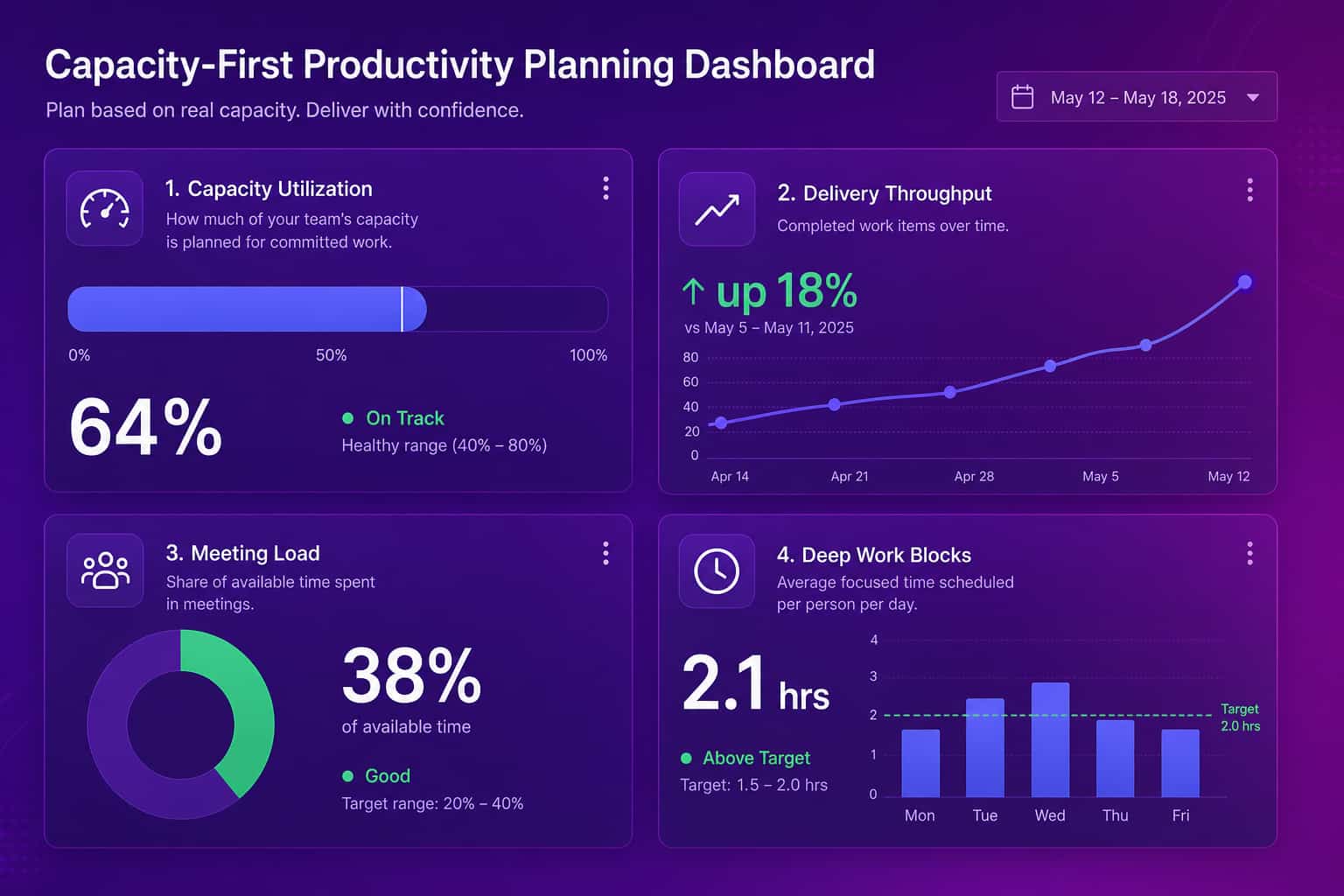
A capacity-first productivity planning framework starts with one question that personal productivity advice never asks: does our committed work actually fit the capacity we have? Answering it takes four steps, run weekly, not annually. First, forecast real capacity per team as the hours available for delivery after meetings, on-call, support rotations, and PTO come out. Second, map committed demand against that capacity so you can see overload and slack before they become missed deadlines or quiet burnout. Third, instrument the leaks, the review bottlenecks, meeting overload, and idle tool licenses that drain capacity without anyone deciding they should. Fourth, measure whether output moved, using delivery signals like throughput and cycle time rather than activity signals like hours logged. None of these four steps requires a screenshot or a keylogger. All of them run on data that already exists in the tools your team uses every day.
- Forecast capacity, not headcount. Ten engineers is not ten engineers of capacity. Subtract meetings, on-call, interviews, and support load, and a team of ten often has six people worth of delivery time. Plan against the six.
- Match demand to capacity every week. Overload and slack both cost you, and both hide until you put committed work next to available hours. A 400-person US fintech customer runs capacity utilization across distributed teams as a standing weekly read.
- Instrument the leaks. Review queues, meeting density above 40% of a week, and unused AI tool seats. The SaaS license optimization wedge alone recovers $50K to $100K a year for most mid-market customers.
- Measure output, not activity. Throughput, cycle time, and delivery confidence. A 50-person Canadian SaaS customer validated Abloomify's data against their own manual spreadsheet. Their COO put it plainly: "What I did manually this week in a spreadsheet is exactly what I think Abloomify should be doing automatically."
If you want to put a dollar figure on the gap before you build the plan, the productivity calculator models the financial impact of closing it.
Where productivity plans leak
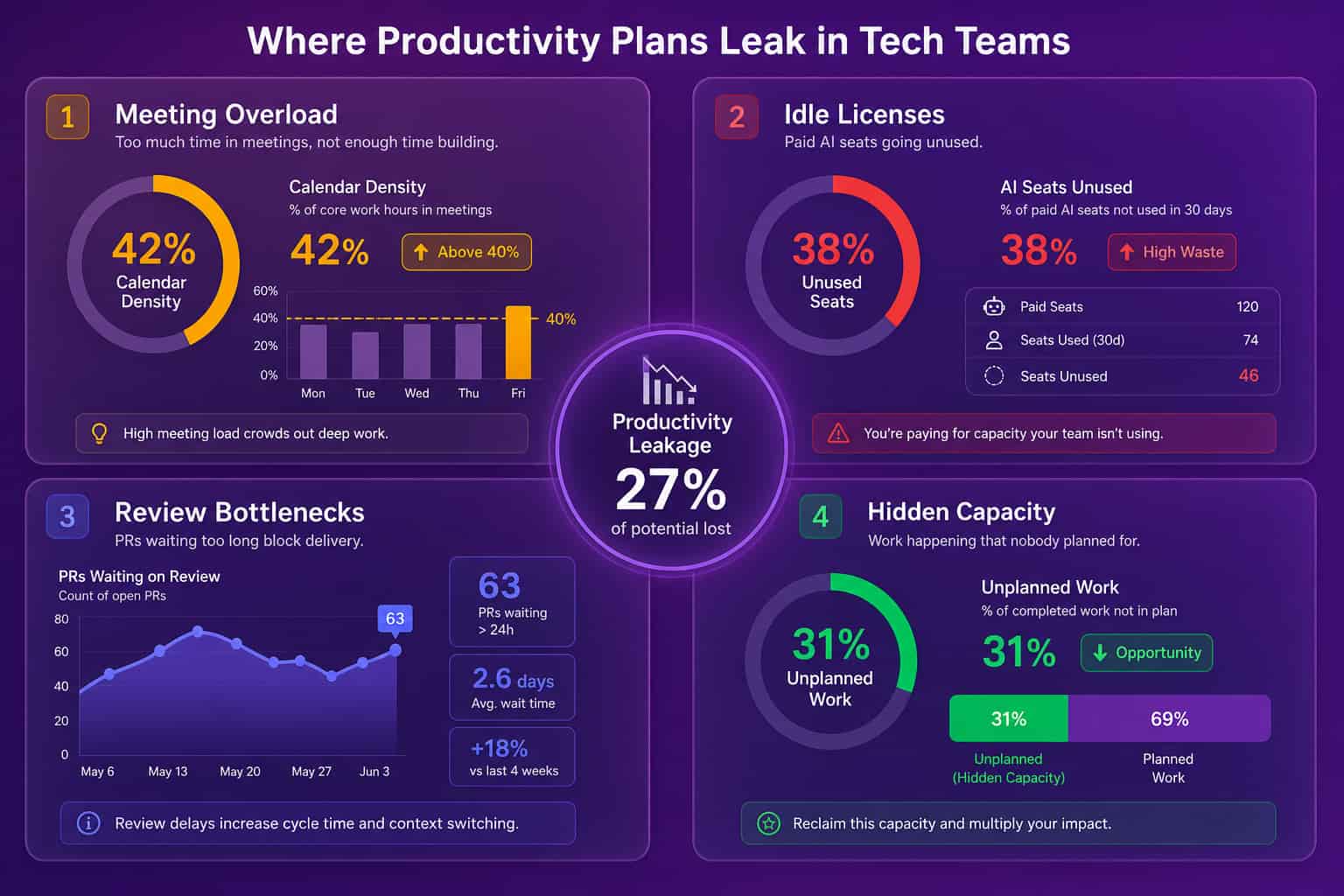
Productivity plans leak in four predictable places, and a capacity-first plan instruments all four instead of guessing. The first is meeting overload, where calendar density climbs past 40% of a week and deep-work blocks disappear, so the work that needs uninterrupted focus never gets a clean run at it. The second is idle tooling, the paid Cursor, Copilot, or ChatGPT seats that sit unused while finance keeps renewing them, which is both wasted spend and a missed productivity gain. The third is review bottlenecks, where finished work waits in a pull request queue for days, so the constraint is not how fast people build but how slowly the system lets them ship. The fourth is hidden capacity, the unplanned support and coordination work that nobody forecasted, which silently eats the delivery time the plan assumed it had. Each leak is invisible on a personal to-do list and obvious on a capacity-first view.
The reason these four matter more than any individual habit is that they compound. A meeting-heavy week fragments deep work, fragmented deep work slows code review, slow review backs up the delivery queue, and the backed-up queue gets blamed on people not working hard enough. The plan that fixes it does not push people harder. It widens the constraint.
Productivity planning without surveillance
Productivity planning without surveillance is not only possible, it produces a better plan, because the signals that predict output do not come from watching screens. A Personnel Psychology meta-analysis found no evidence that monitoring improves performance, and 2026 survey research puts 1 in 6 workers as willing to quit over surveillance. So a plan built on screenshots and keyloggers costs you trust to buy a signal that was never predictive in the first place. The data a productivity plan actually needs already sits in operational systems your team uses: Jira, GitHub, Google Workspace, M365, Slack, and the AI coding tools. Pulling PII-free metrics from those systems by API gives you capacity, velocity, and flow without capturing email content, message content, or file content. This is the architecture we built at Abloomify, and it is the wedge we lead with, because it survives a board meeting and an all-hands at the same time.
The mechanics are two data layers. The first is 100+ API integrations across HRIS, communication, project management, code repos, sales tools, and AI tools. The second is an optional privacy-first device agent on Mac and Windows that captures aggregated metrics like focus time and app categories, with no screenshots, no keyloggers, and no screen recording. The combination is SOC 2 Type 2 certified and GDPR compliant by design, which means the productivity plan you build on it can be defended to a regulator and to the engineer who hates being watched. For operations leaders, the for-operations-leaders solution is the right door, and the outcome-based productivity software page covers how we measure output without surveillance.
How to evaluate a productivity planning approach in 2026
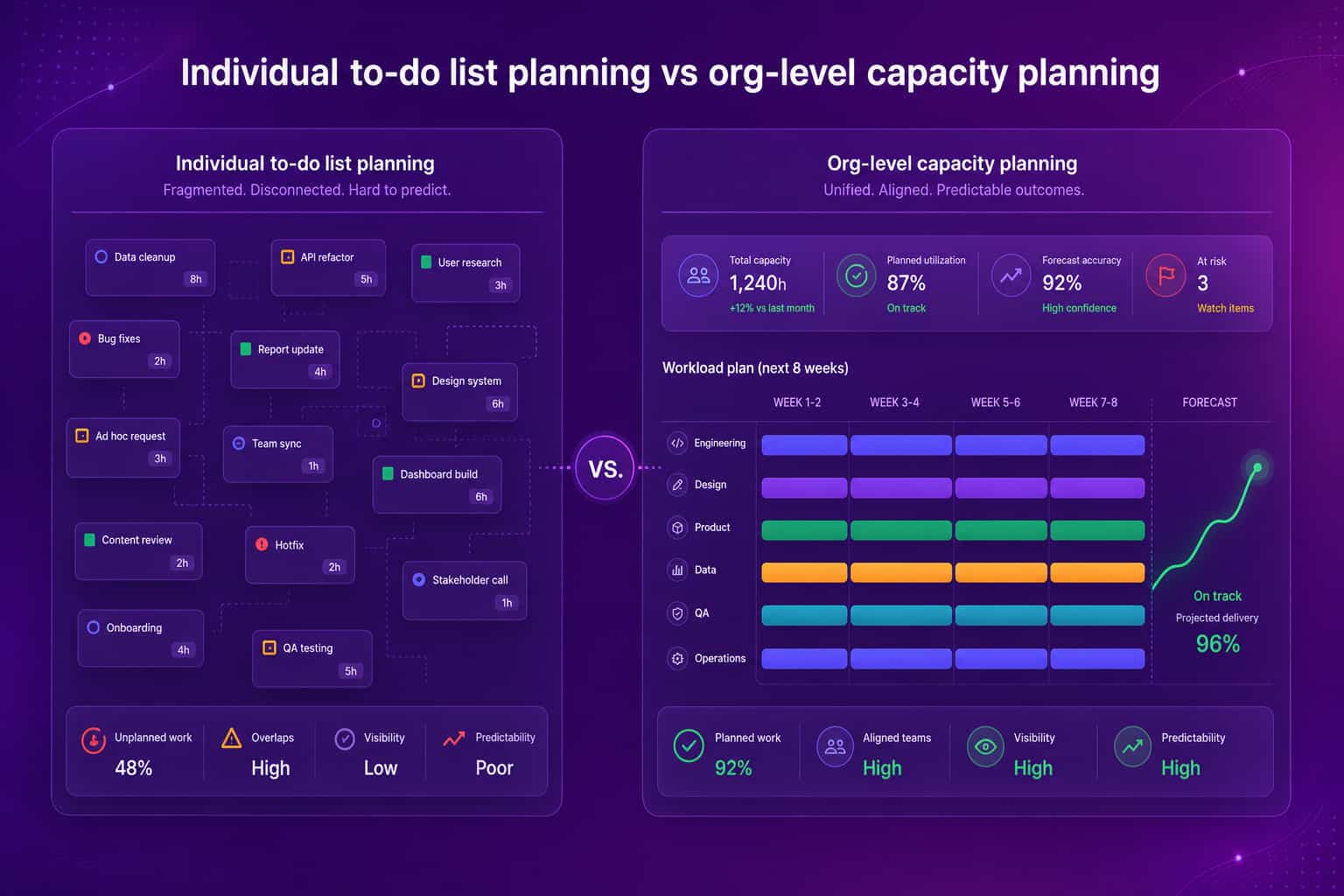
A useful way to evaluate any productivity planning approach in 2026 is to hold three questions in front of it before you commit. First, does it plan at the team and capacity level, or does it just hand individuals better habits, because only the first one moves org-level output. Second, does it run on data your tools already produce, or does it require screenshots, keyloggers, and screen recording that cost trust without buying predictive signal. Third, does it cover the full work surface of a tech company, meaning project management, code repos, communication, and AI tools, or is it locked to one system of record that can only see a slice of the picture. Most personal productivity systems answer no, partial, no. Most monitoring tools answer partial, no, partial. A capacity-first platform built on work signals should answer yes, yes, yes, and that is the bar we hold ourselves to at Abloomify.
The mistake most leaders make at this stage is buying a planning tool for the calendar and hoping it scales to the org. It does not. A view that sees one person's day will never tell you that the platform team is at 95% utilization while support tooling sits at 50%. Plan at the altitude where the decisions actually get made. Personal habits plan a calendar. Capacity plans an outcome.
FAQ
What is productivity planning?
Productivity planning is the practice of matching a team's real capacity to its real demand, then removing the work that leaks output. In a tech company it spans capacity utilization, engineering velocity, meeting load, and AI tool ROI. It plans at the team level, not the individual calendar, and runs on operational data rather than gut feel.
How do I build a productivity plan for an engineering team?
Forecast capacity after meetings, on-call, and support come out, then match committed work against it weekly. Instrument the leaks (review bottlenecks, meeting overload, idle tool seats) and measure output with throughput and cycle time, not hours logged. Abloomify pulls these signals from GitHub, Jira, and Linear so the plan runs on real data.
Is productivity planning the same as capacity planning?
They overlap heavily. Capacity planning forecasts the hours a team actually has for delivery. Productivity planning uses that forecast to allocate work, remove leaks, and measure whether output moved. For tech operations leaders the two are effectively one job, and hidden capacity waste can cost a company $500K to $2M a year.
Can productivity planning work without monitoring software?
Yes, and it works better. A Personnel Psychology meta-analysis found no evidence that monitoring improves performance, and 1 in 6 workers would quit over surveillance. Abloomify plans from PII-free API signals across 100+ integrations plus optional aggregated device metrics, with no screenshots, keyloggers, or screen recording, and it is SOC 2 Type 2 certified.
What tools do I need for productivity planning?
Mostly tools you already have. Project management (Jira, Linear), code repos (GitHub, GitLab), calendar and email (Google Workspace, M365), and AI coding tools (Cursor, Copilot, Claude Code) hold the signals. An intelligence layer like Abloomify connects them via API and renders one capacity-first view, so you plan from a single read instead of five dashboards.

Amir Tavafi
Co-Founder & CEO
Product leader and innovator with over 15 years of experience in the tech sector, grounded in AI and robotics. Previously led product development in fraud detection and AI solutions at Nasdaq Verafin.