Capacity Planning Software: 7 Tools That See Real Capacity (2026)
August 31, 2026
Amir Tavafi
12 min read

Most capacity planning software asks a manager to type in how busy their team is. Abloomify measures it instead, pulling utilization, meeting load, and delivery velocity from GitHub, Jira, calendar, and 100+ other connected tools. This is the honest 2026 shortlist of capacity planning software, comparing allocation schedulers that run on typed-in estimates with tools that plan from what teams actually did.
Key Takeaways
Q: What does capacity planning software actually do?
A: It compares how much work is committed against how much capacity a team has left, so a manager can staff new work without overloading anyone. Most tools take that capacity number as a manual input. Abloomify measures it from real signals across 100+ connected tools, including GitHub and Jira, so the number reflects what a team is actually carrying.
Q: Which capacity planning software is best for an engineering team?
A: Tempo integrates directly into Jira and is a solid pick if capacity planning needs to live inside sprint tooling. For a tech company that also wants PR cycle time, review load, and AI-tool ROI feeding the capacity number instead of story points alone, Abloomify goes further because it reads GitHub and Jira together, not Jira alone.
Q: How is capacity planning software different from a spreadsheet?
A: A spreadsheet is a snapshot someone updates by hand, usually once a week at best. Capacity planning software adds a shared view, some automation, and often a scheduling UI. What separates the tools on this list is whether the capacity number underneath is still a typed-in guess (most of them) or a measured signal from connected work data (Abloomify).
Q: Can capacity planning software work without tracking individual employees?
A: Yes. Abloomify is PII-free by architecture, no screenshots, keyloggers, or screen recording, and it is SOC 2 Type 2 certified. It aggregates work patterns across a team rather than logging what one person typed or clicked, which is the difference between capacity visibility and surveillance.
What capacity planning software actually needs to see
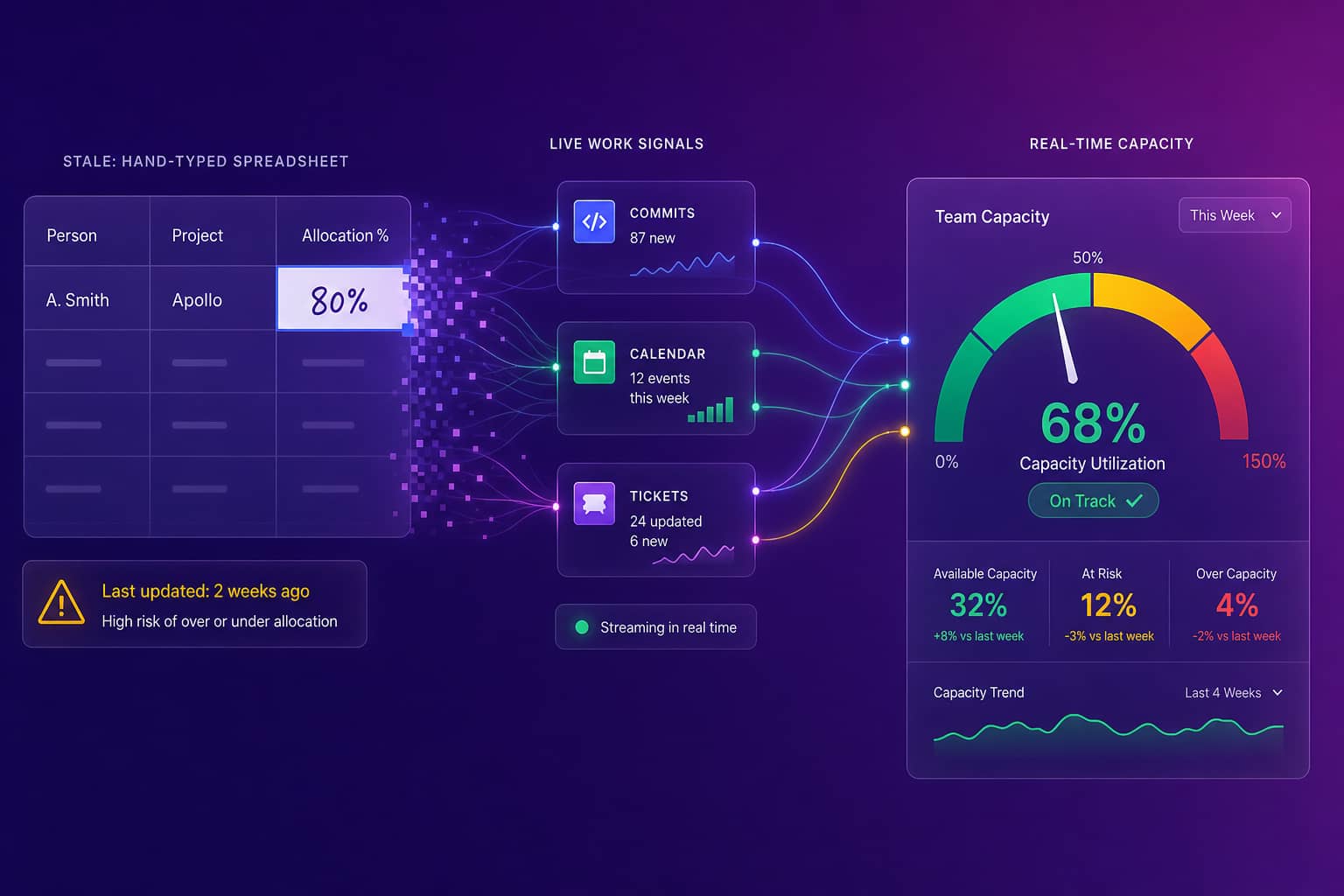
Capacity planning software exists to answer one question: does this team have room for more work right now? The category split into two camps a long time ago and most buyers never notice which one they bought. The first camp, which covers the majority of tools on the market, is allocation scheduling: a manager or resourcing lead assigns people to projects at a percentage (Sarah is 60% on Project A, 40% on Project B), the tool rolls those percentages up into a capacity view, and everyone trusts the math as long as the inputs are current. The second camp, much smaller, measures capacity from the work itself: commits, tickets closed, meetings attended, PRs reviewed, calendar density. The first approach is faster to set up. The second approach is harder to fake, because nobody has to remember to update it, and it catches the gap between what a schedule says and what a team is actually absorbing.
That gap is where most capacity plans quietly fail. A resourcing tool can show a team at 70% allocated and be completely wrong, because the 30% everyone assumed was free is actually going to code review, cross-team meetings, or an incident nobody logged as a project. I have watched leaders make a hiring call off a number like that, then wonder six months later why the new hire didn't move the needle. The schedule was clean. The capacity behind it was never measured.
The best capacity planning software in 2026 (7 picks compared)
The right capacity planning software depends heavily on who is buying it: an agency billing client hours will reach for Float or Runn first, an engineering team living inside Jira will look at Tempo, and a tech company that wants the capacity number tied to real delivery data, not a resourcing spreadsheet with a nicer UI, should put Abloomify on the list before trusting anyone's allocation percentages. Here are the seven worth knowing, ranked for a tech leadership buyer with an honest read on where each one's capacity number actually comes from.
1. Abloomify (best for tech companies that want capacity measured, not typed in)
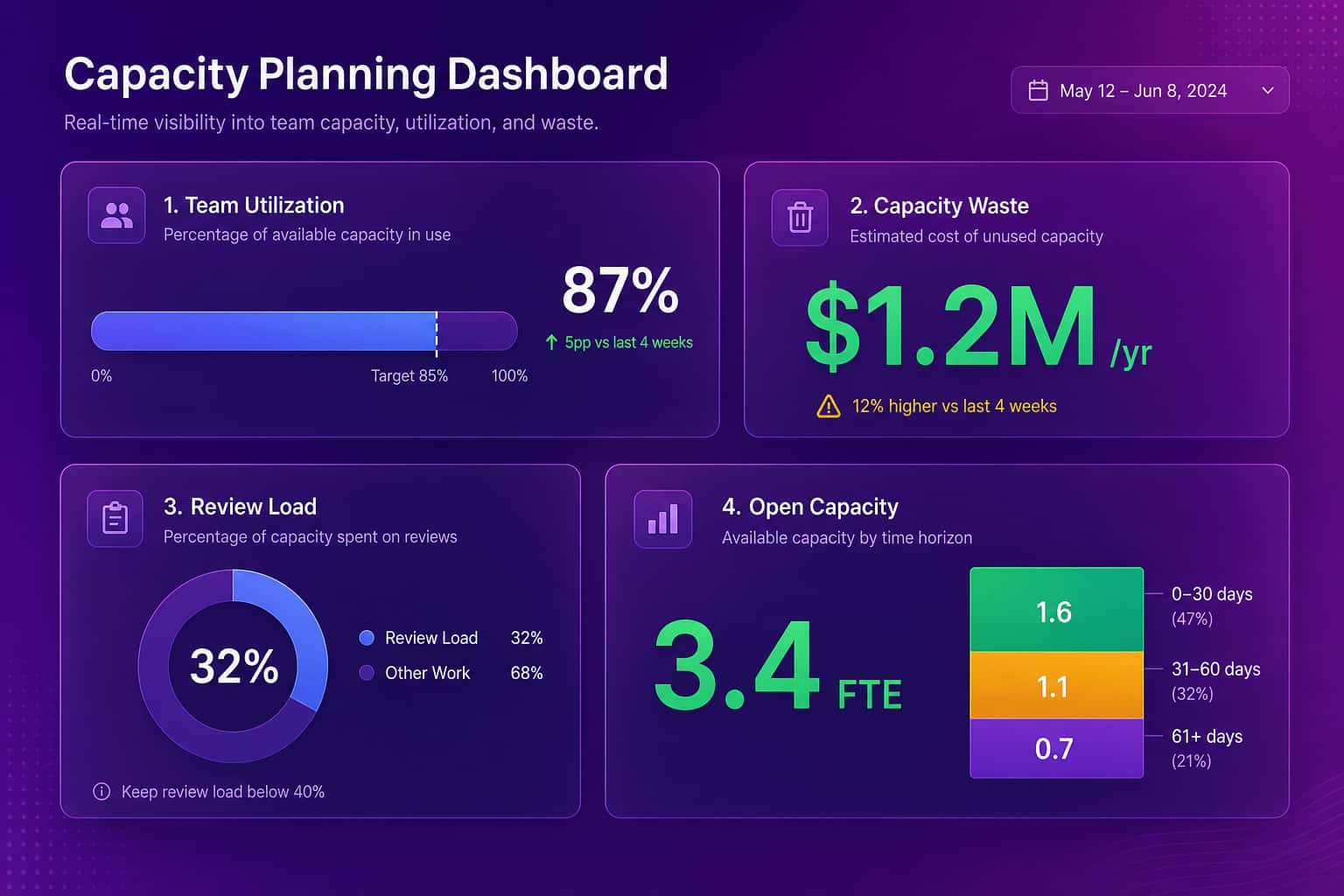
Abloomify is privacy-first workforce intelligence built for technology companies. It connects 100+ tools (GitHub, Jira, Linear, Google Workspace, Microsoft 365, CRM) plus optional device agents that capture aggregated metrics, never screenshots or keystrokes. Capacity here isn't a percentage someone assigned in January and forgot about. It's built from utilization, meeting load, PR cycle time, and review activity, so a COO or VP Engineering can see who has room for the next project and who is already over capacity before approving new work. Bloomy, the AI Chief of Staff, can be scheduled to email a weekly capacity brief instead of making someone build the view by hand. The honest caveat: Abloomify isn't a billing-hours scheduler for client work. If you need timesheet-driven client invoicing, pair it with a dedicated billing tool. If you want the capacity number to reflect what a team actually did, this is the pick.
2. Float (best for agencies scheduling people across client projects)
Float is a well-known drag-and-drop resource scheduler built for agencies and studios that need to see who is booked on what, at a glance. It's fast to set up and the visual timeline is genuinely good for staffing conversations. The capacity number, though, is still what someone drags onto the calendar. If a project runs long or an unplanned fire drill eats a week, Float won't know until someone edits the schedule, because it has no connection to the work systems where that fire drill actually happened.
3. Runn (best for consultancies forecasting utilization and revenue together)
Runn pairs resource scheduling with financial forecasting, which makes it a strong pick for consultancies and professional-services firms that need to see billable utilization and pipeline in one view. It's built around the same allocation model as Float: people get scheduled onto projects at a percentage, and the forecast rolls up from there. For a services business tracking billable hours, that's the right level of detail. For an engineering-heavy tech company, it's still planning from a schedule rather than from GitHub or Jira activity.
4. Tempo (best for capacity planning inside Jira)
Tempo (through its Capacity Planner) lives directly inside Jira and is a reasonable choice if your team already plans sprints there and wants capacity data without leaving the tool. It reads story points and sprint velocity, which is a real signal, just a narrow one. It sees Jira. It doesn't see GitHub review load, meeting density, or whether the team's AI coding tools are actually saving time, so the capacity number is only as complete as what gets logged as a Jira ticket.
5. Wrike (best for cross-functional teams that need one work-management hub)
Wrike is a broad work-management platform with a resource-management module bolted on for teams that want project tracking, timelines, and capacity views in a single tool. It's a reasonable generalist choice if capacity planning is one of several things you need a platform to do. The resourcing view runs on the same manual-allocation model as most of this list: people get assigned hours per task, and capacity is whatever's left after those assignments are totaled, not what the work itself shows.
6. Celoxis (best for Gantt-heavy project and resource management)
Celoxis pairs traditional project management (Gantt charts, dependencies, portfolios) with a resource-utilization heatmap that's genuinely useful for spotting over-allocated people across many projects at once. It's a solid, mature tool for PMOs running structured project portfolios. The heatmap is built from planned hours per task, so like most of this list, it shows you the plan, not necessarily what happened once the plan met reality.
7. Spreadsheets (the honest default most teams still reach for)
The most common capacity planning tool in 2026 is still a spreadsheet: a tab per team, a column per week, and a percentage someone updates when they remember to. It costs nothing and everyone already knows how to use it, which is exactly why it survives every attempt to replace it. The problem isn't the spreadsheet. It's that the number inside it is a guess the moment it's typed, and it stays a guess until someone manually refreshes it. One of our early customers, a 50-person SaaS COO, put it this way: "What I did manually this week in a spreadsheet is exactly what I think Abloomify should be doing automatically." If your capacity plan lives in a spreadsheet, the tool isn't the problem. The data underneath it is.
Capacity planning software compared: allocation-based vs work-data-grounded
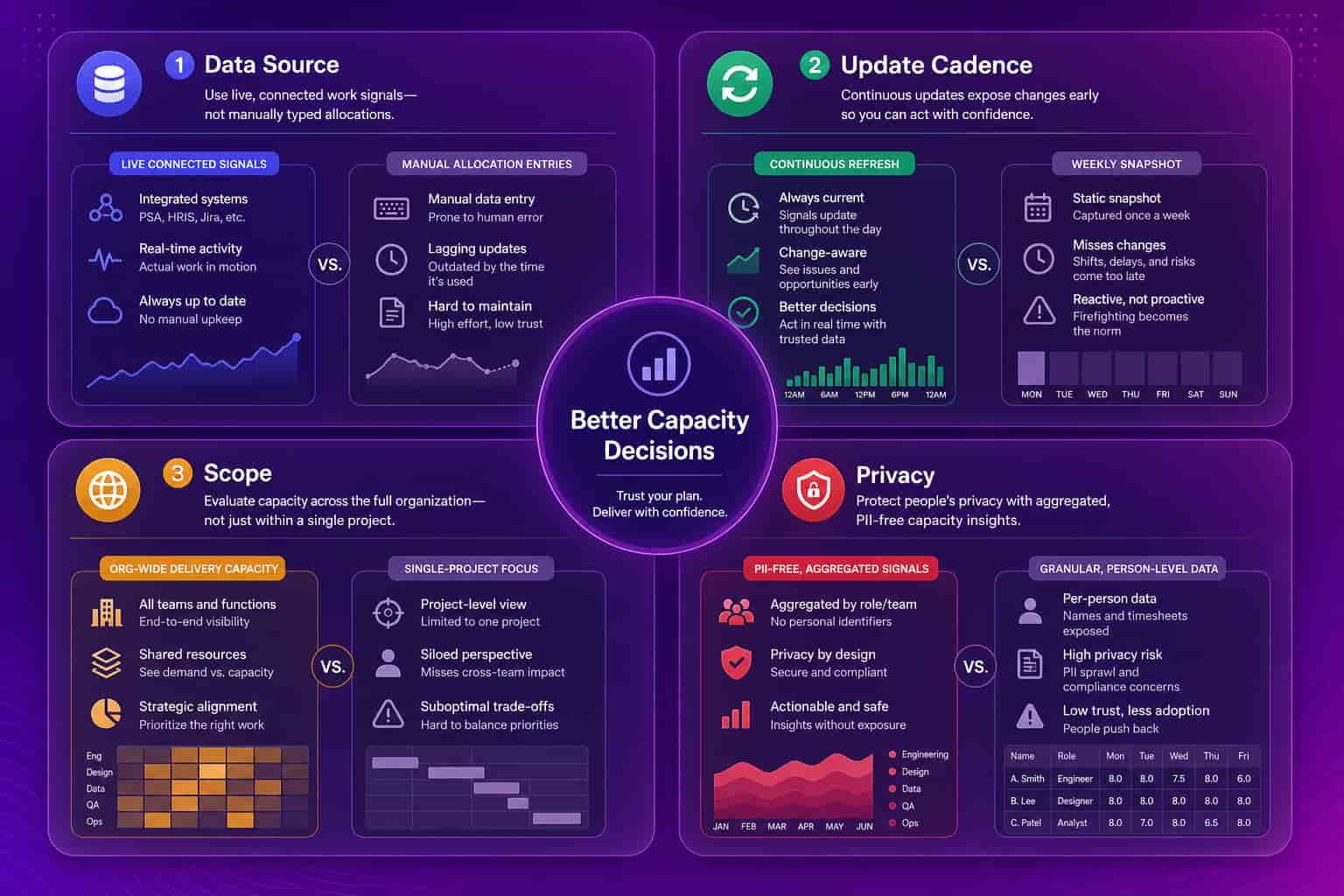
The fastest way to sort capacity planning software is by where the capacity number comes from, because that single fact predicts how much you can trust it under pressure. Allocation-based tools (Float, Runn, Tempo, Wrike, Celoxis, and every spreadsheet) ask a person to assign percentages or hours per project, then roll those assignments into a capacity view. They're fast to deploy and the visual scheduling is genuinely useful for staffing conversations. Work-data-grounded planning (Abloomify) measures capacity from what a team actually did across connected tools, so the number updates itself and catches the drift between the plan and reality. Neither approach is universally right. An agency billing hourly for client work needs Float's scheduling view more than PR cycle time. A tech company deciding whether to hire or reallocate needs the opposite.
Allocation-based scheduling (e.g. Float, Runn, Tempo, Wrike, Celoxis)
Work-data-grounded planning (Abloomify)
How to choose capacity planning software for an engineering-driven company
Choosing capacity planning software for a tech company comes down to four questions, and most teams only ever ask the first one. First, where does the capacity number come from: a percentage someone typed in, or a measurement pulled from the tools where work actually happens? Second, does it see engineering-specific signals like PR cycle time and review load, or only generic task hours? Third, does it update continuously, or does it go stale the moment someone forgets to refresh the schedule? Fourth, can it measure capacity without turning into employee surveillance, because a tool that solves the visibility problem by creating a trust problem isn't a net win. Score any tool on those four and the gap between a scheduling app and a real capacity signal gets obvious fast.
There's a retention angle underneath this too. A capacity plan built on typed-in percentages tends to keep loading the same people who look "available" on paper, and that's an early burnout signal a schedule will never surface. Measuring real capacity and catching the overload before it becomes a resignation is part of how Abloomify customers reduce turnover by up to 62%. You can explore the privacy-first workforce analytics approach, start with how to run data-driven capacity planning, or compare it against strategic headcount platforms in the workforce planning tools shortlist if the question is hiring rather than scheduling. For the operations-leader view specifically, the operations leaders solution covers the same capacity signals.
An allocation schedule shows you the plan. Measured capacity shows you the truth underneath it.
FAQ
What is capacity planning software?
Capacity planning software shows how much work a team can take on versus how much is already committed. Most tools do this by letting a manager type in allocation percentages per project. A smaller group, including Abloomify, measures capacity from real work signals (delivery, meetings, review load) instead of manual entry.
What is the best capacity planning software in 2026?
It depends on the buyer. Float and Runn lead for agencies scheduling billable hours across projects. Tempo is strongest inside Jira for engineering teams. For a tech company that wants capacity tied to real delivery data instead of a manager guess, Abloomify is the privacy-first option because it measures utilization from GitHub, Jira, calendar, and 100+ other connected tools.
Is capacity planning software the same as resource management software?
They overlap heavily and vendors use the terms interchangeably. Resource management usually covers scheduling people to projects and tracking billable time. Capacity planning is the narrower question underneath it: does this team have room for more work right now? Abloomify answers that question from measured signals rather than a schedule someone maintains by hand.
Does capacity planning software require employee monitoring?
No. Privacy-first platforms like Abloomify are PII-free by architecture: no screenshots, no keyloggers, no screen recording, no message content. Capacity is measured from aggregated work patterns across connected tools, not individual surveillance. About 1 in 6 workers say they would quit over surveillance, per 2026 survey research, which is exactly the trust cost this architecture avoids.
How much does capacity planning software cost?
Allocation schedulers like Float and Runn typically run $6-15 per user per month, billed on top of whatever project tool you already use. Abloomify is $9 per seat per month billed annually, and capacity measurement, engineering metrics, and Bloomy's AI-driven capacity briefs are included on every plan, not sold as a separate module.

Amir Tavafi
Co-Founder & CEO
Product leader and innovator with over 15 years of experience in the tech sector, grounded in AI and robotics. Previously led product development in fraud detection and AI solutions at Nasdaq Verafin.