Workforce Planning Tools: 7 That Plan From Real Capacity (2026)
July 28, 2026
Amir Tavafi
13 min read

Most workforce planning tools plan the org chart. They model headcount, roles, and cost, then hand you a clean number: hire five engineers next quarter. What they cannot see is whether your current team is running at 60% capacity or drowning at 130%. Abloomify grounds the plan in real work data instead. This is the honest 2026 shortlist of workforce planning tools, ranked for tech leaders who want a plan tied to what teams can actually deliver.
Key Takeaways
Q: What are workforce planning tools used for?
A: Workforce planning tools help leaders forecast how many people, and which skills, they will need to hit future goals. Most model headcount and cost from HR and finance data. A smaller group, including Abloomify, adds real capacity signals from 100+ connected work tools so the plan reflects delivery, not just the org chart.
Q: Which workforce planning tool is best for a tech company?
A: For a 100 to 500-person tech company, the best fit sees engineering and operational capacity, not just headcount. Abloomify connects GitHub, Jira, calendar, and CRM with a privacy-first, PII-free architecture, so a COO or VP Engineering can plan from utilization and velocity, not a spreadsheet that ages the day it is saved.
Q: How is workforce planning different from workforce management?
A: Workforce planning looks forward: demand, headcount, and skills for next quarter. Workforce management runs the present: scheduling, time, and coordination. Planning tools model the future roster. Management tools operate the current one. The two often get confused because vendors sell both, but they answer different questions.
Q: Can you plan capacity without invasive monitoring?
A: Yes. Abloomify measures capacity from aggregated work patterns, not screenshots or keystrokes. It is PII-free by architecture and SOC 2 Type 2 certified. You see whether a team has room for more work or is already over capacity, without the surveillance that drives employees to quit.
What workforce planning tools actually do (and where most stop)
Workforce planning tools help an organization decide how many people, with which skills, it will need to meet future demand, then model the cost and timing of getting there. The category grew up in two places: HR, where planning meant headcount and org design, and finance, where planning meant tying labor cost to budget and revenue. Both are legitimate. A good tool lets you model a reorg, forecast attrition, plan a hiring wave, and see the cost impact before you commit. The limit is the data underneath. Most workforce planning runs on HR records and finance assumptions: headcount, roles, comp bands, and a growth target someone typed into a cell. None of that tells you whether the team you already have is at capacity. You can forecast that you need five more engineers while three of your current ten are stuck reviewing PRs 40% of the week and two are pinned in meetings. The plan looks rigorous. It is built on a guess about capacity that nobody measured.
When Reza and I started Abloomify, the pattern we kept seeing was leaders answering "how many people do we need?" by digging across five tools and then falling back on gut. The forecast was only as good as the capacity assumption, and the capacity assumption was almost always a spreadsheet from three weeks ago.
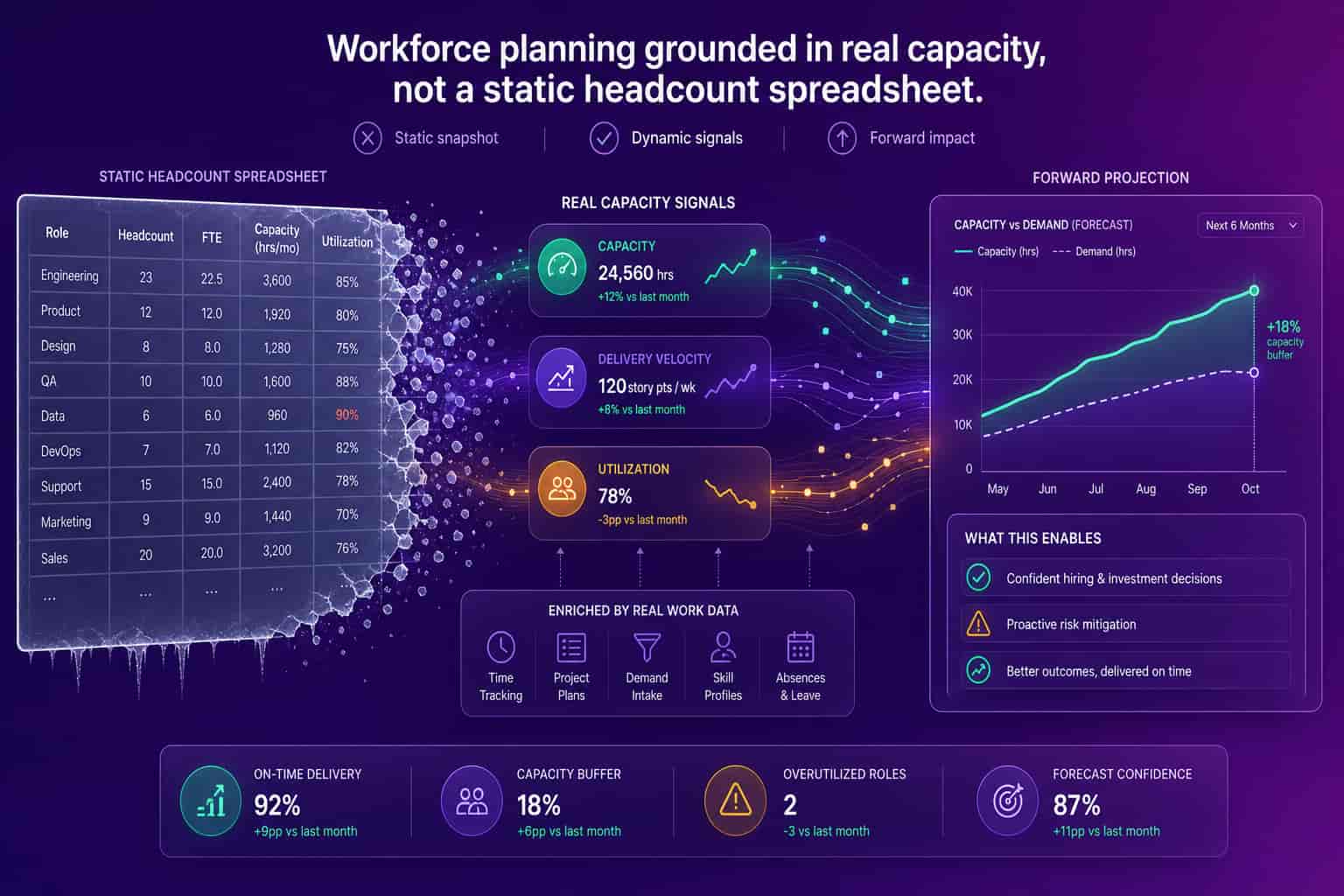
The fix is not a fancier planning spreadsheet. It is a live capacity layer under the plan. When planning tools connect to the systems where work happens, "hire five engineers" becomes "hire two, because the other three roles worth of output is trapped in meeting load and review latency we can recover first." That is the line this shortlist is sorted on.
The best workforce planning tools in 2026 (7 picks for tech leaders)
The best workforce planning tool depends entirely on the buyer: a CFO consolidating labor cost across a 10,000-person enterprise will rank Anaplan or Workday Adaptive Planning first, an HR team modeling org structure will lean toward Visier or ChartHop, and a 100 to 500-person tech company that wants headcount plans grounded in real capacity should put Abloomify on the list before it forecasts anything from the org chart alone. The seven picks below are ranked by fit for a tech leadership buyer, with an honest read on what each does well and where each runs into the capacity-data limit. I have grouped them by the question they were built to answer, because that is what actually decides the right tool.
1. Abloomify (best for tech leaders who want plans grounded in real capacity)
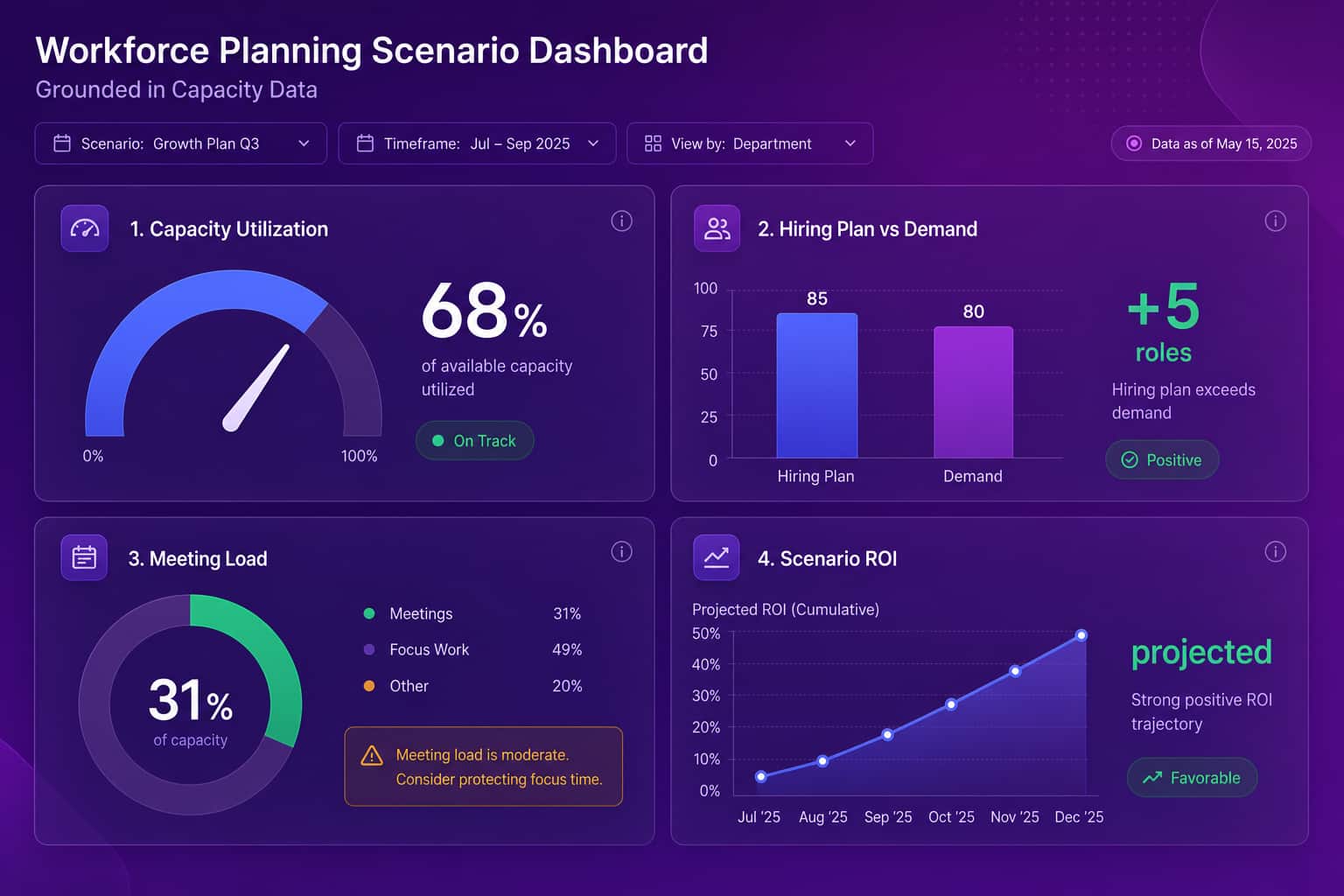
Abloomify is privacy-first workforce intelligence built for technology companies. It connects 100+ tools (Google Workspace, M365, GitHub, Jira, Linear, CRM, HRIS) plus optional device agents that capture aggregated metrics, never screenshots or keystrokes. For planning, that means the forecast starts from measured capacity: utilization, meeting load, PR cycle time, and burnout signals, not just headcount. Bloomy, the AI Chief of Staff, models workforce planning scenarios like hiring and restructuring with projected ROI, and answers "who is overloaded right now?" in plain language instead of a reporting cycle. The honest caveat: Abloomify is not a full FP&A suite. If you need multi-year financial consolidation across the whole P&L, pair it with a finance planning tool. If you want the headcount plan to reflect what the team can actually deliver, this is the pick.
2. Workday Adaptive Planning (best for enterprise finance-led planning)
Workday Adaptive Planning is a mature enterprise platform for financial and workforce planning, strongest when labor cost has to roll up into the broader budget. If your primary buyer is a CFO and your workforce plan lives inside a company-wide financial model, it is a serious tool with deep modeling and consolidation. The trade-off for a tech-company buyer is the same one that runs through this list: it plans from HR and finance records, not engineering delivery or real capacity. It knows what you pay people. It does not know whether your engineers have room for the roadmap. For how work-data planning compares with HR-warehouse analytics, see the Abloomify vs Workday People Analytics breakdown.
3. Visier (best for enterprise HR workforce planning)
Visier, founded in 2010, is the recognized standard in enterprise people analytics, and its workforce planning module is strong for large HR teams: headcount planning, attrition modeling, and skills analysis across very large organizations. If you are a 10,000-person company and the head of People Analytics owns the plan, Visier is hard to beat on that data set. The limit for a tech buyer is that Visier sees HR data, not GitHub, Jira, or tool usage. Deployments commonly run three to six months, and pricing targets enterprise budgets. For the work-data question, see the Abloomify vs Visier comparison.
4. ChartHop (best for modern org and headcount planning)
ChartHop pairs headcount planning with org design in a clean, modern interface. It is strong for fast-scaling companies that need to model reorganizations, plan hiring, and visualize the org as it shifts. Its planning is built on HRIS and compensation data, so it will tell you what the org looks like and how it should change on paper. What it will not tell you is which team is bottlenecked in code review or whether a group is already over capacity, because that signal lives outside the HRIS. It is a good planning canvas that still needs a capacity layer under it.
5. Anaplan (best for large-enterprise connected planning)
Anaplan is a connected-planning platform that spans finance, sales, and workforce, built for large enterprises that want one modeling engine across functions. For a big organization coordinating workforce plans with revenue and supply-side plans, it is powerful and flexible. It is also heavy: implementations are projects, and the workforce plan is only as grounded as the assumptions modelers feed it. Anaplan models the math beautifully. It does not measure your team's actual capacity, so the labor inputs still come from HR records and estimates rather than observed delivery.
6. Pigment (best for finance-led planning with a modern interface)
Pigment is a newer connected-planning platform, often chosen as a more modern alternative to legacy enterprise tools, with strong financial and headcount modeling in a friendlier interface. For a finance team that owns workforce planning and wants fast, flexible scenarios, it is a solid choice. The same boundary applies: it is a planning and modeling layer, not a capacity-measurement layer. It will help you build and compare scenarios quickly, but the headcount assumptions inside those scenarios still depend on how well someone estimated current capacity.
7. Spreadsheets (the honest default most companies still use)
The most common workforce planning tool in 2026 is still a spreadsheet. Excel or Google Sheets, a tab per team, a growth target, and a lot of manual copy-paste. It is free, flexible, and everyone knows how to use it, which is exactly why it persists. The problem is that a planning spreadsheet is a snapshot that is wrong the day after it is saved, and it carries zero live capacity signal. One of our early customers, a 50-person SaaS COO, put it plainly: "What I did manually this week in a spreadsheet is exactly what I think Abloomify should be doing automatically." If your workforce plan is a spreadsheet, you do not have a planning problem. You have a data problem.
Workforce planning tools compared: headcount-first vs capacity-grounded
The clearest way to choose between workforce planning tools is to sort them by what feeds the plan, because that single decision determines how close the forecast lands to reality. Headcount-first platforms (Workday Adaptive, Visier, ChartHop, Anaplan, Pigment, and every spreadsheet) plan from HR and finance records: roles, comp, and a growth target. They are excellent at modeling cost and org structure, and for a CFO or head of People that is often the right job. Capacity-grounded planning (Abloomify) adds the missing input: measured utilization, meeting load, and delivery velocity from the systems where work happens, so "we need five more people" gets tested against how much output is already trapped in the current team. Neither is universally better. A finance leader consolidating a global P&L needs Anaplan more than PR cycle time. A COO at a 300-person SaaS company needs the opposite. The comparison below is the version I would draw for a tech leadership team.
Headcount-first planning (e.g. Workday Adaptive, Anaplan)
Capacity-grounded planning (Abloomify)
How to choose workforce planning tools for a tech company
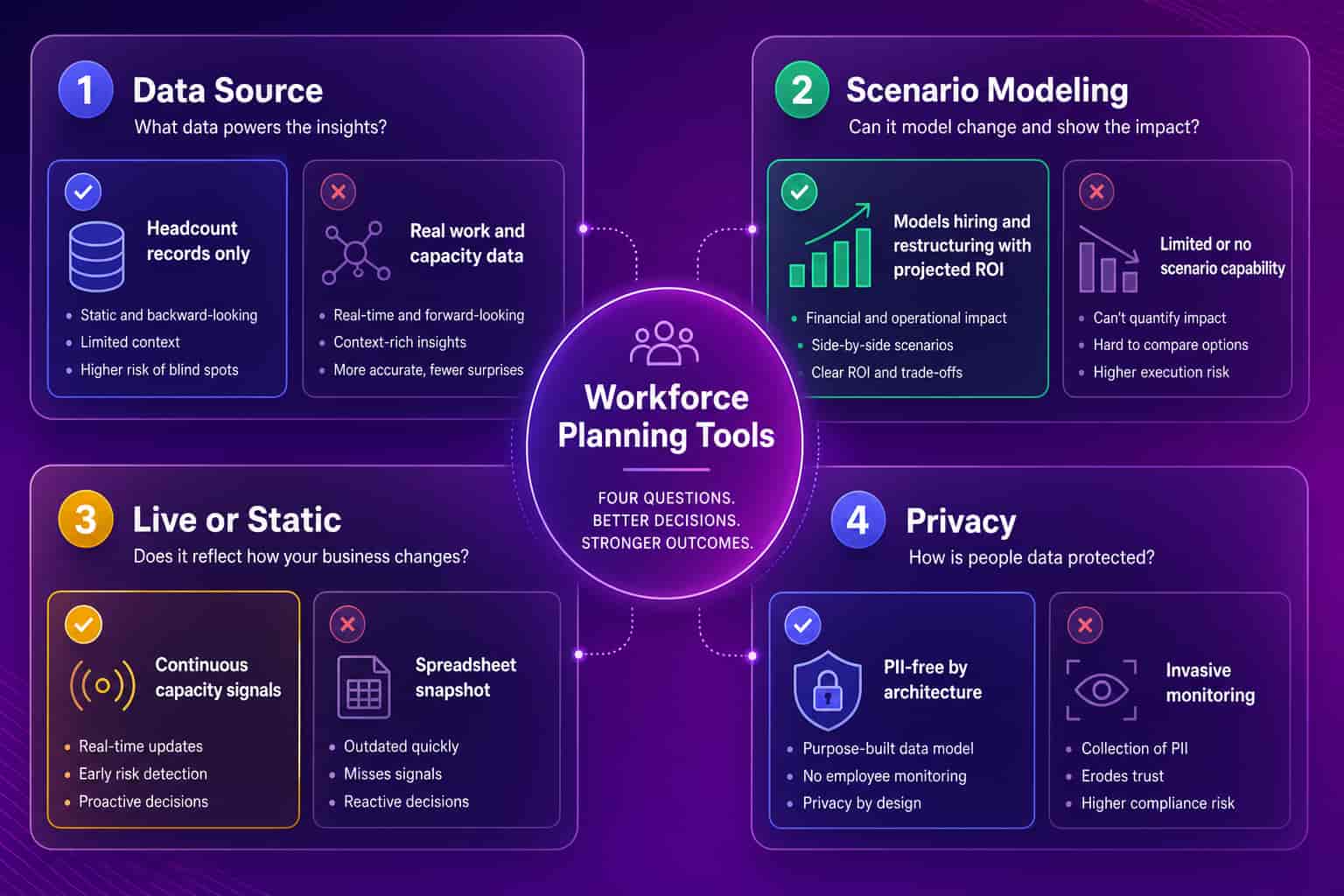
Choosing workforce planning tools for a tech company comes down to four questions, and most buyers skip the one that matters most. First, what feeds the plan? A tool that models from headcount records alone cannot tell you whether the roles you are about to approve already exist as trapped capacity. Second, can it model scenarios with real ROI, so "restructure this way" or "hire that team" comes with a projected outcome, not just a cost line? Third, is the capacity input live or a snapshot? A spreadsheet ages instantly; connected work data updates continuously. Fourth, how is employee privacy handled, because measuring capacity should never mean surveillance. Score any tool on those four and the right pick for your stack gets obvious fast.
There is a retention angle here too. Planning that ignores capacity tends to overload the teams already carrying the most, and overload is an early attrition signal. Tying plans to real work data and catching burnout before it turns into resignations is part of how Abloomify customers reduce turnover by up to 62%. You can explore the privacy-first workforce analytics approach, start with how to run data-driven capacity planning, or read the broader strategic workforce planning guide if you are earlier in the process. For the operations-leader view, the operations leaders solution covers the same capacity signals.
Headcount-first tools plan the org chart. Capacity-grounded tools plan the org.
FAQ
What are workforce planning tools?
Workforce planning tools help leaders forecast how many people, and which skills, they will need to meet future demand, then model the cost and timing. Most plan from HR and finance data like headcount and comp. A newer group, including Abloomify, grounds the plan in real capacity signals from 100+ connected tools so the forecast reflects delivery, not just the org chart.
Is Abloomify a workforce planning tool or an analytics tool?
Both, and that is the point. Abloomify measures real capacity, utilization, meeting load, and engineering velocity across 100+ integrations, then Bloomy uses that data to model workforce planning scenarios like hiring and restructuring with projected ROI. The analytics feed the plan, so you forecast from measured capacity instead of a headcount estimate someone typed into a spreadsheet.
What is strategic workforce planning?
Strategic workforce planning is the longer-horizon version: aligning the workforce you will need over the next one to three years with business goals, including skills, headcount, and cost. Tools support it with scenario modeling and forecasting. Abloomify adds the capacity layer so strategic plans start from what teams can actually deliver, not just projected headcount targets.
Do workforce planning tools need employee monitoring?
No. Abloomify is PII-free by architecture: no screenshots, no keyloggers, no screen recording, no message content, and it is SOC 2 Type 2 certified. It measures capacity from aggregated work patterns, not individual content. That privacy-first design keeps employee trust intact while still giving planners the real capacity signal that headcount records lack.
How much do workforce planning tools cost?
Enterprise planning platforms like Anaplan and Workday Adaptive Planning are custom-priced and often run six figures a year for large deployments. Capacity-grounded workforce intelligence costs far less. Abloomify is $9 per seat per month billed annually, with workforce analytics, engineering metrics, AI tool ROI, and scenario modeling via Bloomy included on every plan.

Amir Tavafi
Co-Founder & CEO
Product leader and innovator with over 15 years of experience in the tech sector, grounded in AI and robotics. Previously led product development in fraud detection and AI solutions at Nasdaq Verafin.