Workforce Management Software: A Buyer's Guide for Tech Leaders (2026)
July 6, 2026
Amir Tavafi
10 min read

Workforce management software used to mean one thing. Track hours, schedule shifts, catch the people slacking off. In 2026 that definition is too small for a tech company. If you lead 50 to 3,500 knowledge workers, you do not need to know who clocked in. You need to know whether the work is moving, where capacity leaks, and whether your AI tools pay for themselves. Abloomify measures that without a single screenshot.
Key Takeaways
Q: What is workforce management software?
A: Workforce management software helps leaders plan, measure, and improve how work gets done. Legacy WFM handled scheduling, time, and attendance. Modern tools like Abloomify measure capacity, engineering velocity, and burnout risk from the systems teams already use, no time clocks required.
Q: What is the best workforce management software for a tech company?
A: For knowledge-work teams, the best workforce management software measures outcomes, not hours. Abloomify connects 100+ tools (GitHub, Jira, Google Workspace) to show where output happens and where it leaks. Shift-scheduling tools fit hourly and field workforces better.
Q: Can you get workforce management software without employee monitoring?
A: Yes. Abloomify is privacy-first by architecture. It uses PII-free signals from 100+ integrations plus optional device agents that collect aggregated metrics, with no screenshots or keyloggers. You get visibility without the trust damage surveillance causes.
Q: What are the core pillars of workforce management software?
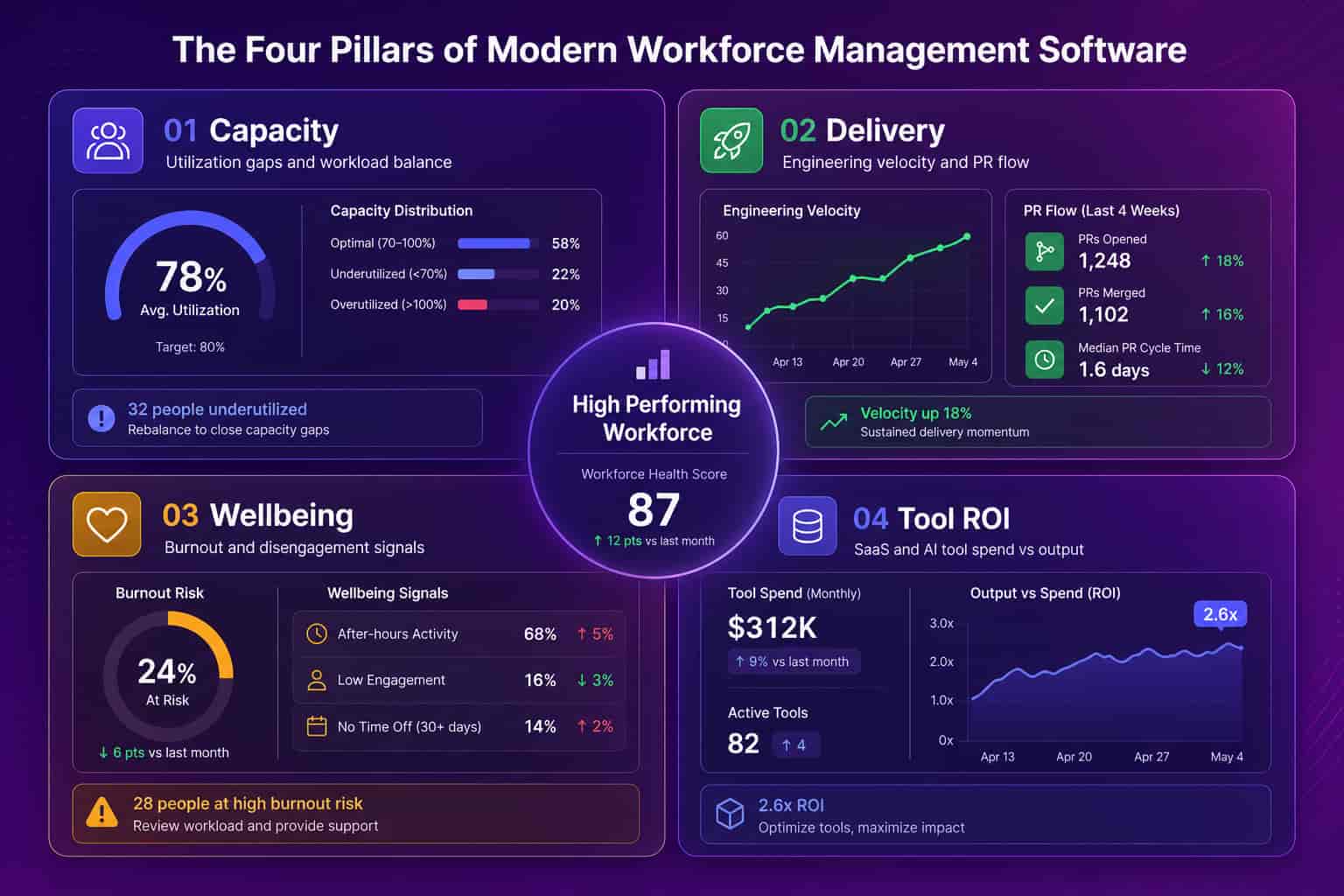
A: Four pillars matter for tech teams: capacity (where hours leak), delivery (engineering velocity and PR flow), wellbeing (burnout and disengagement signals), and tool ROI (SaaS and AI spend versus output). Legacy WFM covers scheduling and payroll; it misses all four.
What is workforce management software?
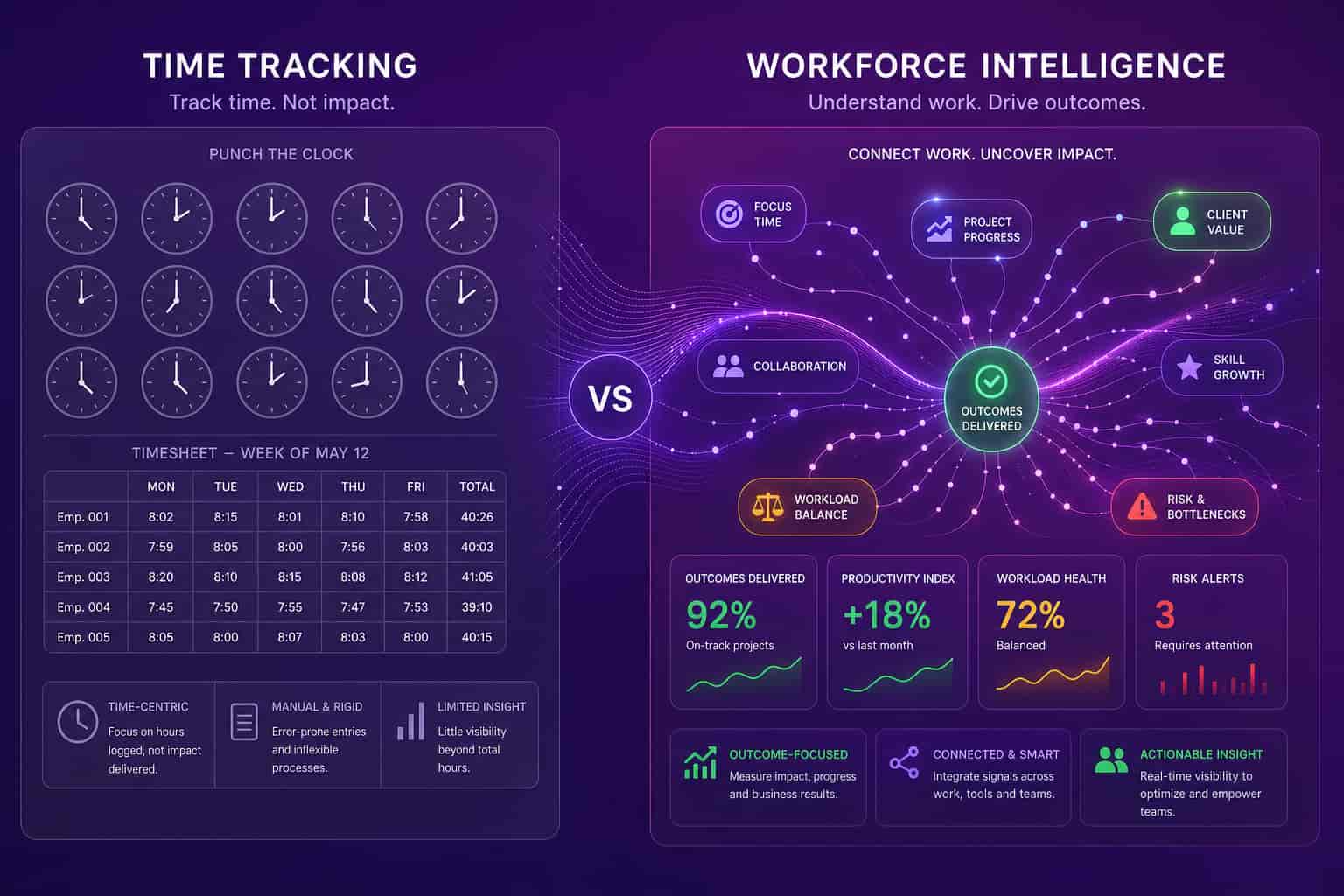
Workforce management software is the category of tools that help leaders plan, measure, and improve how a team's work gets done, and in 2026 it splits cleanly into two very different products wearing the same name. The first is legacy workforce management: scheduling, time and attendance, shift planning, and payroll, the world of Workday, ADP, Deputy, and When I Work. It answers "who is working when." The second is modern workforce intelligence: a layer that connects to the tools your team already uses and shows capacity, delivery, engagement, and tool ROI. It answers "is the work actually moving, and where is it stuck." A hospital or a call center needs the first. A 200-person SaaS company running on GitHub, Jira, and Google Workspace needs the second, and usually buys the first by mistake because the category name is the same.
Most vendors blur this on purpose. The word "workforce management" carries the budget authority of an HR system, so scheduling tools, monitoring tools, and analytics tools all claim it. When you evaluate options, name which product you are buying. If your team clocks in and out, you want scheduling and time. If your team ships code, closes deals, and runs on knowledge work, you want intelligence about outcomes.
The two definitions collide (and why tech leaders pick the wrong one)
The reason tech companies end up with workforce management software that nobody uses is that they buy the legacy definition to solve a modern problem, and the mismatch is expensive rather than obvious. A COO feels the pain first: the board asks where headcount is going, engineering says they are underwater, and nobody can point to a number. So the COO buys a "workforce management" tool, and it turns out to be a scheduling system or an activity monitor, neither of which can tell you whether your engineers are bottlenecked in code review or whether half your Cursor seats sit unused. The tool gets installed, employees resist it, and six months later it is shelfware. The problem was never the tool's quality. It was category confusion.
Legacy WFM was built for a workforce where presence equals output. If you run a warehouse, hours on the floor is a fair proxy for work done. Knowledge work broke that proxy. Two engineers can both log eight hours: one ships three clean PRs, the other sits in five hours of meetings and merges nothing. Time-at-desk shows them as identical. That is why time tracking and screenshot monitoring feel productive but change nothing. They measure the input everyone can already see, not the output that actually matters.
What workforce management software should measure
Good workforce management software for a tech company measures six things, and none of them require watching a screen. Start with capacity utilization, because invisible capacity gaps are where the money goes. Add engineering velocity (PR cycle time, review health, delivery flow) so leaders can see where work bottlenecks. Track meeting overload and lost deep-work hours, since calendars quietly eat the output you are paying for. Watch burnout and disengagement signals so you catch attrition risk before someone quits. Surface SaaS license waste, because unused seats and overlapping tools compound every renewal. And measure AI tool ROI, tying Cursor, Copilot, and Claude Code spend to actual output instead of guessing. Those six signals give a COO or VP Engineering the operating picture legacy WFM was never built to produce, and Abloomify assembles them from 100+ API integrations rather than from a monitoring agent on every laptop.
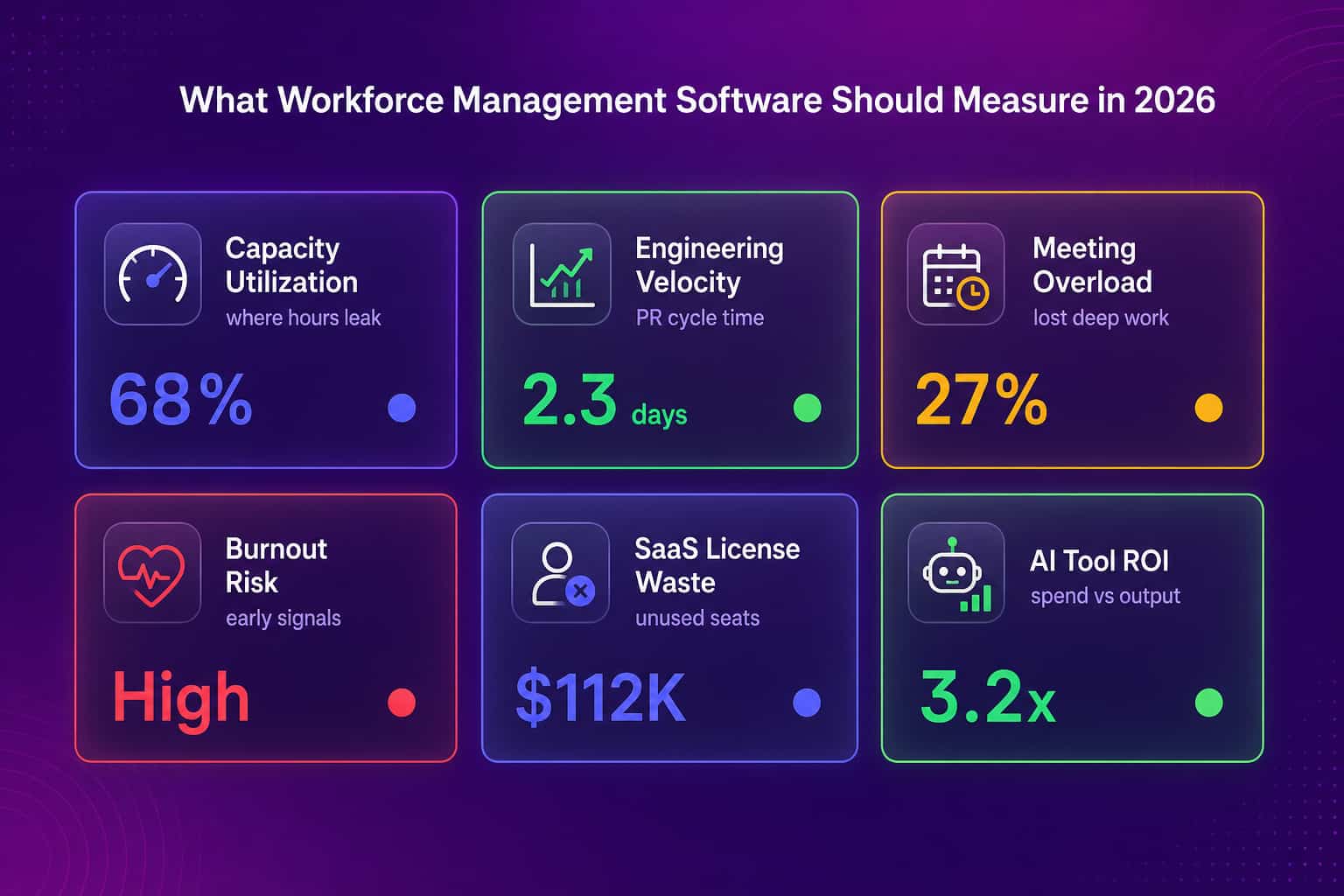
Notice what is not on that list: keystrokes, screenshots, idle timers, or minutes-on-task. Those are the metrics monitoring tools sell, and they are the metrics that generate employee backlash without generating insight. The signals that predict performance in a knowledge-work team live in the systems where work happens, not on the endpoint.
Workforce management software without surveillance
You can get the visibility monitoring tools promise without installing surveillance, and this is the single biggest decision in a 2026 workforce management software purchase. ActivTrak, Insightful, Time Doctor, and Hubstaff are endpoint agents. They capture screen activity, some take screenshots or record the screen, and they measure idle time. They also create a predictable cost that never shows up on the invoice: 1 in 6 workers say they would quit over workplace surveillance, and a Personnel Psychology meta-analysis found no evidence that monitoring improves performance. So you pay for the software, then pay again in trust and turnover, for data that does not move the needle. Abloomify takes the opposite architecture. It reads PII-free signals from 100+ tools (no email content, no message content, no file content) and pairs them with optional device agents that report aggregated usage by application category, never screenshots, keyloggers, or screen recording. You see work patterns without reading anyone's screen.
Monitoring-based WFM (ActivTrak, Hubstaff, Time Doctor)
Abloomify
For a regulated tech company, the architecture also removes legal risk. Abloomify is designed to be GDPR and EU AI Act compliant, is SOC 2 Type II certified, and offers private cloud and BYOC deployment so data stays in your own AWS, Azure, or GCP environment. That matters more every quarter as surveillance regulation tightens.
How to choose the right workforce management software
Choosing workforce management software comes down to one honest question about your workforce, and the answer routes you to a completely different product. If your team is hourly, field-based, or paid by shift, buy for scheduling and time: Deputy, When I Work, or an HRIS module in Workday or ADP will serve you well, and you can stop reading here. If your team is knowledge workers (engineers, product managers, designers, sales), buy for intelligence about outcomes, because presence tells you nothing useful about their work. From there, three tests separate good tools from shelfware. First, does it connect to the systems where work already happens, or does it demand a new agent on every device? Second, does it measure outcomes (delivery, capacity, ROI) or just activity (hours, keystrokes, screenshots)? Third, will your team accept it, or will they resist and game it the way they game surveillance? A tool that fails the third test never produces reliable data, no matter how good its dashboards look.
Abloomify was built for the second workforce and the harder tests. It connects instead of installing, measures outcomes across workforce analytics and engineering productivity, and earns adoption because it does not spy. A 50-person SaaS customer put it plainly after checking our numbers against their own spreadsheet: what they were doing by hand every week was exactly what the software should do automatically. That is the bar for workforce management software in 2026. Not more surveillance. Better questions, answered from the work itself.
Legacy WFM counted who showed up. Modern workforce management software tells you whether it mattered. Pick the one that fits the work your team actually does, not the one with the most familiar name. Big categories bring baggage. The right tool brings answers.
FAQ
What is workforce management software?
Workforce management software helps leaders plan, measure, and improve how work gets done. The legacy version handles scheduling, time, and attendance. The modern version, built for tech companies like Abloomify, measures capacity, engineering velocity, and burnout risk from the tools teams already use, without time clocks or surveillance.
What is the best workforce management software for a tech company?
For knowledge-work teams of 50 to 3,500 people, the best workforce management software measures outcomes, not hours. Abloomify connects 100+ tools like GitHub, Jira, and Google Workspace to show capacity, delivery, and engagement without screenshots or keyloggers. Shift-scheduling tools fit hourly and field workforces better, so match the tool to your workforce.
Is Workday a workforce management tool?
Workday includes workforce management modules for HR, payroll, scheduling, and time tracking, so it qualifies as workforce management software in the HRIS sense. It is not built to measure engineering velocity, capacity waste, or AI tool ROI. Abloomify integrates with HRIS platforms like Workday and adds the operational work-signal layer they lack.
Does workforce management software have to include employee monitoring?
No. Monitoring tools like ActivTrak, Insightful, and Time Doctor use screenshots and idle timers, but that is a design choice, not a requirement. Abloomify delivers workforce visibility from PII-free API signals and aggregated device metrics, with no screenshots, keyloggers, or screen recording, so you avoid the trust damage surveillance creates.
How is workforce management software different from workforce analytics?
Workforce management software is the broad category for planning and running a workforce, while workforce analytics is the intelligence layer that measures how work actually happens. Abloomify focuses on the analytics layer: connecting 100+ tools to surface capacity, delivery, and engagement signals that scheduling and time-tracking systems cannot see.

Amir Tavafi
Co-Founder & CEO
Product leader and innovator with over 15 years of experience in the tech sector, grounded in AI and robotics. Previously led product development in fraud detection and AI solutions at Nasdaq Verafin.