How to Connect Salesforce to Abloomify: Admin Setup Guide
April 8, 2026
Walter Write
3 min read

Quick Setup
Salesforce needs one extra step before OAuth works: the Abloomify package has to be installed in the exact Salesforce org you want to connect.
The short version is:
- Install the package in the correct Salesforce org.
- Return to Abloomify and click Connect.
- Approve OAuth in that same Salesforce org.
Choose The Right Install Link
- Production org: Install the Abloomify Salesforce package
- Sandbox org: Install the Abloomify Salesforce package in a sandbox
If you are connecting a sandbox, use the sandbox install link. If you are connecting production, use the production install link.
Step 1: Install In Salesforce
Open the matching install link while signed in to the Salesforce org you want to connect.
On the install screen:
- Select Install for Admins Only.
- Check the acknowledgment box.
- Click Install.
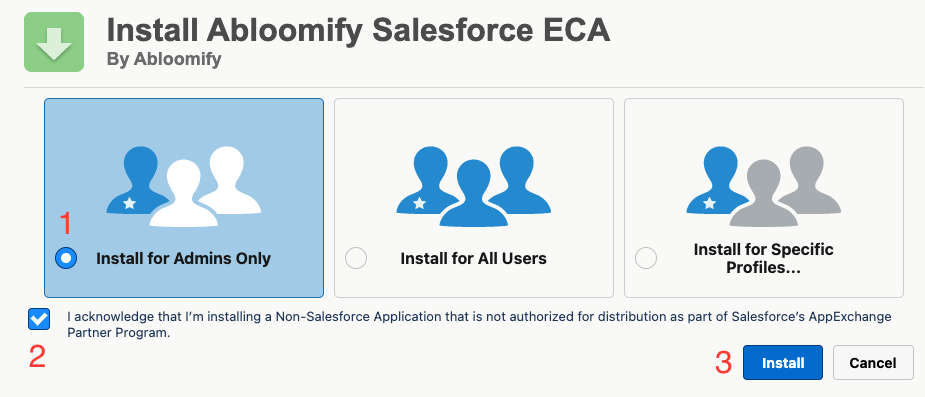
The orange warning banner on this screen is expected for this install flow.
Complete the package install and, if Salesforce is still processing it, wait a few minutes before moving on.
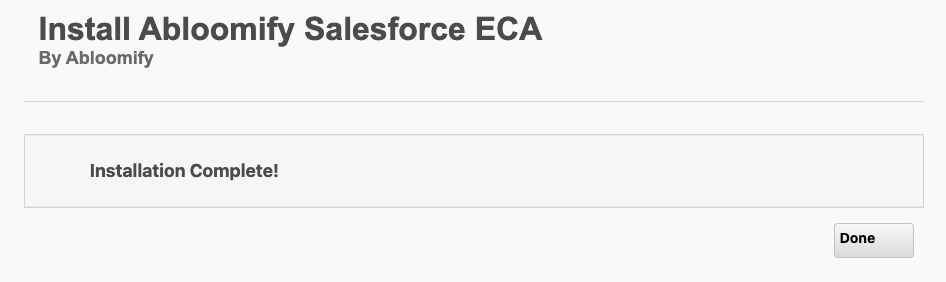
If the install succeeds, Salesforce should show an Installation Complete! screen like this. Click Done and return to Abloomify.
Step 2: Return To Abloomify
Go back to the Abloomify integrations page at app.abloomify.com/configs/integrations and click Connect on Salesforce.
Abloomify shows a short reminder dialog first. That dialog is just there to make sure the install step is done before OAuth starts.
Step 3: Complete OAuth In The Same Org
When Salesforce opens for authorization:
- Sign in to the same org where you installed the package.
- Review the access request.
- Approve the connection.
If You See OAUTH_EC_APP_NOT_FOUND
That error usually means one of these:
- The package was not installed yet.
- The package was installed in a different Salesforce org.
- Salesforce is still finishing the install.
Double-check the org, wait a few minutes, and try again.
What Success Looks Like
- Salesforce shows as connected in Abloomify.
- The OAuth flow finishes without the install error.
- Abloomify successfully loads your salesforce users in the user matching step.
Need Help?
If you get stuck, send Abloomify:
- Whether you are connecting production or sandbox.
- The exact error message.
- Whether the package install already finished.

Walter Write
Staff Writer
Tech industry analyst and content strategist specializing in AI, productivity management, and workplace innovation. Passionate about helping organizations leverage technology for better team performance.