Best Computer Monitoring Software in 2026 (And the Privacy-First Alternative for Tech Teams)
May 15, 2026
Amir Tavafi
18 min read

Most "best computer monitoring software" lists in 2026 still rank tools the same way they did in 2018, by how aggressively they capture screen activity. That made sense when the buyer was a BPO floor manager. It does not make sense for a 100 to 500-person tech company whose engineers and operators do knowledge work. This is the honest 2026 ranking of computer monitoring software, plus the privacy-first alternative most tech leaders should put on the shortlist before they install screenshot capture.
Key Takeaways
Q: What is the best computer monitoring software in 2026?
A: For pure activity monitoring, ActivTrak, Teramind, Insightful, Veriato, Hubstaff, and Time Doctor are the standard shortlist. They differ on screenshot frequency, keystroke logging, and DLP depth. For a tech company that wants visibility into productivity and capacity without recording employees, Abloomify is the privacy-first workforce intelligence alternative on the same shortlist.
Q: Do most tech companies actually need computer monitoring software?
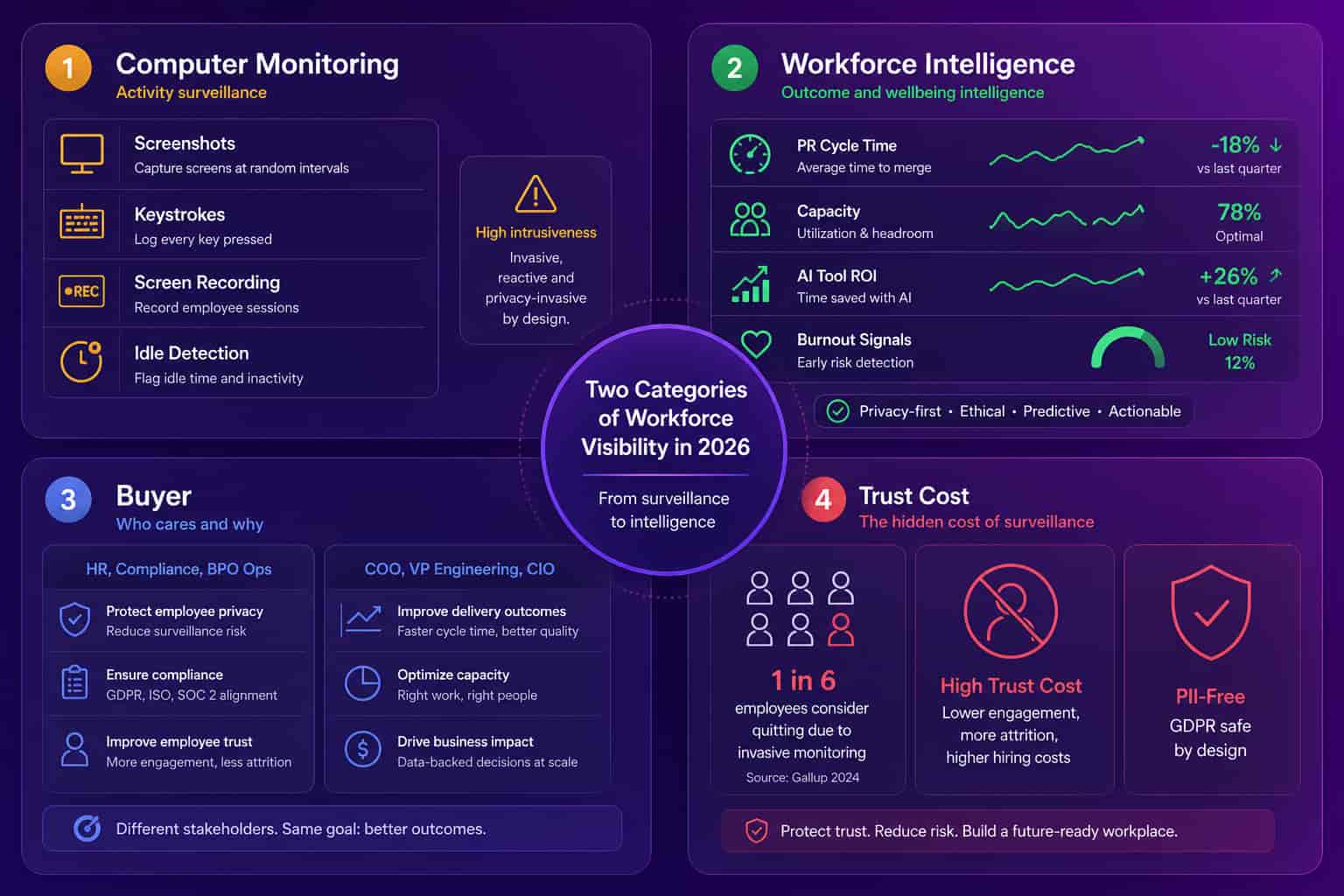
A: Most do not. The Personnel Psychology meta-analysis on monitoring found no evidence that surveillance improves performance, and about 1 in 6 workers say they would quit over employee monitoring per 2026 survey research. The real question for a COO or VP of Engineering is usually capacity, velocity, and AI tool ROI, not "what is my engineer's screen showing right now?"
Q: How much does computer monitoring software cost?
A: Time tracking tools with screenshots (Hubstaff, Time Doctor) run $5 to $25 per seat per month. Activity monitoring (ActivTrak) runs $10 to $19 per seat. DLP-heavy options (Teramind, Veriato) run higher and usually require sales calls for pricing. Abloomify, the privacy-first alternative, is $9 per seat per month annually with engineering velocity, AI tool ROI, capacity analytics, and performance management on every plan.
Q: Is employee computer monitoring legal in 2026?
A: In the US, monitoring company-owned devices is broadly legal with employee notice. In the EU and UK, GDPR and the EU AI Act require lawful basis, transparency, and proportionality, which makes screenshot capture and keylogging hard to defend at procurement. Privacy-first workforce intelligence platforms are compliant by design because no employee content is captured in the first place.
Q: What is the difference between computer monitoring and workforce intelligence?
A: Computer monitoring captures content tied to a named employee (screenshots, keystroke logs, screen recordings, URLs). Workforce intelligence measures patterns from connected work systems (PR cycle time, capacity, meeting load, AI tool adoption, burnout signals). The first answers "what is this person doing right now?" The second answers "where is leverage leaking across the org?"
What computer monitoring software actually does
Computer monitoring software is endpoint software installed on an employee's laptop or desktop that records what happens on that machine, then ships the data to a dashboard a manager or HR or compliance team can review. The shape of "what happens" is where vendors differ: screenshots at random intervals, keystroke logging, application titles and URL history, idle detection, screen recording, optional GPS tracking on mobile, and in some products full data-loss-prevention rules that flag risky behavior. The buyer is typically HR, compliance, or operations at a company that is either remote-heavy, hourly-billing-driven (agencies, BPOs), or in a regulated environment where insider risk is a real line item. The category started in call centers and time-and-attendance, then expanded into knowledge-work companies during the 2020 to 2022 remote-work scramble. The shape that fits a 50-person call center does not fit a 200-person engineering org, but the shortlist that lands in front of a tech COO has not caught up.
If you only remember one thing before reading the listicle: "computer monitoring software" and "workforce intelligence software" are different categories with different buyers and different employee outcomes. The Personnel Psychology meta-analysis on monitoring found no evidence that surveillance improves performance. About 1 in 6 workers say they would quit over employee monitoring per 2026 survey research. That is the trust cost the standard shortlist asks you to absorb.
The best computer monitoring software in 2026 (7 picks plus the privacy-first alternative)
The best computer monitoring software depends entirely on what category the buyer is actually in: a BPO billing by the hour will rank Time Doctor and Hubstaff higher, an insider-risk team in a regulated industry will pick Teramind or Veriato, a generalist HR team that wants productivity dashboards will pick ActivTrak or Insightful, and a tech company that wants visibility into engineering velocity, AI tool ROI, and capacity at the team level should consider Abloomify before installing screen recording on a single engineer's machine. The seven monitoring picks below are ranked by how often they show up on real shortlists in 2026, with an honest read on what each is actually best at, and where each one runs into trouble inside a 100 to 500-person tech org.
1. ActivTrak (best-known activity monitoring for HR-led buyers)
ActivTrak is the brand most "best monitoring" lists open with. Activity classification, productivity scoring, optional screenshots, URL history. The newer ActivTrak Insights line moves toward outcome reporting. The legacy core is still endpoint capture, with the typical screenshot-and-keystroke trust cost. Pricing runs $10 to $19 per seat per month. If you want a pure activity dashboard and your buyer is HR or IT, this is the default pick. If you want engineering velocity, AI tool ROI, or cross-system capacity, ActivTrak does not have it.
2. Teramind (best for insider risk and DLP-heavy environments)
Teramind is the deepest endpoint platform on this list. Screen recording, keystroke logging, DLP rules, behavioral analytics, OCR on screenshots. Used by insider-risk teams in regulated industries (finance, government contractors). Powerful, expensive, hard to deploy without a clear compliance mandate. Most tech companies will find this overkill, and the trust cost in a knowledge-work org is severe.
3. Insightful (formerly Workpuls, productivity tracking with screenshots)
Insightful sits in the "productivity tracking with screenshots" lane between Time Doctor and ActivTrak. App and website tracking, screenshot capture, time tracking, project tracking. Marketed at remote teams and agencies. Reasonable UI, mid-market pricing. Same architectural choice as the rest: screen capture is the source of truth.
4. Veriato (best for insider threat detection at enterprise)
Veriato is the enterprise insider-threat option. Screen recording, keystroke logging, behavioral risk scoring. Long deployments, security-team buyers, six-figure budgets. Almost never the right pick for a 100 to 500-person tech company unless there is an active legal or compliance investigation.
5. Hubstaff (best for hourly remote workers and field service)
Hubstaff is purpose-built for time tracking with screenshots, idle detection, GPS for field workers, payroll integration. Pricing $5 to $25 per seat per month. Strong fit for agencies, BPOs, field service, contractor teams. A weak fit for knowledge-work tech companies, where time-at-desk is a poor proxy for output.
6. Time Doctor (best for time-and-billing remote teams)
Time Doctor is Hubstaff's closest peer. Time tracking, screenshots at random intervals, productivity reports, payroll integration. $7 to $20 per seat per month. Useful for time-and-billing workflows. Wrong tool for an engineering org where two engineers logging the same hours can have wildly different output.
7. Controlio (lower-cost activity monitoring for SMBs)
Controlio is the price-led entry on the standard shortlist. Cloud-based activity monitoring, screenshot capture, productivity dashboards. Cheaper than ActivTrak, lighter on enterprise features. Real fit is small businesses that want a basic monitoring dashboard and are not ready to write an enterprise check.
The privacy-first alternative for tech teams
Abloomify (privacy-first workforce intelligence for 50 to 500-person tech companies). Two data layers: 100+ API integrations across GitHub, Jira, Google Workspace, Microsoft 365, Slack, Cursor, Claude Code, GitHub Copilot, Workday, BambooHR, plus a privacy-first device agent on Mac and Windows that captures aggregated app-category time. No screenshots. No keyloggers. No screen recording. No content capture. SOC 2 Type 2 certified. EU AI Act and GDPR compliant by design. $9 per seat per month annually with engineering velocity, AI tool ROI, capacity analytics, and a full performance management suite on every plan. The 30-day pilot pattern: capacity waste mapped, $50K to $100K in unused SaaS licenses identified, first read on engineering velocity ready for the leadership team. Built for the buyer who wants the visibility that monitoring tools promise without the employee trust damage that comes with installing screen capture.
A quick price sanity check across the shortlist:
| Tool | Approach | Pricing (per seat/mo, annual) | Architecture |
|---|---|---|---|
| ActivTrak | Activity monitoring + insights line | $10 to $19 | Endpoint screenshots optional, URL capture |
| Teramind | DLP + behavioral analytics | Custom (mid 4-figure deals up) | Screen recording, keystrokes, OCR |
| Insightful | Productivity tracking + screenshots | $8 to $15 | Endpoint screenshots, time tracking |
| Veriato | Insider threat detection | Enterprise custom | Screen recording, keystrokes |
| Hubstaff | Time tracking + screenshots | $5 to $25 | Screenshots, idle, GPS |
| Time Doctor | Time tracking + screenshots | $7 to $20 | Screenshots, idle |
| Controlio | Lower-cost activity monitoring | $7 to $11 | Screenshots, activity classification |
| Abloomify | Privacy-first workforce intelligence | $9 (full platform) | PII-free APIs + aggregated device agent, no screenshots, no keyloggers |
Employee computer monitoring software: what employers are actually buying
Employee computer monitoring software is the employer-side name for the same category: an agent installed on each work computer that reports activity to a dashboard. The searches all land in the same aisle whether the phrase is computer screen monitoring, software for monitoring computer activity, or remote computer monitoring for a distributed team. The products differ less than their marketing suggests, because the architecture is the same everywhere: capture what happens on the endpoint, classify it, score it.
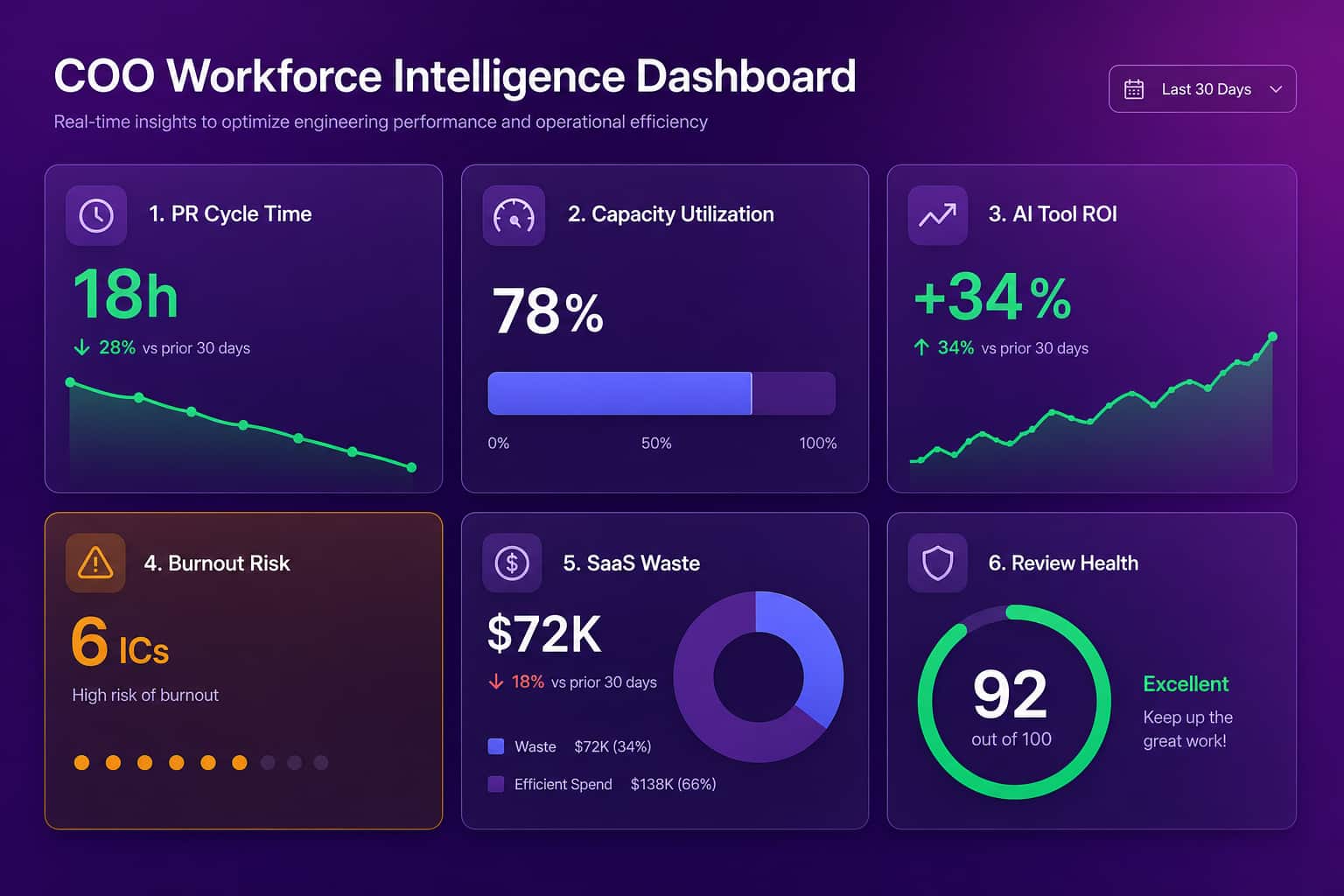
What employers in this aisle are usually trying to answer breaks into four questions. Is my remote team actually working? Are billable hours real? Is anyone leaking data? And where does the time go? The first two are trust questions that screenshots answer badly and at high cost. The third is a legitimate insider-risk problem, and it belongs with a security team running Teramind or Veriato under a compliance mandate, not with a manager reading activity feeds. The fourth is the interesting one, because time allocation across a team is a pattern question, and pattern questions do not need content capture at all. Capacity, meeting load, tool usage, and delivery flow can be read from the systems work already runs through, which is the workforce intelligence approach covered through this guide.
One practical note for employers deploying either category: rollout goes through your existing device management. Abloomify's device agent, for instance, deploys through any MDM (Intune, Jamf, Rippling, Kandji, and more), the same path a monitoring agent would take, without putting screen capture on anyone's machine.
Why most tech companies should pick the privacy-first alternative
Most tech companies should pick a privacy-first workforce intelligence platform over computer monitoring software because the question they are actually trying to answer is "where is leverage leaking across the org?" not "what is this employee's screen showing right now?" When a 200-person SaaS COO walks into a board meeting, the question on the table is capacity utilization by team, engineering velocity trends, AI coding tool ROI on a six-figure Cursor and Copilot bill, SaaS license waste hiding in the renewal pile, and burnout signals before the next wave of attrition. None of those answers live on an employee's screen. They live in GitHub, Jira, Google Workspace, the HRIS, the AI tool admin consoles, and the calendar. A platform that reads from those systems gives the leader the answer in 30 days. A platform that screenshots an engineer's screen every 90 seconds gives the leader a folder of images they will never open.
The other reason is the trust math. Roughly 1 in 6 workers say they would quit over employee monitoring, per 2026 survey research. In a tight engineering market that is a real cost. Layer on the EU AI Act and GDPR for any team with EU operations, and screenshot capture and keylogging move from "trust risk" to "lawful basis risk." The category that fits a hourly call center does not fit a 200-person engineering org, and procurement teams in 2026 are starting to notice.
Computer monitoring software vs privacy-first workforce intelligence
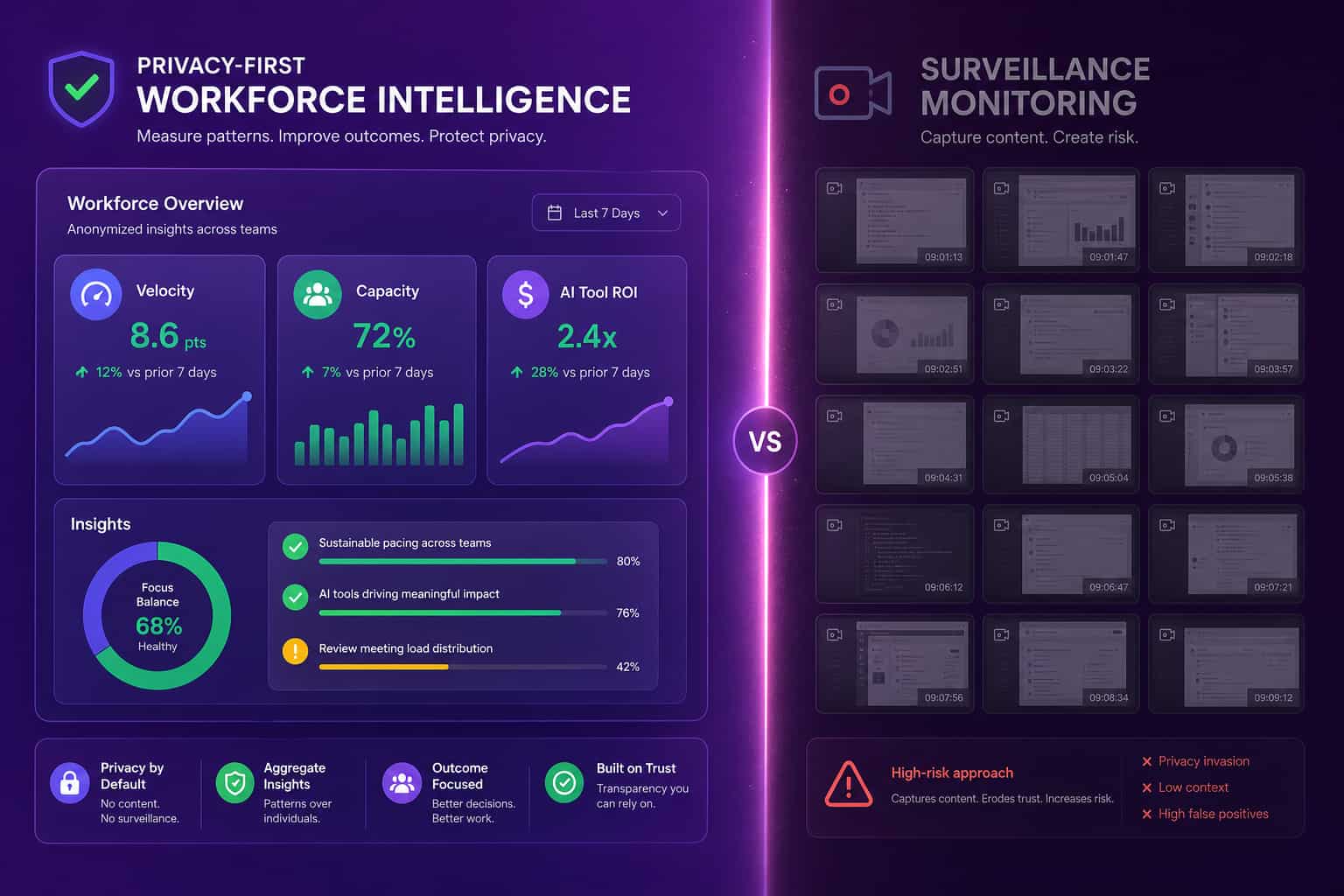
Computer monitoring software and privacy-first workforce intelligence are two architectures aimed at the same buyer pain ("I cannot see what is going on across the team") with very different trade-offs. Monitoring captures content (screenshots at random intervals, keystroke logs, screen recordings, named URL history) tied to a single employee, on a single device, at a single moment in time. Workforce intelligence reads patterns from the systems work already lives in: PR cycle time on GitHub, ticket flow on Jira, calendar load on Google Workspace, license usage from the SSO, AI coding tool output from Cursor or Copilot. Monitoring tells you what an employee did at 2:14pm. Workforce intelligence tells you where the team's hours are leaking, whether engineering velocity is up or down quarter over quarter, and whether the $300K Cursor bill is producing measurable output. Both can be deployed inside a week. Only one of them survives a serious privacy review at a tech company with EU operations.
Computer monitoring software (ActivTrak legacy, Teramind, Hubstaff, Time Doctor, Insightful, Veriato, Controlio)
Privacy-first workforce intelligence (Abloomify)
How to evaluate computer monitoring software (or its alternative) in 30 days
A 30-day evaluation is enough to tell whether a computer monitoring tool, or a privacy-first alternative, will earn its renewal at a tech company. The evaluation pattern that has worked for the customers I have rolled out with looks like this. Week one, deploy on one team. For monitoring tools that means installing the agent on five to ten machines and turning on the default capture profile. For Abloomify it means connecting GitHub or GitLab, Jira or Linear, Google Workspace or M365, your HRIS, and your AI coding tool of record. Week two, baseline the obvious: PR cycle time, review latency, meeting load, capacity utilization by team, license usage, AI tool adoption rate. Week three, sit with the COO or VP of Engineering for a one-hour read of what the data shows. Week four, decide. The platform either showed you something you did not already know in dollars and days, or it did not. Two questions every buyer should ask before week four: did the rollout damage employee trust, and would I publish the data-collection details on the company intranet without flinching?
A useful "did this evaluation work?" checklist:
- Did the tool surface at least $50K of dollarized waste (SaaS, capacity, meeting load)?
- Did it show a velocity, cycle-time, or AI tool ROI gap you can act on this quarter?
- Did the data line up with the read your team already trusts (the manager's intuition, the CTO's spreadsheet)?
- Did employees feel safe with the data-collection model when you walked them through it?
- Could you defend the rollout under EU AI Act, GDPR, or your regional employment law without a workaround?
The single cold-outbound deal that closed for us at a 3,500-person enterprise opened on the line "Quiet quitters at [Company]?" The COO did not want a screenshot grid. He wanted a privacy-first read on Google Workspace engagement, fast, with a 30-day pilot and no agent install. That is the shape of the 2026 buyer who is shopping the "best computer monitoring software" SERP and ending up on the workforce intelligence aisle instead.
Why surveillance keeps showing up on the "best monitoring" list
Surveillance keeps showing up on the "best computer monitoring software" list for two reasons, and both are about marketing rather than employee outcomes. First, the legacy monitoring vendors have spent over a decade buying the term in paid search and SEO, so the SERP is dense with screenshot and keystroke tools that should sit on a different list entirely. Second, the language "I want to see what my team is doing" is genuinely ambiguous, and a buyer who has never sat through a workforce intelligence pilot will sometimes assume the only way to get visibility is to record screens. The right answer for a 2026 tech company is usually a privacy-first platform that reads from the work systems you already pay for. Big companies bring ceremony. Smaller, AI-native ones bring outcomes.
If you want to go deeper on a specific category: the Abloomify vs ActivTrak comparison for the head-to-head with the most-shopped legacy monitoring brand, the alternatives hub for privacy-first replacements to every major monitoring tool, how to measure productivity without screenshots for the architectural argument, the employee productivity software solution page for how Abloomify packages this, and the best productivity software for tech teams in 2026 listicle for the broader shortlist.
FAQ
What is the best computer monitoring software for remote employees?
For pure activity monitoring of remote employees, Hubstaff and Time Doctor lead for hourly and agency teams, ActivTrak leads for HR-led mid-market buyers, and Insightful sits between the two. For a remote tech team where the buyer is a COO or VP of Engineering, the better fit is Abloomify, which reads from cloud work systems (GitHub, Jira, Google Workspace, M365, Cursor) and uses a privacy-first device agent that captures aggregated time, not screenshots.
Can employees tell if their computer is being monitored?
In most jurisdictions, employers are required to disclose monitoring on company-owned devices. Whether the agent is visible varies by tool: some show a tray icon and notification, some run in stealth mode. Stealth deployment carries significant legal risk in the EU and UK under GDPR and the EU AI Act, and creates trust damage when (not if) employees discover it. Privacy-first workforce intelligence platforms do not need stealth because they capture no employee content.
What is the cheapest computer monitoring software?
Hubstaff and Time Doctor start at the low end of the shortlist ($5 to $7 per seat per month) for basic time tracking with screenshots. Controlio sits in the same range. ActivTrak starts at around $10 per seat. For a tech company comparing on price, Abloomify at $9 per seat per month annually is competitive on dollars and adds engineering velocity, AI tool ROI, capacity analytics, and a performance management suite that monitoring tools do not include.
Does computer monitoring software actually improve productivity?
The Personnel Psychology meta-analysis on workplace monitoring found no evidence that surveillance improves performance. There is, however, strong evidence that it damages trust, with about 1 in 6 workers saying they would quit over employee monitoring per 2026 survey research. Workforce intelligence platforms that measure outcomes from connected work systems (PRs shipped, capacity utilized, meetings reduced, licenses reclaimed) typically surface dollarized findings inside 30 days at midmarket tech companies.
How is Abloomify different from ActivTrak, Hubstaff, and Time Doctor?
Abloomify is privacy-first workforce intelligence built for tech companies. No screenshots. No keyloggers. No screen recording. Two data layers: 100+ API integrations across GitHub, Jira, Google Workspace, M365, Cursor, Copilot, Claude Code, plus a privacy-first device agent that captures aggregated app-category time. ActivTrak, Hubstaff, and Time Doctor are endpoint monitoring tools that capture screen activity in some form. Different architecture, different employee trust outcomes, different reasons to buy. The full feature-by-feature breakdown is in the Abloomify vs ActivTrak comparison.
What is the best software for monitoring computer activity?
For endpoint activity capture, ActivTrak and Insightful lead the HR-led shortlist, while Hubstaff and Time Doctor lead for hourly and agency teams. For a tech company, the better question is whether you need activity capture at all. Abloomify reads work patterns from GitHub, Jira, Google Workspace, and M365 plus an aggregated device agent, with no screenshots or keyloggers, at $9 per seat per month annually.
Can employers monitor computer screens remotely?
Technically yes: remote computer monitoring tools capture screens on company-owned devices from anywhere. Legally it depends on jurisdiction. The EU and UK require lawful basis, transparency, and proportionality under GDPR and the EU AI Act, which makes screen capture hard to defend at procurement. Practically, screen monitoring answers "what is on this screen right now," which is rarely the question a COO or VP of Engineering is actually asking about capacity, velocity, or tool ROI.

Amir Tavafi
Co-Founder & CEO
Product leader and innovator with over 15 years of experience in the tech sector, grounded in AI and robotics. Previously led product development in fraud detection and AI solutions at Nasdaq Verafin.